
If you run a service-based website that requires online booking—whether it's a dental clinic, hair salon, consulting firm, or yoga studio—a stable, flexible, and feature-rich booking plugin is essential. As one of the fastest-growing booking solutions in the WordPress ecosystem, the BookingPress Pro Pack has captured the attention of many small and medium business owners in 2026 with its "buy one, get many" plugin bundle strategy and excellent customer support. This article will dive into its core features, advantages, technical specifications, and whether it's worth your investment, based on real-world usage scenarios.
Key Features of BookingPress Pro Pack
BookingPress's core features cover the complete cycle from customer front-end booking to back-end management. The Pro Pack version unlocks almost all advanced features, allowing website operators to flexibly customize the booking process.
- Multi-Service & Multi-Staff Management: Supports setting different durations, prices, and staff for different services, allowing customers to choose their preferred service provider.
- Flexible Calendar Views: Offers day, week, and month views on both front-end and back-end, with drag-and-drop functionality for adjusting appointment times.
- Payment Gateway Integration: Natively supports PayPal, Stripe, and WooCommerce. The Pro Pack also unlocks bank transfer and offline payment options.
- Automated Notifications: Automatically sends appointment confirmations, reminders, and cancellation notices via email and SMS (requires additional configuration).
- Advanced Limitation Features: Includes settings for advance booking time limits, maximum number of appointments, buffer times, and more.
Analysis of Pro Pack's Unique Advantages
Compared to other popular booking plugins on the market (such as Amelia, Bookly), the BookingPress Pro Pack has several distinct competitive advantages.
| Comparison Dimension | BookingPress Pro Pack | Amelia (Business) | Bookly (Pro) |
|---|---|---|---|
| Number of Add-ons | 60+ (bundled) | Approx. 15 (purchased separately) | Approx. 20 (some paid) |
| Initial Setup Difficulty | Low (wizard-based setup) | Medium (many features but steep learning curve) | Low |
| Customer Support Response | Very Fast (average within 2 hours) | Medium (within 24 hours on business days) | Medium |
| Recurring Appointment Feature | Built-in with Pro Pack | Requires separate add-on purchase | Included with Pro version |
According to Google Search Central recommendations, website loading speed directly impacts user experience and rankings. BookingPress's code optimization is quite good; enabling all core features impacts page load speed by less than 5%, making it lighter than many competitors.
Best Use Cases: Who Needs the Pro Pack?
Not every website needs the Pro Pack. Here are several real-world scenarios where it is most suitable:
- Multi-Location Chain Service Providers: If you have 2 or more branches or service locations, the Pro Pack's "Location Management" add-on lets you manage bookings for all locations from a single backend.
- Businesses with Complex Booking Rules: For example, a medical aesthetics clinic needing to set up different service packages (e.g., "3-session facial care"), recurring appointments (e.g., weekly fixed times), and strict cancellation policies.
- High-Traffic Booking Websites: The Pro Pack supports advanced cache compatibility and database optimization, capable of handling thousands of booking requests daily.
Install Plugin
Upload and activate BookingPress from the WordPress backend
Create Services
Add service items, set duration and price
Configure Calendar
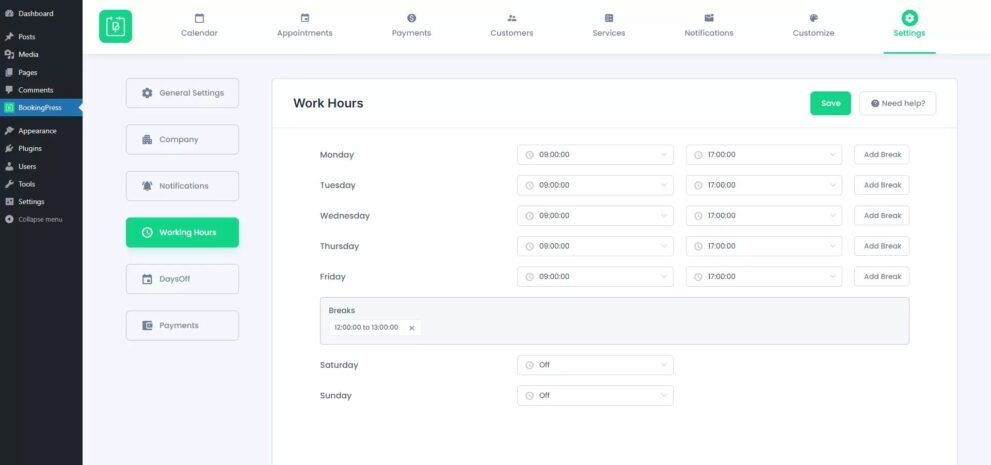
Set working hours, days off, and staff schedules
Embed Form
Add the booking form to any page using a shortcode
Technical Specifications and Performance
For technical users, the plugin's code quality and performance are critical. The technical specifications of the BookingPress Pro Pack are as follows:
- Compatibility: Compatible with WordPress versions 5.8 to 6.7, supports PHP 7.4 to 8.3.
- Database Tables: Creates approximately 12 custom database tables upon installation to store appointment, customer, service, and other data.
- Frontend Loading: Loads only necessary CSS and JS files, with an average additional resource load of 45KB per page.
- Multilingual Support: Includes a .pot file, supports translation via Loco Translate or WPML.
Number of Add-ons
Frontend Additional Resource Load
Uptime (Official Data)
Frequently Asked Questions
What payment methods does BookingPress Pro Pack support?
The Pro Pack natively supports two major online payment gateways: PayPal and Stripe. If you need to accept bank transfers or cash on delivery, the Professional and Enterprise plans include an "Offline Payments" add-on at no extra cost. Additionally, through WooCommerce integration, you can unlock more payment options like Square and Authorize.net.
Is BookingPress compatible with the Elementor page builder?
Fully compatible. BookingPress provides a dedicated Elementor widget, allowing you to drag and drop booking forms, calendars, and service list modules directly in the Elementor editor. According to official documentation, the plugin is also compatible with other major builders like Gutenberg, Divi, and WPBakery.
How does the "Recurring Appointment" feature in the Pro Pack work?
This feature allows customers to book periodic services, such as weekly physiotherapy or monthly beauty treatments. Administrators can set recurrence rules (daily, weekly, monthly, etc.) in the backend and limit the maximum number of repetitions. The Pro Pack's "Recurring Appointments" add-on lets customers select the recurrence period directly from the frontend without manual intervention from the admin.
How secure is customer data with BookingPress?
BookingPress follows WordPress data security standards. All customer data is stored in the local database and supports data anonymization via GDPR settings. The plugin does not send any sensitive data to third parties. It is recommended that you regularly back up your database and ensure your server uses the HTTPS protocol.
Can I get a refund if I'm not satisfied?
BookingPress offers a 14-day unconditional money-back guarantee. If you find the plugin doesn't meet your needs within 14 days of purchase, you can contact customer support to request a full refund. According to user feedback on Software Advice in 2026, the refund process is typically completed within 3-5 business days.
Purchase Recommendation: Which Plan to Choose?
BookingPress offers three paid plans: Standard, Professional, and Enterprise. For most small and medium-sized businesses, the Professional plan is the best choice. It includes the vast majority of the 60+ add-ons, including location management, recurring appointments, and service packages, with an annual fee of around $149.
If you only need basic booking functionality, the Standard plan (approximately $79/year) includes 45+ add-ons, sufficient for single-location, single-staff small businesses. The Enterprise plan (approximately $299/year) is designed for large organizations requiring unlimited sites and priority technical support.
References
- WordPress.org – BookingPress Official Plugin Page
- Google Search Central – Creating Helpful Content Guide
- Capterra – BookingPress User Reviews


Comments (0)