
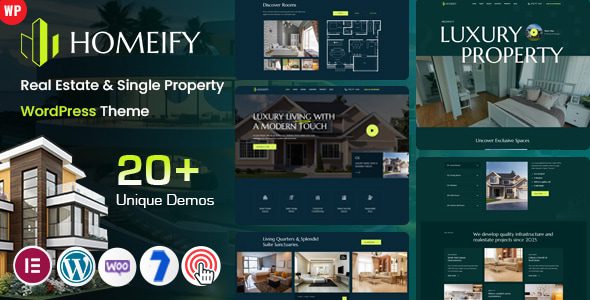
Homeify is a WordPress theme specifically built for real estate and single property projects, with multiple preset web elements built in to help you easily build your own website. As a fully featured WordPress theme, Homeify stands out in the real estate vertical, especially for users who need to showcase a single listing or boutique property project. This article provides a comprehensive and in-depth analysis of Homeify v2.0 from multiple dimensions including features, use cases, installation and configuration, and frequently asked questions.
Homeify WordPress Theme Core Feature Highlights
The Homeify theme is easy to customize, rich in features, and equipped with a powerful admin panel that lets any user build an outstanding website. The theme also includes numerous features that help you present a professional-grade website appearance through beautiful design. Specifically, Homeify's core advantages are reflected in the following aspects:
Preset Web Elements and Visual Editing
Homeify comes with multiple preset web elements built in, and users can quickly build pages through an intuitive visual editor. Whether it's a property showcase module, image gallery, or contact form, layouts can be easily completed through drag-and-drop. This design greatly lowers the barrier to website building, so even users without programming experience can launch a professional website in a short time.
For users who want to further extend functionality, you can combine other tools from the WordPress plugin resource library to achieve richer interactive effects and marketing features.
Fully Responsive Layout Design
The Homeify theme uses a fully responsive layout and can perfectly adapt to various screen sizes and resolutions. Whether on a regular desktop screen, tablet, iPad, iPhone, or various small mobile devices, it can deliver optimal display results. This means your real estate website can provide visitors with a smooth browsing experience on any device, which is especially important for the real estate industry where mobile traffic accounts for a relatively high share.
Applicable Scenarios and Target Users of the Homeify Theme
Homeify is designed for various real estate-related needs and has a wide range of applicable scenarios, including real estate agencies, agents, property directories, listing lists, map integration, MLS systems, modern minimalist style property showcases, and more. The following are several typical use cases:
- Real estate agencies: Need to display information on multiple listings while maintaining a professional brand image.
- Independent agents: Focus on a single listing or boutique project and pursue a concise and efficient presentation approach.
- Property developers: Used for online promotion and appointment scheduling for new developments or single projects.
- Property directory platforms: Need structured listing lists and category filtering functionality.
If you are looking for more real estate-related WordPress solutions, you can refer to the Homeify official page for the latest version information and detailed documentation.
Installation and Configuration Guide for Homeify v2.0
The process of installing the Homeify theme is similar to other WordPress themes. You can upload the theme package through the WordPress dashboard under "Appearance" -> "Themes" -> "Add New Theme," or upload the theme files to the server using an FTP tool. After installation is complete, activate the theme and follow the guidance to import demo content to quickly build the website framework.
During configuration, it is recommended to focus on the theme options in the admin panel, including color schemes, font settings, header and footer layouts, and the selection of property showcase templates. Homeify provides a wealth of customization options, and you can adjust the display method of each module according to your actual needs.
Frequently Asked Questions
How do I install the Homeify theme?
You can install it by uploading the theme ZIP package through the WordPress dashboard under "Appearance" -> "Themes" -> "Add New Theme," or you can use an FTP tool to upload the theme folder to the wp-content/themes directory. After installation is complete, activate the theme and import the demo content according to the prompts. For specific steps, please refer to the official documentation.
What types of websites is Homeify suitable for?
Homeify is designed for real estate and single property projects and is suitable for real estate agencies, agents, property directories, listing lists, map integration, MLS systems, and modern minimalist style property showcase websites. For details, please refer to the official documentation to confirm whether it meets your specific needs.
Is the Homeify theme compatible with the latest WordPress version?
Homeify v2.0 has been optimized and tested for the latest version of WordPress to ensure compatibility and stability. However, specific compatibility may vary depending on the plugins and server environment you use, so it is recommended to conduct thorough testing before going live. For details, please refer to the official documentation.
How often is the Homeify theme updated?
Homeify is maintained by a professional development team and releases new versions regularly based on WordPress core updates and user feedback. Update contents usually include feature improvements, security fixes, and compatibility adjustments. For specific update logs, please refer to the official documentation.
Does Homeify support multilingual websites?
The Homeify theme follows WordPress internationalization standards and supports multilingual translation. You can use plugins such as WPML or Polylang to build a multilingual website. For specific configuration methods, please refer to the official documentation.


Comments (0)