
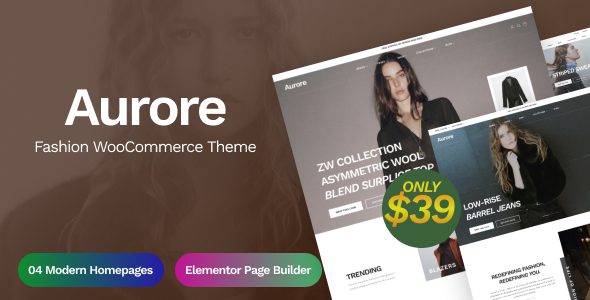
A Complete Introduction to the Aurore Fashion WooCommerce Theme
Aurore is a WooCommerce theme built specifically for clothing, accessories, and multi-brand boutiques. It uses a magazine-editorial layout, with the homepage resembling an issue feature that highlights several looks, followed closely by products. To get the checkout flow working, you still need to install the WooCommerce plugin; the theme is only responsible for display and visual presentation. For fashion e-commerce brands pursuing a distinctive identity, Aurore offers unique visual storytelling capabilities.
Aurore's Homepage Layout Design
The homepage is assembled from multiple modules: full-screen hero images, two-column looks, horizontally scrolling collection bands, editorial recommendations, and product grids. The order of modules can be freely adjusted in the theme customizer, but too many sections will distract users from the products. Fashion categories rely on images to convey information, so consistency in image ratios and color tones matters more than the number of modules. It is recommended that each module focus on one core selling point to avoid information overload.
Aurore's Collection and Look Page Features
The collection page is a content type built into the Aurore theme: one issue of looks with a set of images, accompanied by text explaining the inspiration and styling tips, with shoppable items attached at the bottom. Products in a look must be clickable through to their detail pages; image-based outfit collages cannot be ordered directly, otherwise readers will mistake them for content rather than products. Using this feature well can create an immersive shopping experience and increase average order value.
Aurore's Product Detail Page Optimization
The detail page adds size charts and material descriptions on top of the standard WooCommerce structure. Size charts need to be provided separately by fit; slim and loose styles cannot share a single chart. Materials should specify composition and care instructions, and items containing wool and silk must clearly state dry-clean requirements. Color differences should ideally be shown with real photos of the same item from multiple angles, rather than substituting with color swatches. These details directly affect conversion rates and return rates.
Aurore's Filtering and Sizing Strategy
Filter options are arranged by category, size, color, and price range. Fashion categories have higher return rates, and precise size filtering can effectively reduce returns. For out-of-stock products, it is recommended to keep the page and mark it with an "arrival notification" rather than delisting it directly, which would turn external links into dead links and lose potential traffic. In addition, you can enhance filtering functionality with other tools from WooCommerce e-commerce theme resources.
Aurore's Editorial and Content Management
Looks and products are two separate content types that can be linked to each other on their edit pages. Homepage modules are ordered in the theme customizer, and images are cropped to the ratios specified by the templates. It is recommended to use only one or two fonts; fashion layouts rely on whitespace and imagery, and piling on fonts looks cheap. Maintaining a content update frequency and regularly publishing new looks helps sustain user engagement.
Aurore's Mobile and Checkout Experience
On mobile, filters collapse into a drawer and product images stack into a single column, ensuring smooth browsing on small screens. The fewer fields on the checkout page, the better; address and phone are required, and the rest can be filled in later. Payment methods should be configured by region, and for cross-border sales, clearly state who bears the tariffs—stating this before checkout is more effective than burying it in the terms. Optimizing the checkout flow can significantly improve mobile conversion rates.
Aurore's Scope of Application and Considerations
It suits clothing and accessories stores with a steady cadence of new arrivals: a batch of featured looks each season, with product counts in the dozens to hundreds. For stores selling only single items with very few SKUs, the look pages will sit empty for long periods. For merchants doing bulk wholesale and dropshipping, Aurore has a retail-oriented visual style and cannot express bulk ordering and tiered pricing. Product images and model photos require usage authorization; avoid directly using brand-owned assets. Size and material descriptions must match the actual product; falsely labeling composition is a violation. Promotional prices and original prices must be labeled on a genuine basis. For more themes, you can refer to resources on ThemeForest.
Frequently Asked Questions
How do I install the Aurore theme?
In the WordPress admin under Appearance > Themes > Add New Theme, upload the Aurore theme package, activate it, then install and activate the WooCommerce plugin, and import the demo content as prompted. For detailed steps, please refer to the official documentation.
What types of stores is Aurore suitable for?
It is suitable for fashion e-commerce that emphasizes visual presentation, such as clothing, accessories, and multi-brand boutiques, especially stores with a steady cadence of new arrivals and featured looks each season. Single-product stores with very few SKUs may not be able to make full use of the look page features.
Is Aurore compatible with the latest version of WordPress?
Aurore v1.0.1 has been tested against the current WordPress version, but for specific compatibility, please refer to the official changelog. It is recommended to back up your site before upgrading.
How often is the Aurore theme updated?
The theme update frequency depends on the developer, and updates are typically provided when new versions are released. It is recommended to follow official channels for the latest version information.


Comments (0)