
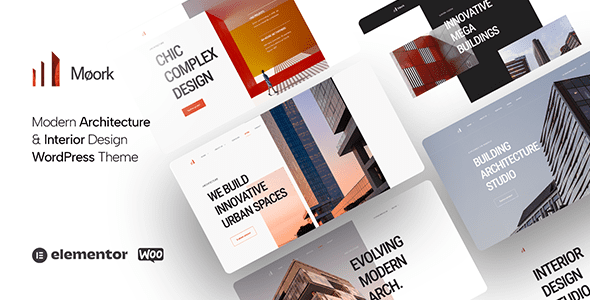
Moork WordPress Theme: A Professional Choice for the Architecture and Interior Design Industry
Moork is a WordPress theme built specifically for the architecture and interior design field, updated to version v1.2.0. It is ideal for architecture firms, interior design companies, individual architect portfolios, industrial and factory businesses, architectural business showcases, exterior design, landscape design, and decoration companies. Whether you are an independent designer or a large architecture enterprise, Moork can help you quickly build a professional and visually outstanding online presence.
The theme balances design sensibility with practicality, offering multiple preset layouts and modules that let you present high-quality project cases, team introductions, and service pages without writing any code. For creative professionals who value efficiency and quality, Moork is a choice worth considering.
Core Features and Design Highlights of the Moork Theme
Moork is developed around the real needs of the architecture and design industry and offers the following standout features:
- Responsive Layout: Ensures the website performs excellently on mobile phones, tablets, and desktop devices, adapting to different screen sizes.
- Portfolio Showcase: Built-in multiple project display styles make it easy to present architectural cases, interior design works, and landscape planning.
- Visual Editing: Compatible with mainstream page builders, with drag-and-drop operation that makes page customization simple and intuitive.
- Preset Templates: Provides multiple carefully designed page templates, covering the homepage, About Us, Services, Project Details, and Contact pages.
- Performance Optimization: Clean code structure and optimized loading speed, which benefits search engine rankings and user experience.
If you want to learn more tips on choosing WordPress themes, you can visit our resource site for more guides.
How to Install and Configure the Moork Theme
Installing the Moork theme is very straightforward. First, in the WordPress admin panel, go to "Appearance" -> "Themes" -> "Add New Theme," upload the theme package, and activate it. After activation, you can install the recommended plugins (such as a page builder, contact form plugin, etc.) as prompted. Next, import the demo content (if provided by the theme) or start customizing pages from scratch. In the "Customize" options, you can adjust colors, fonts, logo, and layout settings to match your brand identity.
For first-time users, it is recommended to read the theme documentation or check the official tutorials first in order to make full use of all features. For specific installation steps and detailed configuration, please refer to the official documentation.
Use Cases and Compatibility of the Moork Theme
Moork is not only suitable for architecture firms and interior design studios, but also serves industrial manufacturing companies, landscape design firms, decoration and renovation teams, and freelance architects well. The theme remains compatible with the latest version of WordPress and has been tested to work well with mainstream browsers (Chrome, Firefox, Safari, Edge). In addition, it supports multilingual plugins (such as WPML), making it easy to create multilingual websites.
In terms of update frequency, the Moork theme regularly releases maintenance versions that fix known issues and add new features. Users are advised to follow the official changelog for the latest information.
Frequently Asked Questions
How do I install the Moork theme?
In the WordPress admin panel, go to "Appearance" -> "Themes" -> "Add New Theme," upload the theme ZIP file, then install and activate it. After that, install the required plugins as prompted.
What types of websites is the Moork theme suitable for?
Moork is designed for websites such as architecture, interior design, landscape design, decoration companies, industrial enterprises, and architect portfolios, and is also suitable for related creative industries.
Is the Moork theme compatible with the latest version of WordPress?
The theme is continuously updated to remain compatible with the latest version of WordPress. For specific compatible versions, please refer to the official documentation.
Does the Moork theme support multiple languages?
Yes, the Moork theme supports multilingual functionality and can be used with translation plugins such as WPML. For specific configuration, please refer to the official documentation.
How often is the Moork theme updated?
The development team regularly releases updates that include feature improvements and security fixes. Users are advised to keep the theme updated to the latest version.

