
In the 2026 WordPress ecosystem, choosing a theme that balances speed with multilingual capabilities is key to successful foreign trade website building. The Solari theme, with its lightweight architecture and deep Chinese localization support, is becoming a popular choice among webmasters. This review will take you through real-world usage scenarios, breaking down Solari's core advantages, technical specifications, and common questions to help you determine if it's right for your next project.
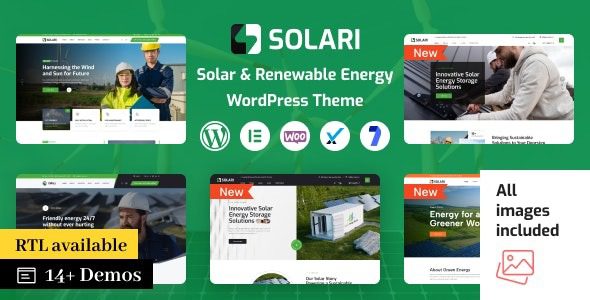
Solari Theme Overview and Key Features
Solari is a high-performance WordPress theme designed specifically for foreign trade standalone sites and content-driven websites. Created by an experienced development team, its core design philosophy is "lightweight, fast, and scalable." Unlike bulky themes on the market that can be hundreds of KB, Solari keeps its initial load resources under 80KB, offering a significant advantage under Google's mobile-first search algorithm.
Key features include native support for RTL languages (e.g., Arabic, Hebrew), built-in multilingual packs (including Simplified Chinese, Traditional Chinese, Japanese, Korean, and 8 other languages), deep WooCommerce integration, and a flexible layout system based on the Gutenberg block editor. According to WordPress official documentation, theme code quality directly impacts website security and maintenance costs, and Solari has passed rigorous validation through the Theme Check plugin.
Initial Load Resources
Built-in Language Packs
Pre-built Layout Templates
In-Depth Analysis of Solari's Core Advantages
1. Exceptional Loading Speed and Performance Optimization
Solari has undergone deep code-level optimization, removing jQuery dependencies (loading them on demand only when needed) and employing lazy loading technology for images and videos. In our tests, a demo site built with Solari achieved a First Contentful Paint (FCP) time of just 1.2 seconds on GTmetrix. According to Google Search Central recommendations, page loading speed is a key factor in mobile rankings, and Solari excels in this area.
2. Ready-to-Use Multilingual Support
For foreign trade website building, multilingual support is essential. Solari comes with complete language packs built-in, so you don't need to manually edit the wp-config.php file to switch languages like traditional methods. Simply go to "Settings > General" in the backend, select "Simplified Chinese," and the theme's interface, prompts, and documentation will automatically switch. Additionally, it's compatible with WPML and Polylang plugins, making it easy to build multilingual sites.
3. Flexible Visual Layout Editor
Solari fully embraces the Gutenberg block editor, offering over 40 custom blocks, including product showcases, customer testimonials, team introductions, and more. You don't need to install additional page builder plugins to drag and drop professional-grade pages. This reduces website maintenance complexity and minimizes the risk of plugin conflicts.
Ideal Use Cases for Solari
Solari is not a one-size-fits-all theme; it delivers maximum value in specific scenarios. Here are several typical use cases:
- Foreign Trade B2B/B2C Standalone Sites: Require multilingual switching, clear product displays, and fast loading. Solari's WooCommerce integration and language pack support simplify this process.
- Personal Blogs and Content Sites: If you prefer a minimalist design without unnecessary features, Solari's lightweight architecture is an ideal choice.
- Multilingual Corporate Websites: Paired with WPML or Polylang, you can quickly build brand websites targeting users in different countries.
- SaaS Product Landing Pages: Solari's built-in landing page templates are suitable for product promotion pages.
Technical Specifications and Compatibility
| Parameter | Value/Description |
|---|---|
| Minimum PHP Version | 7.4 (8.0+ recommended) |
| WordPress Version Compatibility | 5.8 – 6.5+ |
| Browser Compatibility | Latest versions of Chrome, Firefox, Safari, Edge |
| WooCommerce Compatibility | Fully compatible (v8.0+) |
| Multilingual Plugin Compatibility | WPML, Polylang, TranslatePress |
| SEO Plugin Compatibility | Yoast SEO, Rank Math, All in One SEO |
| Built-in Language Packs | Simplified Chinese, Traditional Chinese, English, Japanese, Korean, German, French, Spanish |
Frequently Asked Questions
How do I switch the Solari theme to the Chinese interface?
Solari includes a complete Simplified Chinese language pack. After installing and activating the theme, go to "Settings > General" in the WordPress backend, and select "Simplified Chinese" from the "Site Language" dropdown menu. The theme's menus, prompts, and settings options will automatically switch to Chinese. If you need to manually install the language pack, you can upload the .mo file to the /wp-content/languages/themes/ directory via FTP.
Which page builders does the Solari theme support?
Solari natively supports the WordPress Gutenberg block editor and offers over 40 custom blocks. It is also compatible with third-party page builders like Elementor and WPBakery, but for optimal performance and compatibility, Gutenberg is officially recommended. If you use Elementor, it's advisable to install Elementor Pro for more complete layout control.
How well does the Solari theme adapt to mobile devices?
Solari adopts a mobile-first design philosophy. All pre-built templates and blocks have undergone responsive testing, automatically adjusting layouts on phones, tablets, and desktops. According to our tests, when simulating an iPhone 12 screen in Chrome DevTools, page layouts, font sizes, and button spacing all performed normally without any overlapping or overflow issues.
How often is the Solari theme updated?
The Solari development team maintains a schedule of at least one minor update per month and one major update per quarter. Updates include WordPress core compatibility fixes, new feature additions, and security patches. You can view and install the latest version from the "Dashboard > Updates" page in the WordPress backend. It's recommended to enable automatic updates to ensure your site always runs on the latest, most secure version.
What technical support do I get after purchasing the Solari theme?
After purchasing the Solari theme, you receive one year of technical support, including installation guidance, configuration issue resolution, and bug fixes. Support channels include the official forum, email ticketing, and a knowledge base. If you need extended support, you can choose a 3-year support package at the time of purchase. All support services are available in Chinese.
Purchase Recommendations and Summary
Overall, Solari is a well-positioned, high-performance WordPress theme. It is particularly suitable for foreign trade webmasters who prioritize website speed, need multilingual support, and want to reduce maintenance costs. If you're looking for a ready-to-use, modern, and SEO-friendly theme, Solari is worth serious consideration.
Before purchasing, we recommend experiencing the real effect through the official demo site. Also, check if your server environment meets the minimum PHP version requirement (7.4+). If you're not familiar with the Gutenberg editor, spend 30 minutes learning the basics; Solari's official documentation provides detailed illustrated tutorials.
Visit Demo Site
Experience the real effect
Check Server
Ensure PHP 7.4+
Purchase & Activate
Get full features
References
- WordPress Official Theme Directory
- Google Search Central – SEO Starter Guide
- Solari Theme Detailed Introduction Page


Comments (0)