
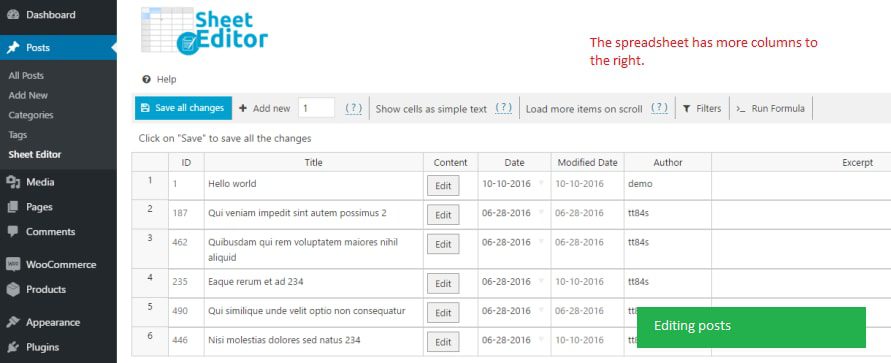
WP Sheet Editor Premium – Taxonomy Terms Pro is a powerful plugin designed for bulk management of WordPress taxonomies. It provides a spreadsheet interface that allows you to easily edit, search, and update all taxonomy terms, including categories, tags, product attributes, and more. Whether you're managing blog posts or WooCommerce products, this essential plugin significantly boosts productivity.
What is WP Sheet Editor Premium – Taxonomy Terms Pro?
In WordPress, taxonomies are used to group content, such as post categories, tags, WooCommerce product attributes, etc. The default WordPress admin interface has limited functionality—you need to create and edit categories one by one, and search is restricted to names. The WP Sheet Editor Premium – Taxonomy Terms Pro plugin revolutionizes this by displaying all taxonomy terms in a spreadsheet, supporting batch editing, advanced search, import/export, and other advanced features.
Core Features Explained
Advanced Search & Filtering
You can search by combining multiple fields, such as finding all categories with empty descriptions, tags without images, or filtering by keywords, parent categories, custom fields, SEO titles, and more. This allows you to quickly locate terms that need updating, saving significant manual search time.
Batch Edit Thousands of Terms
The plugin includes a built-in formula engine that supports batch replacing field values, adding descriptions, uploading images, moving parent categories, and more. For example, you can move hundreds of categories from an old parent to a new parent in one go, or add a unified description to all product attributes.
Import Taxonomy Data from Excel
Supports importing taxonomy terms from Excel or CSV files, or directly copying and pasting lists from other websites. This is particularly useful for batch importing product attributes from wholesalers or suppliers.
Centralized View of All Information
Displays all taxonomy terms and their fields (name, slug, parent category, description, image, SEO info, etc.) on a single page, with editing capabilities. The plugin automatically detects custom fields added by other plugins without requiring additional configuration.
Installation & Usage
First, ensure the WP Sheet Editor Premium core plugin is installed. Then upload and activate the Taxonomy Terms Pro extension—no additional activation steps are needed. After installation, you'll see a new spreadsheet interface in the WordPress admin area, ready to manage taxonomies.
For websites that need to efficiently manage large numbers of taxonomy terms, this plugin is an essential tool for boosting WordPress management efficiency. For more details, visit the official product page.
Frequently Asked Questions
How to install WP Sheet Editor Premium – Taxonomy Terms Pro?
First, install and activate the WP Sheet Editor Premium core plugin, then upload and activate the Taxonomy Terms Pro extension. No additional configuration or activation code is required.
What scenarios is this plugin suitable for?
It is suitable for any scenario requiring bulk management of WordPress taxonomies, such as editing large numbers of product categories, tags, attributes, or cleaning up SEO descriptions and images. It is especially useful for WooCommerce stores and content-rich blogs.
Which WordPress versions is the plugin compatible with?
The plugin is compatible with mainstream WordPress versions. For a specific compatibility list, please refer to the official documentation. It is recommended to keep WordPress and the plugin updated to the latest versions.
How often is the plugin updated?
The developer releases regular updates to fix bugs and add new features. It is recommended to enable automatic updates or follow the official update log.


Comments (0)