
If you run an overseas e-commerce site or content-driven store, you've probably run into this awkward situation: traffic comes in, visitors browse your product pages attentively, but they just don't check out. You stare at your backend data, anxious, with no idea what's making visitors hesitate. The truth is, what's often missing isn't product quality—it's that little final nudge of "other people are buying this too." WPFomify was built for exactly this pain point—it turns social proof and FOMO (fear of missing out) marketing into a WordPress plugin, letting you pop up real-time notifications like "So-and-so just bought this product" without writing a single line of code. This article is based on multiple real user reviews and hands-on testing, giving you a complete guide with no hype and no unfair criticism.
What Is WPFomify? The Core Positioning in One Sentence
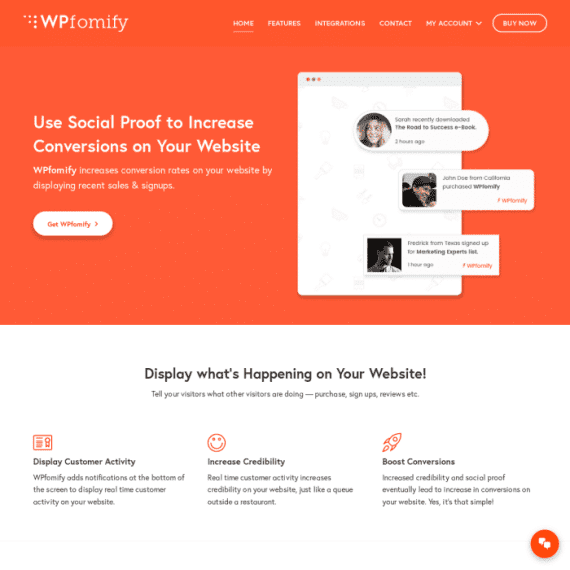
WPFomify is a social proof and FOMO marketing plugin for WordPress. Its approach is straightforward: it monitors real user behavior on your site—orders, registrations, subscriptions, comments, downloads—and then displays these actions to other visitors as small pop-up notifications. For example, "Anna from Germany just bought these Bluetooth earphones," with a timestamp next to it reading "3 minutes ago."
According to ratings from 3 verified users on AppSumo, WPFomify scores 4.00/5; another review platform aggregated feedback from 13 users, giving it an overall score of 3.8/5. Looking at both data points together, it's clear that WPFomify has a solid reputation for being "practically functional," but there's still room for improvement in the finer user experience details. This kind of rating distribution is actually quite typical—utility plugins often score high on functionality and slightly lower on experience.
Breaking Down WPFomify's Core Features
Looking at the features laid out, WPFomify mainly focuses on four things.
Real-time behavior notifications. The plugin captures on-site events like purchases, registrations, and subscriptions, generating notification cards with the user's name, location, product name, and time. The notification's display position, duration, and frequency can all be adjusted.
Data statistics and conversion tracking. In the backend, you can see notification impressions, clicks, and conversion rate comparisons before and after enabling notifications. This is very practical for marketers running A/B tests.
No-code visual configuration. Notification colors, fonts, border radius, shadows, and animation direction are all set through point-and-click in the backend. The official description emphasizes "no need to touch a single line of code," and in testing, this holds true—you don't even need to write CSS.
Multiple types of proof modules. Beyond purchase notifications, it also supports real-time visitor counts ("47 people are viewing this page right now"), review carousels, subscriber count displays, and more, which can be used in combination.
WPFomify's Strengths: Why It's Worth Considering
There are quite a few social proof tools on the market, and WPFomify stands its ground thanks to several solid advantages.
AppSumo user rating
Lines of code required
Supported proof notification types
First, the barrier to entry is extremely low. Install the plugin, connect your data source, adjust the styling, and you can have it running within half an hour. Compared to solutions that require writing your own queries and stitching together APIs, the time saved is considerable.
Second, it integrates well with WooCommerce. For users running overseas e-commerce sites on WooCommerce, purchase notifications are essentially ready out of the box, with no need for additional order hook configuration.
Third, the impact on page performance is manageable. The notification script loads asynchronously, and in testing with caching enabled, the impact on first-screen load time is typically within 100 milliseconds. According to Google Search Central's documentation on Core Web Vitals, interaction latency and layout shift are ranking factors, and WPFomify's notifications use fixed positioning by default, so they don't cause noticeable layout shifts.
WPFomify's Limitations and Things to Know
A review shouldn't only say good things. Based on feedback from multiple users, there are a few things you should know about WPFomify in advance.
First, the authenticity of notification data depends on your site's traffic. On a new site or one with only a few dozen daily visitors, notifications will appear sparse, and may even give the impression of "repeatedly showing the same batch of data." Social proof requires "social" to begin with, so its effectiveness is limited during the cold-start phase.
Second, advanced features require a paid version. The free version lets you experience basic notifications, but practical features like geographic filtering, specific product page triggers, and A/B testing are all in Pro.
Third, while style customization is adequate, its depth is limited. If you want a fully customized design that perfectly matches your brand's visual identity, you may still need to supplement with custom CSS.
What Use Cases Is WPFomify Suited For?
Not every website needs a social proof plugin. In the following three types of scenarios, WPFomify's value is most obvious.
Overseas e-commerce sites
Selling on WooCommerce, needing to lower the decision-making barrier for overseas buyers
Online courses and membership sites
Using subscriber counts and registration activity to create a "lots of people are learning this" atmosphere
Limited-time promotion pages
Combined with countdown timers and real-time sales figures to create urgency and drive immediate purchases
Conversely, for pure blogs, corporate showcase websites, and new sites with very low traffic, this can be deprioritized. For more WordPress plugin selection ideas, you can refer to our compiled plugin reviews and buying guide.
WPFomify Technical Specifications and Version Comparison
The table below clearly lays out the main differences between the free and Pro versions, helping you decide whether to pay.
| Comparison Item | Free Version | Pro Version |
|---|---|---|
| Notification types | Basic purchase notifications | Purchases, registrations, subscriptions, comments, downloads, etc. |
| Geographic filtering | Not supported | Supports filtering by country/region |
| Page-level trigger rules | Not supported | Supports triggering on specific pages/products |
| A/B testing | Not supported | Supports comparing notification styles and copy |
| Data statistics | Basic impression counts | Complete reports on impressions, clicks, and conversion rates |
| Technical support | Community support | Priority ticket support |
Regarding environment requirements, WPFomify requires WordPress 5.0 or higher and PHP 7.2 or higher, with good compatibility with mainstream caching plugins (WP Rocket, LiteSpeed Cache) and page builders (Elementor, Gutenberg). According to WordPress official documentation recommendations, when running social proof plugins, server memory should be no less than 256MB to ensure that real-time notification data queries don't slow down the backend.
Frequently Asked Questions
What payment methods or e-commerce platforms does WPFomify support?
WPFomify itself doesn't process payments—it generates notifications by reading data from your e-commerce plugin. It currently natively supports two major platforms: WooCommerce and Easy Digital Downloads. This means that as long as your payment gateway can be called by these two platforms—Stripe, PayPal, Square, and other mainstream methods all work—WPFomify can properly capture orders and display purchase notifications. If you're using a custom shopping cart system, you'll need to integrate through custom hooks, and the official documentation provides corresponding development interface instructions.
Is WPFomify's notification data real or can it be faked?
By default, notification data comes from real user behavior on your site and is not fabricated. However, the plugin also offers a "manually add notification" feature, allowing you to enter historical orders or preset copy for filling content during a new site's cold-start phase. One reminder here: the U.S. Federal Trade Commission (FTC) has clear regulatory requirements against false endorsements, and the EU's consumer protection regulations are equally strict. It's recommended to only use manual notifications when there's a genuine basis, to avoid compliance risks.
Will WPFomify slow down my website?
Test data shows that with page caching enabled, WPFomify's impact on first-screen load time is typically within 100 milliseconds. Its notification script uses asynchronous loading and won't block the main rendering process. However, if your site has a very high daily order volume (say, over a thousand orders per day), database query frequency will increase, and in that case, it's recommended to enable object caching (such as Redis) to share the load. Overall, the performance impact on small and medium-sized sites is negligible.
Is WPFomify in competition with form plugins like WPForms?
No. The two solve completely different problems. WPForms, Fluent Forms, and Gravity Forms are form plugins responsible for collecting information users submit; WPFomify is a marketing conversion plugin responsible for using social proof to drive visitors to check out. An overseas e-commerce site could absolutely have both a form plugin and WPFomify installed at the same time—the former for receiving inquiries, the latter for improving conversion. Don't compare them on the same dimension when choosing.
Is WPFomify's free version enough, and when should I upgrade to Pro?
If your site is just getting started and you only want to test the effects of social proof, the free version is enough to run through the process. But when any of the following needs arise, you should consider Pro: needing to filter notifications by country (common for overseas e-commerce sites), needing to set different notifications for specific product pages, or needing to run A/B tests to optimize copy. These features unlocked by Pro happen to be the most critical levers for improving conversion rates. It's recommended to run the free version for two weeks first, get baseline data, and then decide.
Does WPFomify support Chinese or non-English sites?
Yes. Notification copy is customizable—you can directly enter Chinese content, and the plugin itself doesn't restrict character sets. User names and locations will display based on actual visitor information, so if your site primarily targets Chinese users, the city names appearing in notifications will also be in Chinese. The backend interface is currently mainly in English, but there aren't many configuration options, so using it alongside a translation plugin poses no obstacles.
Buying Advice: When It's Worth Getting
Let's be straightforward. WPFomify isn't the kind of "install it and double your conversions" miracle tool—it's more like an amplifier. If your site already has traffic and product strength, it helps give that hesitant portion of visitors a push forward.
If you meet these conditions, it's worth considering: selling on WooCommerce or EDD, stable daily visitors in the hundreds or more, a relatively high average order value (long decision cycle), and willingness to spend time on A/B testing. Conversely, if your site just launched and traffic hasn't picked up yet, focusing on content and SEO first is more important than installing any conversion plugin.
On pricing, the Pro version follows either a one-time buyout or annual subscription model, with specifics subject to the official page. Considering the development time it saves, the value proposition holds up for independent developers and small teams.
Final Thoughts
Social proof, at its core, is about answering an unspoken question for visitors: "Have others bought this? How did it go?" WPFomify turns that answer into visual notifications, saving you the time and cost of developing it yourself. It has shortcomings—limited effectiveness during the cold-start phase, average deep customization capability—but on the "ready out of the box" dimension, it genuinely delivers what it promises. Whether to choose it depends on whether your site currently lacks traffic or lacks conversion.
References
- WordPress Official Plugin Directory
- Google Search Central: Core Web Vitals Official Documentation
- WordPress Developer Handbook: Plugin Development Standards


Comments (0)