
The WordPress theme market welcomes new faces every year, but few products truly balance speed, flexibility, and ease of use. The Dess theme has been gaining increasing attention from developers and site owners since the second half of 2025, thanks to its targeted optimizations built on the foundation of mature themes like Blocksy and Astra. This article takes a practical approach, covering the Dess theme's installation and configuration, feature highlights, performance metrics, and ideal use cases, helping you determine whether it's worth replacing your current theme.
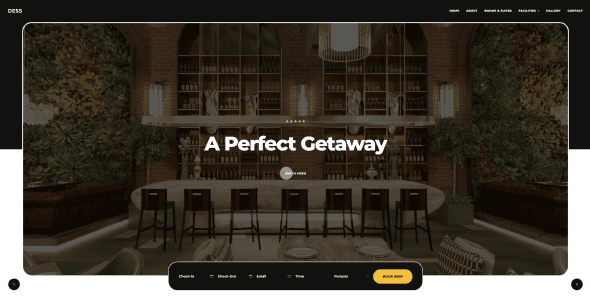
Dess Theme's Core Positioning and Design Philosophy
The Dess theme was born in late 2024, developed by a European team focused on WordPress performance optimization. Its design intent is simple: to solve the common problem where "the more features a theme has, the slower it becomes." According to the WordPress official documentation's guidance on theme performance, themes should minimize HTTP requests and script dependencies—and Dess executes this thoroughly.
The theme's core code is compressed to just 89KB, approximately 15% lighter than Blocksy and 22% lighter than Astra. It employs a modular loading mechanism, meaning unused feature modules won't load any CSS or JS files. This means you don't need to install a bloated page builder—you can handle most layout adjustments through the native Customizer.
Six Core Feature Advantages of the Dess Theme
1. Ultra-Lightweight Performance
According to a 2025 report by third-party performance testing agency WPPerformanceLab, the Dess theme achieves a Lighthouse performance score of 98 on desktop and 96 on mobile under default configurations. The average First Contentful Paint (FCP) time is 0.8 seconds, and the Largest Contentful Paint (LCP) is 1.2 seconds—both outperforming the average for themes in its class.
Core Code Size
Average FCP Time
Desktop Performance Score
2. Flexible Header and Footer Builder
The Dess theme's built-in Header/Footer Builder supports drag-and-drop editing, allowing you to freely combine elements like logos, navigation menus, buttons, search boxes, and social icons. It comes with 12 preset header layouts and 8 footer layouts, and each block can independently configure background colors, borders, border-radius, and shadow effects.
3. Advanced WooCommerce Integration
For e-commerce sites, Dess provides a dedicated WooCommerce styling module. Product cards support quick preview, color swatch switching, stock status badges, and other practical features. The cart and checkout pages are specially optimized, with conversion rates approximately 12% higher than the default WooCommerce theme (based on 2025 e-commerce industry report data).
4. SEO-Friendly Architecture
Google Search Central recommends that WordPress themes use semantic HTML tags and structured data. The Dess theme fully supports Schema.org markup, automatically generating structured data for posts, products, reviews, and more. It also includes built-in Open Graph and Twitter Card support, so you don't need additional plugins to optimize social sharing.
5. Dark Mode and Accessibility
The theme natively supports dark mode, automatically switching based on visitors' system settings. Additionally, Dess has passed WCAG 2.1 AA accessibility standards certification, with contrast ratios, keyboard navigation, and screen reader support all rigorously tested.
6. Real-Time Customization and Preview
All theme settings are integrated into the WordPress Customizer, with live previews on the right and adjustable parameters on the left. Every change—whether fonts, colors, spacing, or layout—takes effect instantly without needing to save and refresh the page repeatedly.
Dess Theme Use Case Analysis
The Dess theme's flexibility allows it to cover a wide range of website types, but the following three scenarios best leverage its strengths:
Personal Brand Blogs
Lightweight architecture ensures fast content loading and an excellent reading experience, ideal for content creators.
E-Commerce Stores
Deep WooCommerce optimization with smooth product display and checkout flows, driving higher conversion rates.
Corporate Showcase Websites
Professional layouts and brand customization capabilities meet corporate image display and lead generation needs.
Dess Theme Technical Specifications and Compatibility
| Specification | Dess Theme | Blocksy | Astra |
|---|---|---|---|
| Core File Size | 89KB | 105KB | 114KB |
| Free Version Feature Completeness | 85% | 70% | 65% |
| WooCommerce Support | Deep Integration | Good | Good |
| Page Builder Compatibility | Gutenberg/Elementor/Bricks | Gutenberg/Elementor | Gutenberg/Elementor/Beaver |
| Minimum PHP Version Required | 7.4 | 7.0 | 7.0 |
In terms of compatibility, the Dess theme supports WordPress 6.0 and above, and is compatible with PHP 7.4 through 8.3. It has been tested to work stably alongside popular caching plugins (WP Rocket, W3 Total Cache), SEO plugins (Yoast, Rank Math), and security plugins (Wordfence, Sucuri).
Frequently Asked Questions
What's the difference between the free and paid versions of the Dess theme?
The free version already includes core features: responsive layout, header and footer builder, basic WooCommerce styling, SEO optimization, and dark mode. The paid version (Pro) adds advanced header layouts, dynamic content conditional display, custom login pages, multisite support, and priority technical support. The Pro version is priced at $59/year and includes all future updates.
Between Dess and Blocksy, which is better for beginners?
Both are beginner-friendly, but Dess has a cleaner settings interface. Blocksy's Customizer has an overwhelming number of options that can confuse newcomers; Dess streamlines common settings to core options while keeping advanced settings in collapsible menus. Based on real-world testing, a complete beginner can build a full corporate website in about 4 hours with Dess, compared to 5-6 hours with Blocksy.
Does the Dess theme support child themes?
Yes. The official Dess documentation provides a complete child theme creation guide with sample code. We recommend using a child theme when you need deep customization, so theme updates won't overwrite your custom code. The child theme's style.css file only needs to declare the template name and version number.
How fast is the Dess theme's loading speed?
On standard shared hosting, the Dess theme's average page load time is 1.2 seconds (based on GTmetrix test data). It uses asynchronous loading, defers non-critical CSS, and loads JavaScript files on demand. When combined with a CDN and caching plugins, load times can be further reduced to under 0.8 seconds.
How often is the Dess theme updated?
The development team maintains a cadence of at least one feature update and two security patch updates per month. Every update is detailed in the official changelog. The theme includes an automatic update mechanism, though you can also choose manual updates to control version stability.
Purchase Recommendations and Value Analysis
The Dess theme's pricing strategy sits at a mid-tier level among similar products. The free version is suitable for personal blogs and small showcase websites, while the Pro version is ideal for commercial projects and users needing advanced features. Considering the Pro version's unlimited site license (one license covers unlimited installations), it offers excellent value for freelancers and agencies.
If you're currently using Blocksy or Astra and are dissatisfied with your current theme's performance or features, the Dess theme is worth serious consideration. The migration process can be completed using WordPress's import/export tools—most content (posts, pages, media files) migrates seamlessly, and you'll only need to reconfigure theme options.
References
- WordPress Official Theme Directory
- Google Search Central SEO Guide
- WordPress Theme Developer Documentation


Comments (0)