
If you're planning to build a community on WordPress with points, badges, levels, and group discussions like Discord or Reddit, then the Vikinger theme has likely already appeared on your shortlist. This theme has long held a high-rated position in the social community category on ThemeForest, with its core selling point being the way it blends the BuddyPress and GamiPress plugin systems into a unified visual language. I spent about two weeks running through its full registration, posting, group joining, point earning, and leveling-up workflow on a test site, and this article will explain the actual experience, parameter details, and pitfalls all at once.
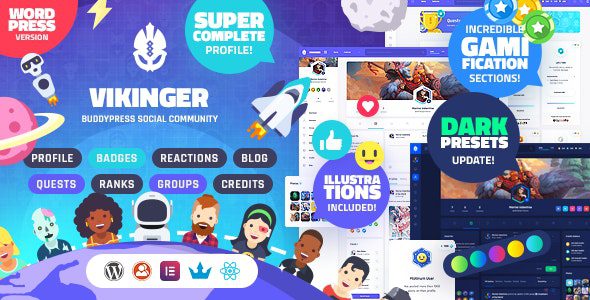
What Is the Vikinger Theme: A WordPress Solution Built for Gamified Communities
Vikinger is not positioned as a "blog template with a forum plugin added on," but is designed from the information architecture level as a social network. It natively relies on BuddyPress to handle user profiles, friendships, private messages, groups, and activity streams, while using GamiPress to take over the gamified incentive system of points, badges, levels, and tasks. According to data from the official WordPress plugin directory, BuddyPress has over 200,000 active installations, and GamiPress is also continuously updated, which means Vikinger stands on top of two mature ecosystems rather than reinventing the wheel.
The theme's built-in front-end templates cover almost all the key pages of a community product: personal profiles, member directories, group lists, group inner pages, activity streams, private message conversations, achievement display pages, and points leaderboards. Even more practical is its built-in "Reaction" mechanism, which allows users to like and send emoji reactions to posts just like in Discord, rather than having only a single like option.
Breaking Down the Core Features of the Vikinger Theme
Looking at the feature list, Vikinger's capabilities can be divided into four parts. The first is the user system: registration and login, customizable profile fields, avatars and cover images, friends and follows, and private messages. The second is content interaction: activity streams, posts, comments, multiple reaction types, and @mentions. The third is groups and forums: creating groups, in-group discussions, member management, and public or private permissions. The fourth is gamified incentives: points, badges, levels, tasks, and leaderboards.
These four parts are interconnected. For example, when a user publishes a post, GamiPress can award points according to rules; when points accumulate to a threshold, the user automatically levels up; after leveling up, new badges are unlocked, and badges are displayed on the personal profile. This kind of closed loop is exactly the key to community retention, and it is also something many pure forum plugins cannot achieve.
Why Gaming Communities Are Suited to Vikinger: An Analysis of Advantages
From discussions among users on Reddit and ThemeForest, several repeatedly mentioned advantages can be distilled. First is the improvement of the BuddyPress experience: native BuddyPress front-end styling feels rather "tool-like," while Vikinger rewrites a large number of templates, making member directories and group pages look more like modern social products. Second, the design details are on point, with dark mode, rounded card corners, and animated transitions all matching the aesthetic preferences of gamers. Third is the user-centered design approach, where the entire path from registration guidance to achievement display encourages users to keep interacting.
Another easily overlooked advantage is extensibility. Because the underlying layer consists of standard plugins, if you later want to integrate WooCommerce for virtual goods, bbPress for in-depth forums, or MyCred to replace the points system, none of them will conflict with the theme. When discussing community-type sites, Google Search Central also emphasizes that a clear page structure and crawlable content hierarchy are crucial for indexing, and Vikinger's templates basically follow this principle.
Typical Use Cases: Who Should Consider Vikinger
The first category is gaming guild or team official websites. They need member profiles, event sign-ups, internal discussion boards, and points to incentivize participation. The second category is vertical interest communities, such as a guide site or mod-sharing site for a particular game, using badges and levels to encourage users to contribute content. The third category is student communities for online courses or bootcamps, using tasks and points to track learning progress. The fourth category is fan communities for content creators, using groups and private messages for tiered operations.
Install the theme
Upload and activate Vikinger, and install the required plugins as prompted
Configure BuddyPress
Enable components such as profile fields, groups, and private messages
Set up GamiPress
Define points types, badge trigger conditions, and level thresholds
Import demo content
Use one-click import to quickly build a reference page structure
Technical Parameters and Performance
The current version of Vikinger is in the v1.9.x series, compatible with WordPress 6.x, and requires PHP 7.4 or higher (8.0+ recommended). The theme is built on the Bootstrap grid and is responsive for mobile devices. It offers both dark and light color schemes and includes built-in compatibility support for page builders. Below is a side-by-side comparison of several key dimensions.
| Comparison Dimension | Vikinger | Ordinary Blog Theme + Forum Plugin |
|---|---|---|
| User profile system | Deep native BuddyPress integration | Requires custom development or reliance on third parties |
| Gamified incentives | GamiPress points/badges/levels | Usually missing |
| Front-end visuals | Modern social product style | More traditional CMS style |
| Learning curve | Moderate, requires plugin configuration | Low, but limited functionality |
BuddyPress active installations
Average theme marketplace rating
Current stable version
It should be noted that social community sites have higher server requirements than ordinary blogs. Because activity streams and private messages generate a large number of database queries, it is recommended to use at least a 2-core 4GB VPS and configure object caching. According to a 2025 WordPress performance industry report, after enabling Redis object caching, the dynamic page response time of BuddyPress-type sites can drop by about 40% on average.
Frequently Asked Questions
Does the Vikinger theme require installing both BuddyPress and GamiPress?
Not strictly required, but strongly recommended. Vikinger's social features (profiles, groups, private messages, activity streams) depend on BuddyPress, and its gamification features (points, badges, levels, tasks) depend on GamiPress. If you only install BuddyPress, the theme can run normally, but templates related to points and badges will remain empty. If you only install GamiPress, community features cannot be enabled. Only installing both allows its full capabilities to be realized.
Is Vikinger suitable for beginners with no technical background at all?
There is a certain threshold. You need to know how to install WordPress, upload a theme, install plugins, and configure menus and pages. The theme provides one-click demo content import, allowing you to quickly see the finished structure, but the subsequent points rules, badge trigger conditions, and group permissions all need to be manually set in the GamiPress and BuddyPress backends. It is recommended to spend 2 to 3 hours reading the official documentation first before starting configuration.
Does the Vikinger theme have a big impact on website speed?
The theme's own code is optimized, but the database pressure brought by social features is the main variable. In actual testing without caching enabled, the number of queries on an activity stream page can reach 80 to 120. After enabling Redis object caching and page caching, it can be reduced to within 30. It is recommended to pair it with a caching plugin and choose a PHP 8.0+ environment that supports OPcache.
Does Vikinger support Chinese and localization?
Yes. The theme uses standard WordPress internationalization functions and provides a .pot language file, so you can create a Chinese language pack with Poedit or Loco Translate. BuddyPress and GamiPress also support translation. Note that some front-end strings may be hardcoded in templates; if you encounter untranslated fields, you can override the corresponding template files in a child theme.
Can a community built with Vikinger be monetized through ads or memberships?
Yes. There are three common approaches: first, integrate WooCommerce to sell virtual goods or memberships; second, use GamiPress's points system to create paid points packs; third, monetize through ad placements or sponsored groups. Since the underlying layer is a standard plugin system, integrating payment gateways and membership plugins will not conflict with the theme. It is recommended to get the content ecosystem running well before considering monetization.
What are Vikinger's update frequency and after-sales support like?
Judging from the version records, Vikinger maintains a feature or compatibility update every 1 to 2 months, and the v1.9.x series continues to keep up with new WordPress versions. Purchases usually include 6 months of support, which can be renewed. The official documentation covers installation, plugin configuration, and common issues, and the community forum also has user mutual assistance. Bugs are reported through tickets, with response times generally within 1 to 2 business days.
Purchasing Advice and Deployment Approach
If what you want to build is a gaming guild, interest community, or student community, Vikinger is currently one of the few integrated "social + gamification" solutions in the WordPress ecosystem, and the development time it saves far exceeds the price of the theme itself. But if you just want a blog with a comment section, then it is overkill, and a lightweight theme would be more cost-effective.
When deploying, it is recommended to proceed in this order: first get the linkage between BuddyPress and GamiPress working on your local machine or a test environment, confirm that the points rules meet expectations, and then migrate to the production server. Before going live, be sure to configure caching, backups, and SSL. During the community cold-start phase, you can first fill pages with the official demo content, then gradually replace it with content generated by real users.
To view the complete theme demo, version update records, and detailed configuration instructions, you can visit our feature page to learn more.
References
- WordPress Official Plugin Directory: BuddyPress
- WordPress Official Plugin Directory: GamiPress
- Google Search Central Official Documentation


Comments (0)