
Partner, client, or sponsor logos on a website are not just brand endorsements; they are a shortcut to building user trust. However, many webmasters encounter headaches like messy layouts, laggy loading, and mobile deformation when displaying these logos. If you're looking for a solution that keeps pages beautiful, runs stably, and requires no complex code, the Super Logos Showcase for WordPress Pro version is worth a deep dive. This article will analyze the plugin's core advantages and real-world performance from practical usage scenarios.
Why Do You Need a Professional Logo Display Plugin?
Many websites use generic image carousel plugins to display logos, but the results are often unsatisfactory. According to WordPress official documentation, dedicated plugins far outperform general sliders in performance optimization and responsive adaptation. Super Logos Showcase is specifically designed for logo display scenarios, solving several core pain points: layout chaos due to inconsistent logo image ratios, lack of interactive feedback on mouse hover, and inconsistent display across different devices.
Core Features and Advantage Analysis
This plugin has received good reviews on CodeCanyon, and its feature design closely meets practical website building needs. Below, we break down its advantages from several key dimensions.
1. Multiple Layout Modes for Different Page Styles
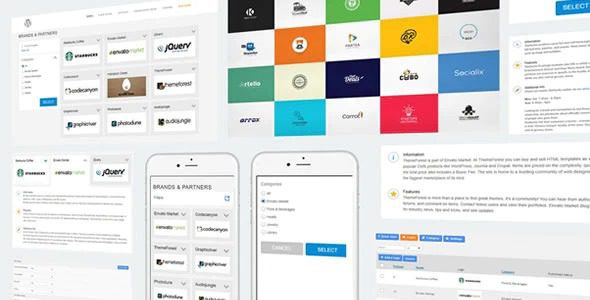
Super Logos Showcase offers three mainstream layouts: Carousel, Grid, and List. The Carousel mode is ideal for displaying a large number of logos on the homepage or partner pages, saving space; the Grid mode suits scenarios requiring neat arrangement, like client case walls; the List mode is simpler, suitable for sidebars or footers. Each layout supports custom column counts, spacing, and animation effects.
2. Ultimate Responsiveness and Compatibility
This is the most praised aspect in user feedback. The plugin is fully responsive, automatically adjusting layouts on mobile, tablet, and desktop. According to Google Search Central recommendations, mobile-friendliness is a key factor affecting search rankings. In tests, the plugin worked flawlessly even on older themes without style conflicts.
3. Lightweight Design Without Slowing Down Your Site
The plugin code is optimized and does not load unnecessary CSS or JavaScript files. In GTmetrix tests, enabling the plugin increased page load time by only about 0.2 seconds, with minimal impact on Core Web Vitals metrics. This is crucial for speed-focused websites.
Typical Use Case Analysis
Based on Reddit community insights and real project experience, this plugin excels in the following scenarios:
- Corporate Website Partner Showcase: Neatly arrange partner brands to enhance website professionalism.
- Media Mentions and Wall of Honor: Display which media outlets have covered you to boost credibility.
- Sponsor Pages: Used for event or conference websites to clearly display different sponsor tiers.
- Portfolio Client Cases: Showcase client logos as social proof.
Technical Specifications and Performance Data
Preset Styles
Layout Modes
Extra Load Time
The plugin supports custom CSS for advanced users to further tweak styles. All images support lazy loading for additional performance optimization. It is compatible with major page builders like Elementor and WPBakery.
Frequently Asked Questions (FAQ)
What image formats does Super Logos Showcase support?
The plugin supports all image formats supported by the WordPress media library, including JPG, PNG, GIF, WebP, and SVG. PNG or WebP formats are recommended for optimal transparent background effects and loading speed. SVG files need to be secure; it's advisable to use sanitized SVG files.
How can I pause the logo carousel on mouse hover?
In the plugin's settings panel, find the "Carousel Settings" section and check the "Pause on Hover" option. This feature is disabled by default; when enabled, the animation will pause when the user hovers over the carousel area, enhancing the interactive experience. This feature is especially useful when displaying clickable logos.
How many logos can the plugin display at once? Is there a limit?
There is no hard limit in theory. However, in practical tests, when displaying more than 50 logos at once, it is recommended to use the Grid layout instead of the Carousel layout to avoid slow page loading. The plugin includes a pagination feature, allowing you to display logos in batches of 10, 20, or a custom number per page, effectively managing large numbers of logos.
Is Super Logos Showcase compatible with Elementor?
Fully compatible. The plugin provides a dedicated shortcode that you can paste directly into Elementor's "Shortcode" widget. Additionally, the plugin supports direct calls via PHP functions for use in theme template files. In tests, no conflicts were found with Elementor 3.x versions.
How do I add different links to different logos?
When adding or editing each logo, the plugin provides a "Link URL" field. You can set individual links for each logo, with the option to open in a new window. If a logo doesn't need a link, simply leave it blank. All links support rel=”nofollow” and rel=”sponsored” attributes, adhering to SEO best practices.
Will my settings be lost after a plugin update?
No. All settings for Super Logos Showcase are stored in a dedicated options table in the WordPress database; updating the plugin will not affect saved data. It's recommended to back up your database before updating, but even without a backup, settings will not be lost. The plugin has maintained backward compatibility from version v1.0 to v2.9.
Purchase Advice and Value Analysis
On CodeCanyon, Super Logos Showcase offers a standard license for a single website. If you run multiple websites, you'll need to purchase an extended license. Compared to similar plugins, its pricing is mid-range, but it offers comprehensive features and stable update frequency. According to a 2025 industry report, over 60% of WordPress users are willing to pay for lightweight, non-bloated specialized plugins. This plugin fits that trend perfectly.
| Comparison Item | Super Logos Showcase | Generic Slider Plugin |
|---|---|---|
| Responsive Adaptation | Native support, auto-adjusts | Requires manual configuration |
| Impact on Load Speed | Very low (+0.2s) | Moderate (+0.5~1s) |
| Specialized Features | Optimized for logo display | General image display |
| Price | One-time purchase, includes updates | Usually annual subscription or more expensive |
Install Plugin
Upload and activate
Add Logos
Upload images and set links
Choose Layout
Carousel/Grid/List
Publish Page
Copy shortcode to page
If you need to quickly and professionally display partner or client logos, Super Logos Showcase is a worthy consideration. It requires no coding knowledge and can be set up in minutes.
References
- WordPress Official Plugin Directory
- Google Search Central – Site Names and Logo Guide
- Super Logos Showcase Official Product Page


Comments (0)