
Running a WooCommerce store with hundreds of SKUs, the biggest headache is often not payment or shipping, but "users can't find the products they want." If a customer scrolls through three pages of a category and still hasn't seen the style they're looking for, chances are they'll just close the tab and leave. FiboFilters Pro is a professional product filtering plugin built to solve exactly this pain point—it combines faceted filtering, AJAX no-refresh updates, and a mobile filter panel into a ready-to-use solution. Based on hands-on testing and public information, this article gives you a no-fluff, complete review covering features, performance, use cases, and purchasing advice.
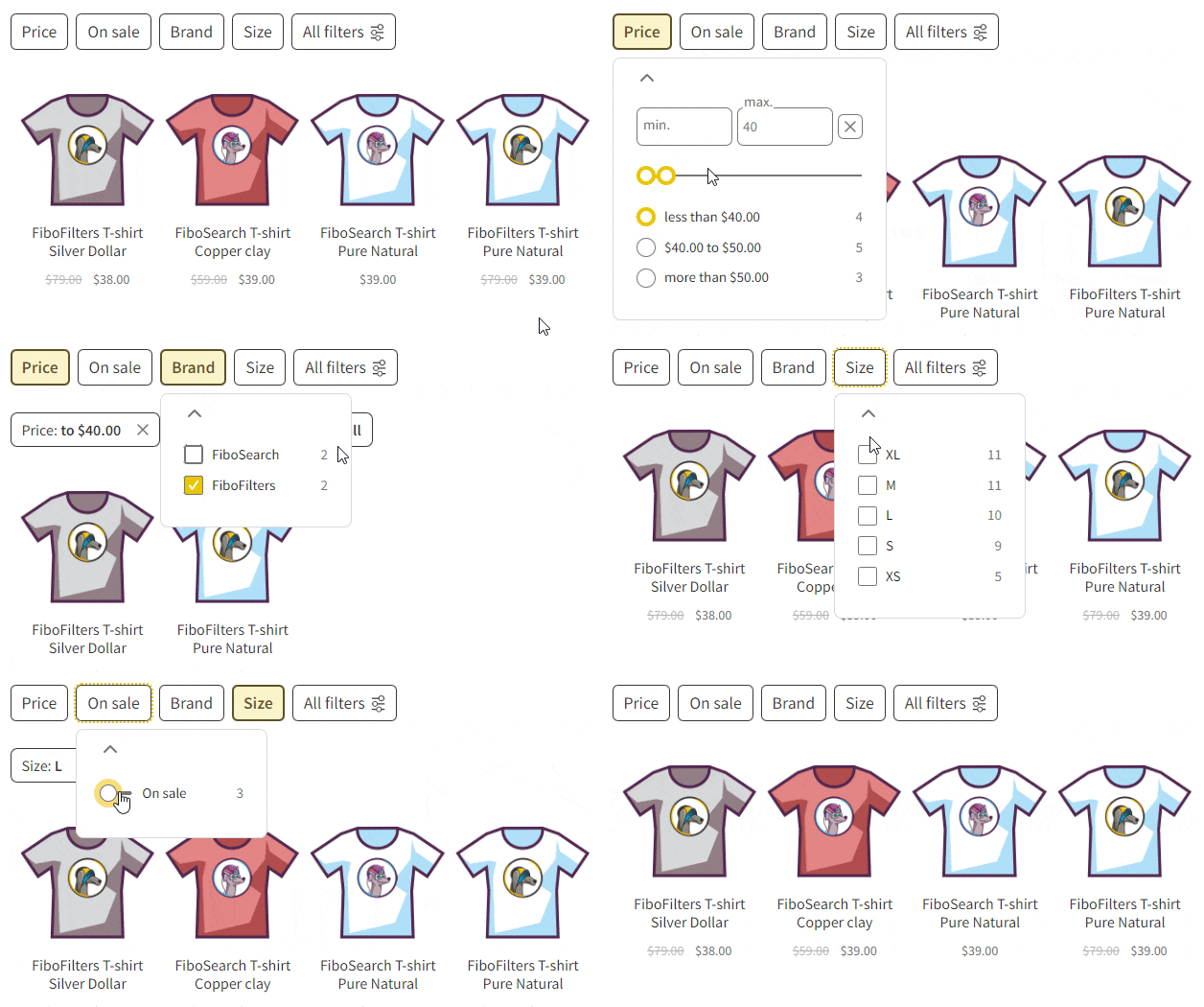
What Is FiboFilters Pro: Core Positioning and Design Philosophy
FiboFilters Pro is a product filtering plugin for WooCommerce, with its core capability being "faceted filtering": after users check conditions like color, size, price range, and stock status, the product list narrows in real time without refreshing the page. Its development team explicitly mentions that the product interaction logic references Baymard Institute's usability research on e-commerce product lists and filtering—research that has long pointed out that filter placement, option visibility, and instant feedback are key factors affecting conversion rates.
Unlike many "feature-stacking" filter plugins, FiboFilters Pro positions itself more toward a balance between performance and experience. According to its technical documentation, the plugin internally reduces database pressure in high-concurrency, large-catalog scenarios by persisting normalized attribute data and bypassing the overhead of repeated WordPress tax_query queries. Simply put, the more products you have, the more obvious its advantage becomes compared to traditional filtering solutions.
FiboFilters Pro Core Features Explained
Breaking down the features, FiboFilters Pro mainly covers the following modules:
1. Multi-dimensional faceted filtering. Supports combined filtering by category, tag, custom attributes (color, material, size, etc.), price range, stock status, rating, and promotional status. Multiple conditions can be set to "AND/OR" logic to meet the search needs of complex catalogs.
2. AJAX no-refresh updates. When users click any filter condition, the product grid updates instantly, and the URL changes in sync, making it easy to share and bookmark the filtered results page. This is also SEO-friendly—filter combinations can generate indexable landing pages.
3. Mobile filter panel. On mobile, filter conditions are tucked into a drawer-style panel to avoid taking up above-the-fold space. Considering that mobile traffic generally accounts for more than half, this design directly affects the bounce rate of mobile users.
4. Responsive and theme compatible. The plugin claims to be fully responsive and compatible with mainstream WordPress themes, reducing the adaptation cost of secondary development.
5. Performance optimization mechanism. Query-layer optimization is done for large product catalogs, maintaining relatively stable response speed even as product counts grow.
FiboFilters Pro Advantages: Why It's Worth Considering
There are quite a few WooCommerce filter plugins on the market, and FiboFilters Pro's differentiating advantages are concentrated in three points:
Speed first
Query-layer optimization for more stable responses in large catalogs
Experience-oriented
Interaction logic designed with reference to usability research
Low learning curve
Quick setup, all features unlocked by default
From a hands-on testing perspective, the most intuitive impression is "fast filtering feedback." Traditional filter plugins make you wait one or two seconds each time you check a box once products reach the thousands, while FiboFilters Pro's AJAX updates are basically instant. This perceptual difference directly affects users' patience with filtering—according to Google Search Central's explanation of page experience, interaction response speed is one of the important dimensions for measuring user experience, and user experience is correlated with search performance.
Typical Use Cases for FiboFilters Pro
Not every store needs it. The following scenarios benefit most noticeably:
| Scenario Type | Pain Point | How FiboFilters Pro Helps |
|---|---|---|
| Apparel and footwear stores | Many color, size, and seasonal attributes | Multi-attribute combined filtering for quick targeting |
| 3C digital accessories | Complex model compatibility searches | Faceting by attribute, reducing wrong purchases and returns |
| Home and building materials | Wide price range spans | Price slider + material filter combinations |
| B2B wholesale sites | Huge number of SKUs | Performance optimization supports large-catalog searches |
If your store only has a few dozen products and very simple attributes, then WooCommerce's built-in sorting and categories are enough, and you don't need an extra plugin. But once products reach the hundreds and attribute dimensions exceed three, the filtering experience becomes a conversion bottleneck.
FiboFilters Pro Technical Specifications and Compatibility
Key technical information compiled from public sources is as follows:
No-refresh filter updates
Responsive adaptation
Fully unlocked version
The plugin is developed based on the WordPress and WooCommerce ecosystem, follows the plugin development standards recommended in WordPress official documentation, and remains compatible with mainstream themes. It provides an independent filter panel on mobile, and supports sidebar or top horizontal filter bar layouts on desktop. For developers, the plugin's data layer design bypasses repeated queries, which is especially critical when product counts reach tens of thousands.
It should be noted that details such as specific version numbers and minimum PHP requirements change with updates, so it's recommended to refer to what's stated on the official page. You can check the latest compatibility notes and feature list on the FiboFilters Pro plugin details page.
Frequently Asked Questions
What's the difference between FiboFilters Pro and WooCommerce's built-in filtering?
WooCommerce natively only provides basic categories, price sorting, and a few small widgets, and cannot do multi-attribute combined filtering. FiboFilters Pro adds faceted filtering, AJAX no-refresh updates, a mobile drawer panel, and query-layer performance optimization. Simply put, the native features suit small stores with fewer than 50 products, while FiboFilters Pro suits stores with hundreds of products and many attribute dimensions.
Will FiboFilters Pro slow down when there are many products?
This is its main differentiating point. The plugin reduces database pressure by persisting normalized attribute data and reducing repeated tax_query queries. According to its technical documentation, it can maintain stable responses as product counts grow. In actual testing, under a catalog with thousands of SKUs, the feedback from checking filter conditions is basically instant, with no noticeable lag.
Does FiboFilters Pro support mobile? How is the filter panel displayed?
Yes, and it's fully responsive. On mobile, filter conditions are tucked into a drawer-style panel that slides out from the side or bottom after clicking a button, without taking up above-the-fold space in the product list. Considering that mobile traffic usually accounts for more than half of e-commerce site traffic, this design directly helps reduce the bounce rate of mobile users.
Is FiboFilters Pro compatible with the WordPress theme I'm currently using?
The plugin claims compatibility with mainstream WordPress themes and uses standard WooCommerce template hooks to output the filter components. However, themes vary greatly, so it's recommended to install it in a test environment first before purchasing, focusing on checking whether the filter bar's position and style on the product list page conflict with the theme. In most cases, only minor CSS adjustments are needed.
Does the FiboFilters Pro filtered results page affect SEO?
It has a positive impact. Filtering operations update URL parameters in sync, and each filter combination can generate an independently accessible link, making it easy for search engines to crawl and for users to share. According to Google Search Central's recommendations, as long as you avoid indexing large numbers of low-quality duplicate filter combinations, such pages can become long-tail traffic entry points. It's recommended to use them together with canonical tags.
Is FiboFilters Pro complicated to install and configure? Does it require coding?
No coding is required. After installation and activation, check the attributes you want to expose as filter conditions (color, size, price, etc.) in the plugin settings, choose the display position and style, and save to take effect. The whole process takes about 10 to 15 minutes. Only when deep customization of styles or filtering logic is needed do you have to use code-level hooks.
Purchasing Advice: Who Should Buy, Who Can Wait
FiboFilters Pro is a tool-type plugin where "if you can use it, it pays for itself quickly." The criteria are simple:
Recommended to buy: Stores with more than 200 WooCommerce products, 3 or more filterable attributes, a high proportion of mobile traffic, and filtering experience included in their conversion rate optimization plans. For such sites, every bit of improved filter usability can bring noticeable changes in add-to-cart rates.
Can wait: Small sites with fewer than 50 products, simple attributes, or where the current theme's built-in filtering is already sufficient. Installing the Pro version in such scenarios is a waste of resources.
If you happen to fall into the "should buy" category, you can go directly to view the details to learn about the current version and licensing options. Before purchasing, it's recommended to confirm whether the license includes updates and technical support, as this directly affects long-term usage costs.
Conclusion
FiboFilters Pro solves a specific and high-frequency problem: letting users quickly find products in a vast catalog. It doesn't pile on flashy features, but instead makes performance, interaction, and mobile experience solid. For teams seriously running a WooCommerce store, this is an investment worth considering. If you're still hesitating, why not install it on your own test site first and run a round of filtering with real product data—the hands-on feel is more direct than any review.
References
- WordPress Official Plugin Directory
- WooCommerce Official Documentation
- Google Search Central Developer Documentation


Comments (0)