
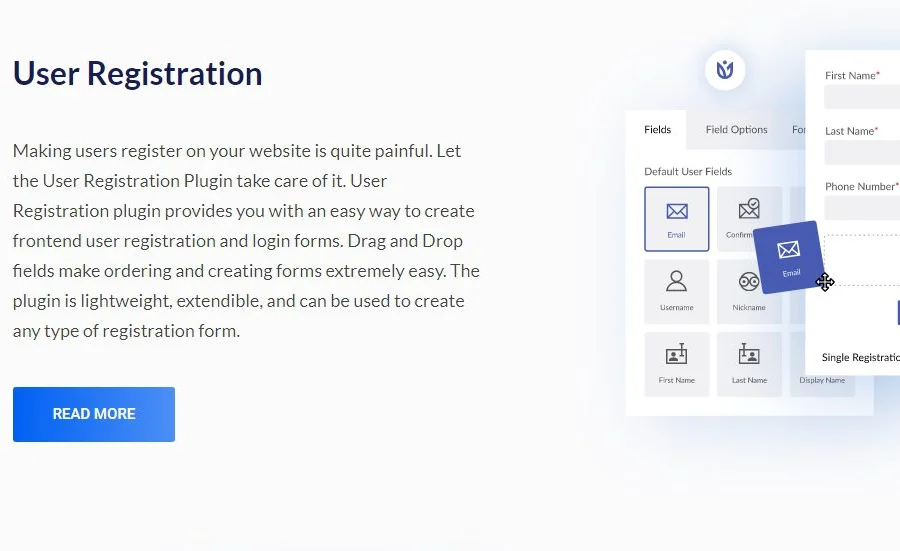
WPEverest User Registration Pro Plugin Overview
WPEverest User Registration Pro is a professional WordPress plugin focused on designing and optimizing the user registration form flow. It provides a drag-and-drop form builder that lets you create custom registration forms, login forms, and multi-step registration flows without writing any code. The plugin is lightweight, extensible, and fully responsive, making it suitable for all types of WordPress websites.
As one of the core products of the WPEverest team, User Registration Pro adds advanced features on top of the basic version, including multi-step registration, conditional logic, social media login, SMS verification, and more, helping you create a smooth and secure user registration experience.
Core Features and Benefits
User Registration Pro offers a range of powerful features to meet registration needs from simple to complex:
- Custom Registration Forms: Freely add, remove, or modify form fields via drag-and-drop to collect the user information you need.
- Multi-Step Registration: Break the registration process into multiple steps, guiding users to complete it gradually and improving completion rates.
- User Verification: Support email verification or admin approval to ensure the authenticity of user information.
- Role and Permission Assignment: Automatically assign user roles and capabilities upon registration, so new users immediately receive the appropriate permissions.
- Automated Workflows: Create automated tasks such as sending welcome emails or adding users to mailing lists.
- Conditional Logic: Dynamically show or hide form fields based on user input to deliver a personalized registration experience.
- Interface Customization: Customize the appearance of registration and login pages to match your website's brand style.
- Social Media Login: Allow users to quickly register and log in via social media accounts.
- SMS Verification: Enhance registration security through SMS verification codes.
- User Management: Provide search, filter, and sort tools for easy management of registered users.
- Data Export: Support exporting user data for backup or analysis.
- Plugin Integration: Seamlessly integrate with popular plugins like WooCommerce to extend e-commerce functionality.
If you need more WordPress resources, you can visit bobohello.com to get related plugins and themes.
Installation and Usage Guide
Installing the User Registration Pro plugin is very simple. You can upload the plugin ZIP file via the "Plugins" -> "Add New" page in the WordPress admin, or upload the plugin files to the wp-content/plugins directory via FTP. After installation, activate the plugin and enter your license key (if applicable) to start using it.
Once activated, you can find the "User Registration" menu in the WordPress admin and use the drag-and-drop builder to create forms. Add the required fields, configure multi-step flows, set verification methods and automation rules, then embed the form into your website pages via shortcode or widget.
For more detailed documentation and update information, please refer to the official WPEverest website.
Use Cases and Best Practices
User Registration Pro is suitable for WordPress websites that require highly customized user registration flows, especially in the following scenarios:
- Membership sites: Collect detailed user profiles and assign membership levels.
- E-commerce sites: Integrate with WooCommerce to create registration flows for wholesale customers or specific user groups.
- Educational platforms: Collect student information through multi-step registration and automatically assign course permissions.
- Community forums: Simplify registration through social media login to increase user engagement.
For best results, it is recommended to design a concise and clear registration form based on your website's goals, use conditional logic appropriately, and enable verification features to prevent spam registrations.
Frequently Asked Questions
How do I install the WPEverest User Registration Pro plugin?
You can install it by uploading the plugin ZIP file via the "Plugins" -> "Add New" page in the WordPress admin, or by uploading it to the wp-content/plugins directory via FTP. After installation, simply activate and configure it.
What registration methods does User Registration Pro support?
It supports standard form registration, multi-step registration, social media login (such as Facebook and Google), and SMS verification registration. For the specific social media platforms supported, please refer to the official documentation.
Is the plugin compatible with WooCommerce?
Yes, User Registration Pro integrates well with WooCommerce, allowing you to collect additional information during registration and automatically create WooCommerce customer accounts.
How often is the plugin updated?
The WPEverest team regularly releases updates to fix vulnerabilities and add new features. It is recommended to check the official changelog periodically for the latest version information.

