
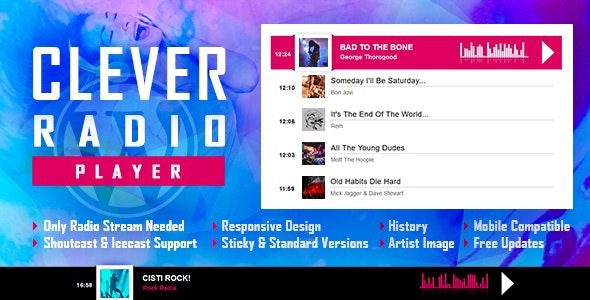
CLEVER Radio Player – Professional Radio Station Streaming Player WordPress Plugin
Many music radio websites, podcast blogs, or general news portals want to embed 24/7 internet radio live streams on their pages, but ordinary players not only frequently drop the stream but also fail to display the name of the currently playing track. CLEVER Radio Player is a highly acclaimed internet radio station player WordPress plugin on CodeCanyon. It fully supports Shoutcast and Icecast live streaming protocols, delivering stable playback with low latency, and can automatically fetch the currently playing song title and artist information from public databases, while fully displaying a timeline of previously played tracks!
1. Main Use Cases of CLEVER Radio Player
- Online live broadcasting for internet radio stations and music channels: Place a persistent full-width player at the bottom of the website to stream radio programs 24/7 with low latency.
- Radio portals for independent musicians and DJ tours: Display replays of past radio recordings with automatically synchronized historical track lists.
- Corporate background music and leisure community spaces: Place an elegant miniature radio widget in the corner of the webpage to enhance the site's style.
2. Core Feature Breakdown
- Perfect compatibility with both Shoutcast and Icecast protocols: Natively supports direct parsing by entering the streaming server IP and port, and supports m3u8 and AAC high-definition audio stream playback.
- Fully automatic retrieval of current track info and album art (Live Metadata): The system backend automatically reads ID3 tags from the stream and displays the song title, artist, and HD cover in real time on the player interface.
- Timeline list of previously played songs (Play History): A clear list of the last 10 played tracks is displayed below the player, allowing readers to copy song titles or jump to purchase with one click.
- Lightweight native core hook loading: The code is clean and well-structured, consuming no system resources when not invoked, and completely avoids slowing down the site's front-end instant-load speed.
3. Performance and Compliance Notes
✅ A truly professional internet radio listening tool, with pure and stable sound quality, completely eliminating stuttering and stream drops when switching pages.
✅ The interface design supports multiple attractive modern skins (deep black, plain white, semi-transparent glass), perfectly blending with your theme style without any code.
❌ You must ensure that the connected Shoutcast/Icecast streaming server address supports the HTTPS secure protocol to avoid browsers blocking mixed content loading.
If you are looking for more extension tools to enhance your corporate website's presentation and interactive experience, welcome to visit WordPress Resource Site to get more high-quality development tools.
Frequently Asked Questions
How do I install the CLEVER Radio Player plugin?
In the WordPress admin, go to "Plugins" -> "Add New", upload the plugin ZIP package, and activate it. For details, please refer to the official documentation.
Which streaming protocols does this plugin support?
CLEVER Radio Player is fully compatible with Shoutcast and Icecast protocols, and supports m3u8 and AAC audio streams.
Can the player display the current song and historical tracks?
Yes. The plugin automatically reads ID3 tags from the stream, displays current song information and album art in real time, and lists the 10 most recently played tracks.
Will the plugin affect website loading speed?
The plugin uses lightweight native core hook loading, consumes no system resources when not invoked, and will not slow down the website's front-end speed.
Does the plugin support HTTPS streaming?
Yes, but you need to ensure that the connected Shoutcast/Icecast streaming server address supports HTTPS to avoid browsers blocking mixed content loading.


Comments (0)