
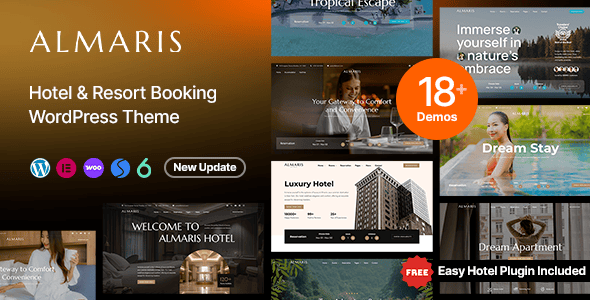
Almaris WordPress Theme: A Professional-Grade Solution for Hotel Bookings
Almaris is a luxury WordPress theme tailor-made for the hotel industry, blending elegant design with practical functionality. Whether you run a boutique hotel, a resort, or a bed-and-breakfast, Almaris helps you quickly build a professional, high-converting online booking platform. Crafted by an experienced ThemeForest author using best-in-class coding and design practices, this theme ensures that code quality is just as impressive as its visual presentation.
Almaris Core Features Explained: A Seamless Experience from Booking to Payment
Almaris integrates deeply with WooCommerce Booking and, through the Easy Hotel Booking plugin, lets you manage hotel reservations with ease. Guests can intuitively select rooms, add extra services, and complete payment—the entire process is smooth and convenient. Built on the Elementor page builder, the theme allows you to customize every detail via drag and drop even without any coding knowledge, enabling true visual editing.
If you're looking for more similar resources, visit WordPress Resource Site for more theme and plugin recommendations. In addition, the official Almaris page offers detailed demos and documentation—click the Almaris Official Link to view the full feature set.
Almaris Responsive Design and Performance
Almaris is fully responsive, ensuring your website looks perfect on smartphones, tablets, and desktops. Its optimized code structure guarantees fast loading speeds, which is crucial for improving user experience and search engine rankings. The theme is also compatible with major browsers and supports multiple languages, making it easy to expand into international markets.
Why Choose the Almaris WordPress Theme?
Almaris doesn't just look luxurious—it also focuses on real operational efficiency. With the Easy Hotel Booking plugin, you can manage room availability, pricing, and orders in real time. The theme comes with multiple pre-built page templates, such as room showcases, facility introductions, and contact pages, significantly reducing site-building time. At the same time, Almaris follows SEO best practices, helping your hotel website gain better visibility in search results.
Frequently Asked Questions
How do I install the Almaris theme?
You can install it by uploading the theme ZIP file via "Appearance" -> "Themes" -> "Add New" in the WordPress dashboard, or by uploading the theme folder to the wp-content/themes directory via FTP. After installation, activate it and import the demo content to quickly set up your website.
Which booking plugins does Almaris support?
Almaris primarily integrates with the Easy Hotel Booking plugin and relies on WooCommerce Booking functionality. For a detailed compatibility list, please refer to the official documentation.
Is Almaris compatible with the latest version of WordPress?
The theme is continuously updated to remain compatible with the latest version of WordPress. We recommend checking the official changelog before use to ensure compatibility with your current WordPress version.
How often is the Almaris theme updated?
The author releases updates regularly to fix issues and add new features. You can download the latest version through your ThemeForest account—for specific update frequency, please refer to the official documentation.

