
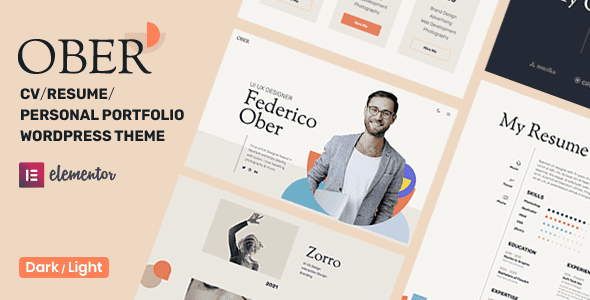
What Is the Ober WordPress Theme?
Ober is a WordPress theme built specifically for personal resumes, CVs, and portfolios, with a minimalist, clean, and refined style. Whether you're a designer, developer, programmer, freelancer, artist, or photographer, Ober helps you quickly build a professional personal website. It's perfectly suited for showcasing work experience, skills, education, past projects, and professional specialties, making it an ideal choice for creating a creative resume or personal portfolio.
The core strengths of the Ober theme lie in its flexible layout system and powerful visual editing capabilities. It offers both dark and light interfaces with real-time switching, allowing visitors to choose their preferred reading mode. The unlimited header and footer builder lets you customize your site structure without writing any code, while single-page and multi-page layouts adapt to different content depth requirements.
Key Features of the Ober Theme
Dark/Light Mode with Real-Time Switching
Ober includes both dark and light color schemes, which users can toggle with one click anywhere on the page. This feature not only enhances the visual experience but also keeps your resume site readable in different lighting environments. For personal branding sites pursuing a modern feel, dark mode has become a popular trend, and Ober implements this experience very naturally.
Unlimited Header and Footer Builder
With the unlimited header and footer builder, you can freely combine navigation menus, social icons, copyright information, and other elements without touching any code. Each page can have its own independent header and footer style, which is ideal for portfolio projects that require differentiated presentation.
Freely Switch Between Single-Page and Multi-Page Layouts
Ober supports both single-page scrolling layouts and traditional multi-page layouts. The single-page layout is ideal for concise resume displays, where visitors can smoothly browse each section through parallax scrolling effects; the multi-page layout suits creative professionals with a larger number of works that need categorized display. You can switch between the two modes at any time to meet your site's needs at different stages.
Elementor Page Builder and One-Click Import
Ober deeply integrates with the Elementor page builder, making layout intuitive and efficient through drag-and-drop editing. The theme also offers a one-click demo data import feature—after installation, just one click gives you a complete example website, including all pages, posts, menus, and theme settings, greatly lowering the barrier to building a site. If you need more WordPress themes and plugin resources, you can visit the WordPress resource site.
Portfolio Display with Filtering
The portfolio module supports category filtering, allowing visitors to quickly browse your works by project type. Combined with beautiful animations and visual effects, every piece of work is presented at its best. Parallax scrolling effects further enhance the page's sense of depth and immersion.
Who Is the Ober Theme For
The target users of the Ober theme are very clear: creative professionals who need to showcase their personal resume, portfolio, or professional specialties online. Designers can use it to display UI/UX projects, developers can present code work and open-source contributions, photographers can build image galleries with filtering, and freelancers can quickly establish a personal branding page through the single-page layout. Artists and programmers can benefit as well, because Ober's visual style is neutral enough not to steal the spotlight.
For freelancers just starting out, Ober's one-click demo data import feature is especially useful—you don't need to design the page structure from scratch; simply replace the text and images based on the demo content and you're ready to go live. For experienced developers, the unlimited header and footer builder and deep Elementor integration provide ample room for customization.
How to Install and Configure the Ober Theme
The installation process for the Ober theme is the same as for other WordPress themes: upload the theme zip file in the admin under Appearance → Themes → Add New, activate it, and follow the prompts to install required plugins (such as Elementor). Then use the one-click demo data import feature to load the example content, and modify page copy and images through the Elementor editor. The header and footer builder is located in the theme settings panel and can be configured page by page. The dark/light toggle usually appears in the header area, and its exact position can be adjusted in the theme settings. For more detailed installation steps, refer to the official documentation.
Frequently Asked Questions
What plugins does the Ober theme require to work properly?
The Ober theme primarily relies on the Elementor page builder for visual editing, and installing the theme usually prompts you to install the related required plugins. For the specific plugin list, please refer to the official documentation.
Does the Ober theme support Chinese content?
The Ober theme itself supports WordPress's standard multilingual mechanism, and Chinese content displays normally. The theme's interface text can be localized through language files; please refer to the translation instructions in the official documentation for details.
Is the dark/light switching in the Ober theme automatic?
Ober offers both dark and light interfaces and supports real-time switching. Switching is usually triggered manually by visitors, and a default mode can also be configured through theme settings. For specific behavior, please refer to the official documentation.
Does the Ober theme support both single-page and multi-page layouts?
Yes, Ober supports both single-page scrolling layouts and traditional multi-page layouts, and users can freely choose based on their content needs. The single-page layout, combined with parallax scrolling effects, is ideal for concise resume displays; the multi-page layout suits scenarios with many portfolio categories.
How often is the Ober theme updated?
The Ober theme is distributed through the ThemeForest platform, and update frequency depends on the developer's release schedule. It's recommended to check the changelog on the ThemeForest product page for the latest version information. For details, please refer to the official documentation.

