
Meow Apps AI Engine PRO WordPress Plugin: Inject AI Capabilities into Your Website
Meow Apps AI Engine PRO is a powerful WordPress plugin that lets you easily integrate ChatGPT-style chatbots into your website, while also offering a rich set of tools including a GPT content generator, AI image generation, AI Playground, and more. Whether you want to automatically generate article content, provide intelligent customer support for visitors, or explore advanced features like AI translation and proofreading, AI Engine PRO can meet your needs. It is developed by the Meow Apps team with continuous updates and iterations, and has now been updated to version v3.8.4, bringing more stable performance and more practical features.
An Overview of AI Engine PRO's Core Features
AI Engine PRO is not just a chatbot plugin—it is a complete AI toolkit designed to help WordPress site owners improve content production efficiency and user experience.
ChatGPT-Style Chatbot
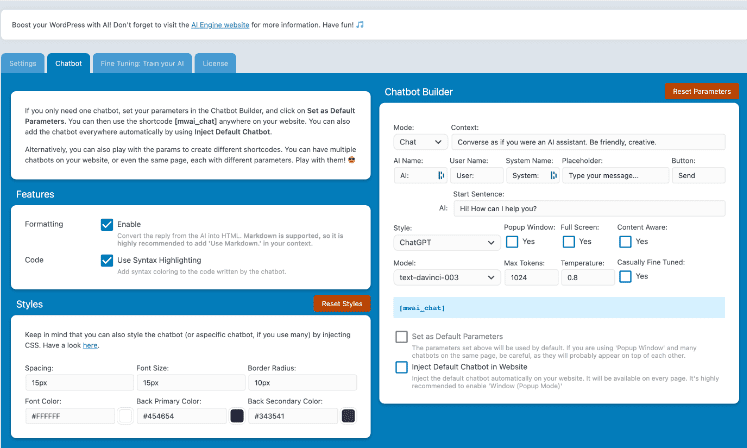
You can quickly add a chatbot anywhere on your website, with support for image bots, shortcode generators, and extensive parameter configuration. The chatbot can also perceive the content of the current page and discuss and analyze topics related to the page, making it ideal for product Q&A or content guidance.
GPT Content and Image Generator
With the built-in content generator, you can batch-generate fresh and engaging text content for your website, as well as generate accompanying images. Combined with the template system, you can create custom templates for the content generator, image generator, or AI Playground, making repetitive work much easier.
AI Playground and Training Tools
AI Playground offers a variety of AI tools such as translation, proofreading, discussion, and SEO suggestions. You can also use the training module to edit datasets, train AI models, and manage fine-tuned models. The plugin's original "Casually Fine-Tuned" concept makes AI training and integration simpler—just enable the corresponding options in different parts of the plugin to complete fine-tuning.
Statistics, Limits, and Internal API
AI Engine PRO tracks every AI request, helping you obtain detailed usage statistics and allowing you to set limits and conditions for AI usage. In addition, the plugin provides an internal API so that other plugins can also call its AI capabilities for broader extensibility. For more technical details, refer to WordPress plugin development resources.
Installation and Usage Tips for AI Engine PRO
After installing the AI Engine PRO plugin, you need to go to the plugin settings page to configure your API key (such as an OpenAI API Key). The plugin does not include a Chinese language pack, but you can localize it yourself through the WordPress translation system. Once enabled, you will see quick suggestion buttons in the post editor, allowing you to generate titles, excerpts, or content with one click. The chatbot can be embedded into pages via shortcodes or blocks, with flexible configuration. If you encounter issues during configuration, it is recommended to consult the official documentation or community discussions.
The official page provides detailed documentation and a changelog, which you can visit at: Meow Apps AI Engine Official Page.
Frequently Asked Questions
What prerequisites are required to use AI Engine PRO?
You need a valid OpenAI API key or a key from another supported AI provider. The plugin itself does not provide API credits; you need to apply for them on the corresponding platform. For the specific AI providers supported, please refer to the official documentation.
What scenarios can this plugin be used for?
It is suitable for automatically generating article content, creating intelligent customer service chatbots, batch-generating product descriptions, translating and proofreading text, generating images, and more. It is especially suitable for content-based websites, e-commerce websites, and blogs that need to improve user engagement.
Is AI Engine PRO compatible with the latest WordPress version?
The plugin is continuously maintained by the Meow Apps team and is usually updated for compatibility promptly after a new WordPress version is released. It is recommended to keep the plugin at the latest version for the best experience. For specific compatibility information, please refer to the official documentation.
How often is the plugin updated?
The Meow Apps team updates relatively frequently, usually releasing feature updates or fixes monthly or quarterly. You can get update notifications through the WordPress dashboard or official channels.
Does it support multiple languages or Chinese localization?
The plugin itself does not include a Chinese language pack, but you can adapt it for Chinese through the WordPress translation system or use a third-party translation plugin. For details, please refer to the official documentation or community tutorials.

