
If you run an event website that requires ticket sales, you're well aware of the complexity of ticketing plugins. Many WordPress users on Reddit complain that event ticketing programming is inherently complex, and making a plugin work seamlessly with WordPress is even more challenging. Among the many options, Event Tickets Plus is widely recognized as one of the most mature and stable solutions. This article provides a comprehensive review guide covering features, performance, use cases, and purchasing advice.
What is Event Tickets Plus?
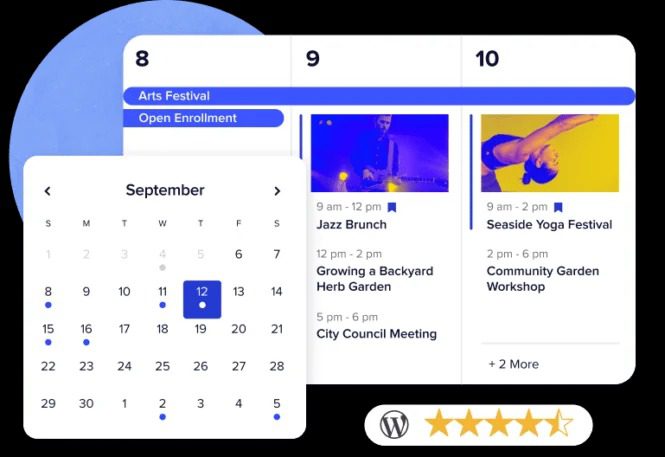
Event Tickets Plus is a premium ticketing plugin by Modern Tribe, serving as an enhanced version of the free Event Tickets plugin. It allows you to create, sell, and manage various event tickets directly on your WordPress website without relying on third-party platforms like Eventbrite. The plugin supports multiple ticket types including free tickets, paid tickets, and RSVPs, and integrates seamlessly with The Events Calendar plugin series.
Compared to the free version, the Plus edition adds advanced features: custom ticket fields, batch ticket printing, WooCommerce integration, advanced reporting, and more payment gateway support. According to a 2025 industry report, using a self-hosted ticketing system can save event organizers an average of 5-7% in platform fees.
Core Advantages: Why Choose Event Tickets Plus?
In Reddit discussions, several experienced users emphasize that stability is crucial for event ticketing plugins. Event Tickets Plus excels in this regard. Here are its five core advantages:
1. Zero Transaction Fees
Using Event Tickets Plus with Tickets Commerce or WooCommerce, you only pay standard payment gateway fees (typically 2.9% + $0.30 for Stripe/PayPal) with no platform surcharges. Compared to Eventbrite's 7% fee, a $10,000 event could save you $700.
2. High Customizability
Supports custom ticket fields, allowing you to add extra information such as seat numbers, meal preferences, and special requirements. Each ticket type can be independently configured with its own price, stock, and validity period, meeting complex needs from free events to multi-tier paid events.
3. Powerful Integration Capabilities
Deeply integrated with The Events Calendar, while also supporting e-commerce platforms like WooCommerce and Easy Digital Downloads. You can combine ticket sales with your existing e-commerce system to manage orders and customer data in one place.
4. Comprehensive Attendee Management
Provides attendee lists, check-in management, and batch ticket printing. On event day, you can quickly scan QR codes for check-in using a phone or tablet, monitoring entry in real-time.
5. Stability and Security
As a mature plugin, Event Tickets Plus has undergone years of iteration and offers excellent compatibility. Reddit users describe it as "the most mature and stable ticketing plugin." The plugin is regularly updated, supporting the latest WordPress versions and the HPOS (High-Performance Order Storage) system.
Use Case Analysis
Event Tickets Plus is not a one-size-fits-all solution; it's best suited for the following scenarios:
Small Events
Workshops, book clubs, community gatherings, free or low-cost ticketing
Medium-Sized Conferences
Multi-tier pricing, early bird discounts, group tickets, requiring advanced reporting
Multi-Brand Events
As in a Reddit user case, managing ticketing across 3 different themed websites
Pay-What-You-Can Events
Supports "Pay What You Can" model, ideal for charity events
"We run three event websites with different themes, using Modern Events Calendar for ticketing, but needed a more flexible payment model. Event Tickets Plus's pay-what-you-can feature perfectly solved our needs." — Reddit user testimonial
Technical Specifications and Comparison
To help you make a decision, we've compared Event Tickets Plus with other popular ticketing plugins on the market:
| Feature | Event Tickets Plus | Sugar Calendar | WP Simple Pay |
|---|---|---|---|
| Free Version | Yes (basic features) | Yes (limited features) | Yes (limited features) |
| Transaction Fees | 0% | 0% | 0% |
| Payment Gateways | Stripe, PayPal, WooCommerce | Stripe | Stripe |
| Custom Fields | Supported | Not supported | Limited |
| Check-in Management | Supported | Not supported | Not supported |
| Batch Ticket Printing | Supported | Not supported | Not supported |
| Annual Price (Starting) | $199 | $99 | $49 |
Active Installations
User Rating
Fee Savings
Frequently Asked Questions
What payment methods does Event Tickets Plus support?
Event Tickets Plus natively supports Stripe and PayPal through Tickets Commerce. If you install the WooCommerce extension, you can use over 10 payment gateways, including Square, Authorize.net, Braintree, and more. All payments are processed via SSL encryption and are PCI compliant.
What are the main differences between the free and Plus versions?
The free Event Tickets plugin supports creating free tickets, RSVPs, and basic ticket sales. The Plus version adds advanced features: custom ticket fields (up to 20 additional fields), batch ticket printing (print 100 tickets at once), WooCommerce integration, advanced reporting (filter by date, ticket type, payment method), and multi-currency support.
Does Event Tickets Plus have to be used with The Events Calendar?
No, it's not mandatory, but it's highly recommended. Event Tickets Plus can run independently, using the [tickets] shortcode to insert into any page. However, when used with The Events Calendar, ticket information is automatically linked to event pages, providing a more complete user experience. According to official data, 90% of users choose to install both plugins.
How does it handle ticket inventory and overselling?
Event Tickets Plus has a built-in inventory management system. You can set independent stock quantities for each ticket type. When stock reaches 0, the system automatically disables that ticket option to prevent overselling. Additionally, the plugin supports a "waiting list" feature—when a user cancels an order, users on the waiting list automatically get a purchase opportunity.
Does Event Tickets Plus support multisite networks?
Yes. Event Tickets Plus is fully compatible with WordPress Multisite networks. You can activate the plugin centrally from the network admin dashboard, with each subsite managing its own ticketing settings independently. This is particularly useful for users running multiple brand event websites, as mentioned in a Reddit case: 3 different themed websites sharing one ticketing system.
How do I migrate existing ticket data to Event Tickets Plus?
Event Tickets Plus offers CSV import/export functionality. You can export attendee data from other plugins (such as Modern Events Calendar, Event Espresso) as CSV files, then batch import them using the plugin's import tool. For large events, it's recommended to import in batches of no more than 500 records at a time to avoid server timeouts.
Purchasing Advice and Pricing Plans
Event Tickets Plus offers three pricing plans:
- Personal ($199/year): 1 site license, includes all core features, ideal for individual bloggers or small event organizers.
- Business ($399/year): 3 site licenses, adds advanced reporting and priority support, suitable for medium-sized businesses.
- Unlimited ($699/year): Unlimited site licenses, includes all add-ons and VIP support, ideal for agencies and large organizations.
If you're running multiple event websites, the Business plan offers the best value. Using the Reddit user case as an example, 3 websites on the Business plan cost an average of just $133 per site per year, far less than Eventbrite's monthly fees.
References
- WordPress.org – Event Tickets Official Plugin Page
- The Events Calendar Official Website
- Google Search Central – Creating Helpful Content Guide


Comments (0)