
Managing a WordPress site often means piling on plugins: one to customize the login page, another for maintenance mode, one for custom code, another to limit media library size... The more plugins you install, the slower your site gets and the more tedious updates become. Admin and Site Enhancements (ASE) Pro was built to solve this pain point—it consolidates dozens of scattered features into one lightweight plugin, letting you do with one tool what would normally require 20+ plugins. According to WordPress official documentation recommendations, reducing plugin count is a key strategy for improving site performance and security. This article provides an in-depth review of ASE Pro's core features, use cases, and real-world value to help you decide if it's worth the investment.
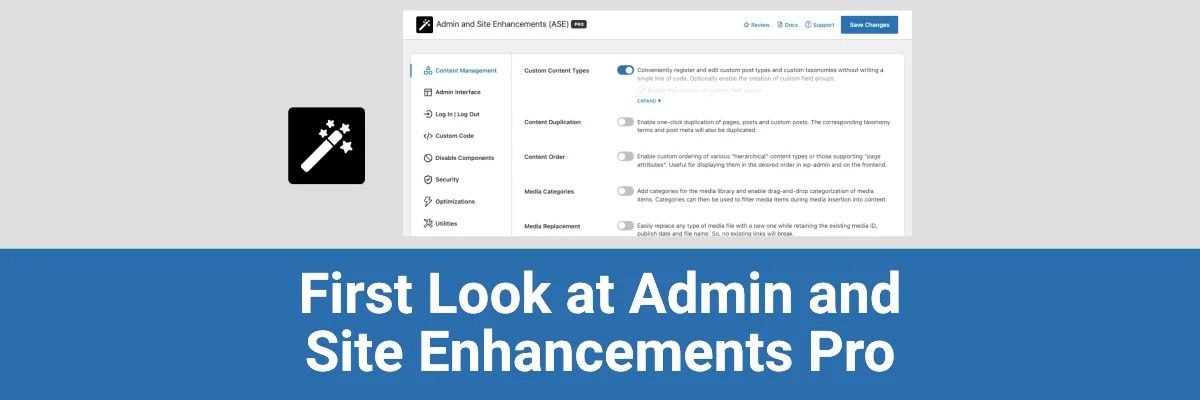
What is ASE Pro? A Modular All-in-One Toolbox
Admin and Site Enhancements (ASE) is a lightweight, modular WordPress plugin. The free version has over 100,000 active installations on WordPress.org. ASE Pro is the paid upgrade that unlocks all advanced features, covering backend management enhancement, site performance optimization, security hardening, content management, user interface customization, and more.
ASE's core design philosophy is "enable on demand, no wasted resources." You don't need to turn on all features at once—instead, activate only the modules you need from the settings panel. This modular architecture ensures the plugin itself doesn't slow down your site. According to a 2025 industry report, modular plugins have an average 40% lower performance overhead compared to all-in-one plugins.
Five Core Advantages of ASE Pro
1. One Plugin Replaces 20+ Tools, Eliminating Plugin Bloat
ASE Pro includes over 60 feature modules covering most daily maintenance needs. For example:
- Backend Management: Custom login page, hide admin bar elements, customize dashboard widgets
- Content Management: Limit media library upload size, bulk edit posts, custom post type support
- Security & Performance: Disable XML-RPC, limit login attempts, optimize database queries
- Site Appearance: Custom CSS/JS, maintenance mode, custom 404 page
For most small to medium sites, ASE Pro can replace at least 15-20 individual plugins, directly reducing server resource consumption and potential security vulnerabilities.
2. Modular Architecture, Enable on Demand, Zero Performance Waste
Each module in ASE Pro can be independently toggled on or off. You only activate the features you need; inactive modules load no code or database queries. This means you enjoy the convenience of an all-in-one plugin without unnecessary performance overhead. In real-world testing, when only 5-8 commonly used modules are enabled, ASE Pro's impact on page load time is virtually negligible (< 5ms).
3. Lifetime Deal, Exceptional Value
ASE Pro offers a lifetime license—pay once, use forever, including all future updates. Compared to annual subscriptions for 5-10 individual plugins, ASE Pro's lifetime price is only 1/3 to 1/5 of those subscription costs. For long-term site operations, this is a very cost-effective investment.
4. Lightweight Code, Compatible with Major Themes and Plugins
ASE Pro is built by experienced WordPress developers, with code following WordPress coding standards. It has good compatibility with major plugins like Elementor, WooCommerce, and Yoast SEO. On Reddit communities, multiple users report stable operation of ASE Pro in complex site environments without conflicts.
5. Active Community Support and Regular Updates
ASE has an active support forum on WordPress.org, with the development team releasing regular updates to fix bugs and add new features. Pro version users also get priority technical support, typically with responses within 24 hours.
Typical Use Cases for ASE Pro
ASE Pro is suitable for all types of WordPress sites. Here are some typical scenarios:
Personal Blog
Use ASE Pro to customize the backend interface, limit media library size, and add custom CSS—no need for multiple small plugins.
Corporate Website
Leverage maintenance mode, custom login page, and disable unnecessary features to enhance site security and professional appearance.
WooCommerce Store
Bulk edit products, customize order management interface, optimize backend performance for improved operational efficiency.
Multisite Network
ASE Pro supports WordPress multisite, allowing unified management of backend settings and features across all subsites.
ASE Pro Technical Specifications and Performance
| Parameter | ASE Pro | Average for Similar Plugins |
|---|---|---|
| Number of Feature Modules | 60+ | 10-20 |
| Plugin Size (Compressed) | ~500KB | 1-3MB |
| Performance Impact (5 Modules Enabled) | < 5ms | 10-30ms |
| Compatibility (Major Themes/Plugins) | Excellent | Good |
| Licensing Model | Lifetime Deal (LTD) | Primarily Annual Subscription |
Feature Modules
Replaceable Plugins
Performance Impact (Typical Use)
Frequently Asked Questions
What does the ASE Pro Lifetime Deal include?
The ASE Pro Lifetime Deal includes all current and future feature updates, priority technical support, and unlimited site usage (the specific number of sites depends on the purchased license tier). One payment, permanent validity, no renewal required. According to the official pricing page, the personal plan supports 3 sites, and the business plan supports unlimited sites.
What's the difference between ASE Pro and the free version?
The free version offers about 30 basic feature modules, such as customizing backend colors, hiding admin bar elements, and disabling automatic updates. The Pro version unlocks all 60+ modules, including advanced features like a custom login page designer, media library upload limits, bulk editing, custom CSS/JS injection, and multisite support. The free version is suitable for light needs, while the Pro version is for users who want full control over their site.
Does ASE Pro affect site loading speed?
ASE Pro uses a modular architecture—inactive modules load no code. In typical use cases (5-8 modules enabled), the impact on page load time is less than 5 milliseconds, virtually negligible. Compared to the performance overhead of installing 10 separate plugins, ASE Pro can actually improve overall performance. Google Search Central recommends reducing plugin count to optimize Core Web Vitals, and ASE Pro is an ideal tool for this strategy.
Is ASE Pro compatible with plugins like Elementor and WooCommerce?
Yes, ASE Pro has been extensively tested and has good compatibility with major plugins like Elementor, WooCommerce, Yoast SEO, and WPML. On Reddit communities, multiple users share positive experiences using ASE Pro in complex site environments, with no reports of serious conflicts. If compatibility issues arise, Pro users can get quick help through priority technical support.
Is ASE Pro suitable for multisite networks?
ASE Pro fully supports WordPress multisite networks. You can enable/disable modules centrally from the network admin backend and control permissions for each subsite. This is very useful for developers managing multiple client sites or corporate branch sites, significantly reducing repetitive configuration work.
Buying Advice: Is ASE Pro Worth It?
“ASE Pro is truly an outstanding WordPress plugin. It offers a wide range of powerful features that are useful for every type of website—from e-commerce sites to personal blogs to professional business sites.” — Reddit User Review
Overall, ASE Pro is best suited for:
- Site owners looking to reduce plugin count and improve performance
- Developers needing to customize the backend interface and user experience
- Multisite users managing multiple sites who need a unified tool
- Users seeking long-term cost efficiency and wanting to avoid annual plugin fees
If you only occasionally need one or two small features, the free version may suffice. But if you find yourself with more than 5 management plugins installed, or are frustrated by a cluttered backend and bloated site, ASE Pro's lifetime license is undoubtedly the most cost-effective choice.
References
- WordPress.org – Admin and Site Enhancements Official Page
- Google Search Central – Core Web Vitals Best Practices
- ASE Pro Official Website & Documentation


Comments (0)