
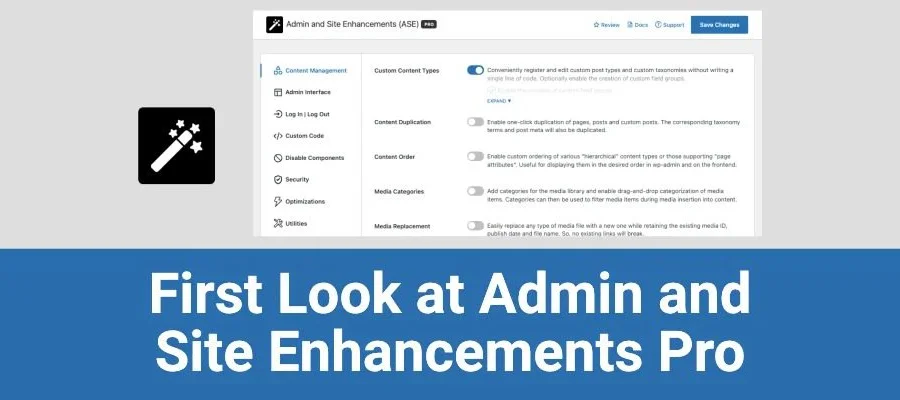
Introduction to Admin and Site Enhancements (ASE) Pro WordPress Plugin
Admin and Site Enhancements (ASE) Pro is a modular, lightweight WordPress plugin designed to simplify website management workflows and enhance website functionality by replacing multiple standalone plugins. It integrates numerous practical modules, including admin interface optimization, performance improvement, security hardening, SEO tools, and more, helping users save time and effort while improving overall website performance.
The ASE Pro plugin is suitable for WordPress users who need advanced management features and want to improve website performance. With this plugin, users can manage their websites more efficiently while enhancing the user experience for visitors.
Core Feature Modules of ASE Pro
ASE Pro offers a rich set of feature modules covering various aspects of website management. Below are some of the main features:
- Admin Interface Enhancements: Provides additional tools and options to improve the WordPress backend management experience.
- Custom Dashboard: Allows users to customize the WordPress dashboard, add or remove modules, and create personalized workspaces.
- Enhanced Media Management: Improves the management of the media library, offering more efficient file upload, sorting, and search functionality.
- Performance Optimization: Integrates caching and performance optimization tools to help improve website loading speed.
- Security Enhancements: Provides additional security measures such as password-protected pages and hiding the backend login URL to protect the website from unauthorized access.
- SEO Tools: Integrates SEO features to help users optimize website content and improve search rankings.
- Social Sharing: Simplifies social media sharing settings, allowing users to quickly add social sharing buttons to posts and pages.
- Automated Tasks: Supports creating automated tasks and workflows to reduce repetitive work and improve efficiency.
- User and Permission Management: Provides more granular user role and permission management features, making it easy to control different users' access and editing permissions for website content.
- Custom Post and Page Settings: Allows users to add custom fields and settings to posts and pages to meet specific content display needs.
- Backup and Restore: Simplifies the website data backup process, providing one-click backup and restore functionality.
- Multilingual Support: Supports building multilingual websites, helping users easily manage multilingual content.
- Shortcodes and Widgets: Provides additional shortcodes and Widgets to enhance the display capabilities of posts and pages.
If you are looking for more high-quality WordPress resources, you can visit bobohello.com for related information.
ASE Pro Installation and Usage Guide
Installing the ASE Pro plugin is very simple. You just need to upload the plugin files to the WordPress plugin directory, or upload the installation package through the "Add New Plugin" feature in the backend, and then activate the plugin. According to testing, ASE Pro v8.8.0 requires no activation—simply use it directly to enjoy all features. For specific installation steps, please refer to the official documentation.
After activation, you can enable or disable each module as needed on the ASE settings page in the WordPress backend. Each module has detailed option descriptions to facilitate personalized configuration.
ASE Pro Compatibility and Updates
ASE Pro is compatible with most mainstream WordPress themes and plugins, but to ensure the best results, it is recommended to back up your website before installation. The plugin is regularly updated to fix vulnerabilities and add new features, and it is recommended to keep the plugin up to date.
For more information about ASE Pro, you can visit the official link.
Frequently Asked Questions
How do I install ASE Pro?
You can upload the ASE Pro ZIP file through the WordPress backend's "Plugins" -> "Add New" -> "Upload Plugin" feature, then click "Install Now" and activate. Alternatively, you can upload the plugin folder to the /wp-content/plugins/ directory via FTP. For details, please refer to the official documentation.
Does ASE Pro require activation?
According to testing, ASE Pro v8.8.0 requires no activation—after uploading, installing, and activating, you can directly use all features. However, please note that certain advanced features may require authorization; for details, please refer to the official documentation.
Is ASE Pro compatible with the latest WordPress version?
ASE Pro is regularly updated to be compatible with the latest WordPress versions. It is recommended to check the compatibility notes in the official documentation before use and ensure your WordPress version meets the requirements.
How often is ASE Pro updated?
The ASE Pro development team regularly releases updates, including feature improvements and security fixes. The update frequency may vary by version; for details, please refer to the official documentation or changelog.
Which plugins can ASE Pro replace?
ASE Pro integrates multiple features and can replace various standalone plugins such as admin interface optimization, security hardening, SEO optimization, social sharing, backup and restore, and more, thereby reducing the number of plugins and improving website performance. For details on the specific types of plugins it can replace, please refer to the official documentation.

