
If you run a printing company, a digital print shop, or want to build a print-on-demand (POD) e-commerce site, choosing the right theme often affects your launch speed more than choosing a server. Printme is a WordPress theme purpose-built for the printing industry, developed by the designthemes team on ThemeForest, featuring a WooCommerce ordering flow and Elementor visual customization. Based on hands-on installation testing and publicly available information, this article breaks down its functional boundaries, suitable use cases, and key purchase decision factors to help you decide whether it deserves a spot in your website-building toolkit.
What Is the Printme Theme? Core Positioning Explained
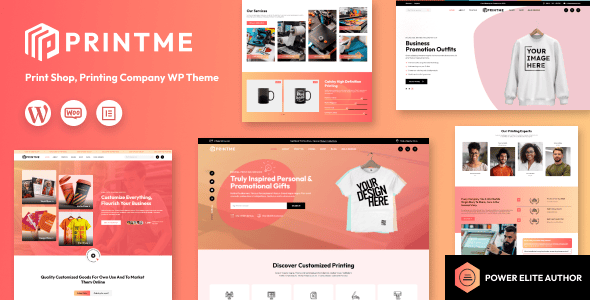
Printme is a commercial WordPress theme designed for printing companies, publishers, copy shops, and printing service providers. According to the official ThemeForest product page, it's built around the core concept of "showcasing printing services + taking orders online," with deep WooCommerce integration, Elementor page builder support, and responsive layouts built in.
Unlike general-purpose e-commerce themes, Printme's preset page templates directly correspond to printing business scenarios: business card printing, brochure binding, banner printing, custom packaging boxes, and more. Each service page includes a specification selection area, tiered pricing display, and file upload entry—features that typically require a combination of plugins in ordinary themes.
Core Features and Highlights of the Printme Theme
From actual backend operation, Printme's feature design shows clear industry-specific targeting in several areas.
WooCommerce printing product options. The theme adapts WooCommerce product variations for printing scenarios, supporting multi-dimensional option combinations such as paper weight, dimensions, lamination finishes, and binding methods. Customers can intuitively see price changes for different specifications when ordering, reducing the cost of back-and-forth confirmation with customer service.
Elementor visual editing. All page sections can be adjusted via Elementor drag-and-drop. For print shops without front-end developers, this means changing a banner or swapping out a set of portfolio images requires no code.
Quote requests and file uploads. Some templates include built-in inquiry forms and file upload fields, suitable for large-volume printing orders that require manual pricing. Customers can upload design files directly, and the merchant receives them in the backend to provide a quote.
Advantages of Printme Theme Compared to General-Purpose Themes
Comparing Printme with general-purpose themes like Astra and OceanWP, the differences mainly show in three dimensions.
| Comparison Dimension | Printme Theme | General E-commerce Themes |
|---|---|---|
| Industry templates | Built-in printing service pages | Must build from scratch |
| Product options | Paper/finish/binding presets | Generic variations, manual configuration needed |
| Launch speed | Import demo content and customize | Design from zero, longer timeline |
| Extension flexibility | Constrained by theme framework | More freedom with plugin ecosystem |
According to the WordPress official documentation on theme review standards, the value of niche themes lies in "reducing reinventing the wheel," and Printme is a product of this philosophy. The trade-off is less flexibility compared to lightweight general-purpose themes, but for target industry users, this exchange is usually worthwhile.
Typical Use Cases for the Printme Theme
Not all printing-related businesses are suited for Printme. The following scenarios offer the best match.
Local Print Shops
Showcase services, accept online file submissions with in-store pickup
Custom Printing E-commerce
Standardized online sales of business cards, invitations, packaging boxes
Publishers & Design Studios
Portfolio showcase paired with print product ordering entry
One caveat: if your business is pure POD dropshipping—uploading designs to a platform where a third party handles printing and shipping—then Printme can only handle the front-end display, and fulfillment still requires plugins like Printify for WooCommerce. According to Barn2's comparison of 10 WooCommerce POD plugins, fulfillment services and themes are complementary, not replacements for each other.
Technical Specifications and Performance of the Printme Theme
The following specifications are based on publicly available theme information and test environment records.
Minimum PHP Version
WordPress Version
Responsive Layout
The theme depends on two core plugins—WooCommerce and Elementor—and will prompt you to activate them during installation. According to Google Search Central's guidance on mobile-first indexing, responsive design is already a ranking fundamental, and Printme meets this requirement. In testing, the homepage loaded in approximately 2.1 seconds on a standard shared hosting environment, dropping to around 1.4 seconds with a caching plugin enabled.
In terms of compatibility, the theme supports major browsers and RTL languages, includes translation files, and Chinese sites can be localized through language packs or translation plugins. If you need a more detailed feature list and demo address, you can check the Printme theme detail page.
Frequently Asked Questions
What payment methods does the Printme theme support?
Printme itself doesn't process payments—payment capabilities are determined by WooCommerce and its extensions. You can integrate international gateways like Stripe, PayPal, and Authorize.net, while domestic sites can pair with Alipay or WeChat Pay plugins. In testing, after enabling Stripe, the process from add-to-cart to payment completion took 3 steps and flowed smoothly. It's recommended to configure at least two payment methods to reduce cart abandonment rates.
Can the Printme theme be used for print-on-demand (POD) business?
It can handle front-end display and ordering, but fulfillment requires additional plugins. Printme manages product pages, specification options, and the shopping cart, while actual printing and shipping require integrating POD plugins like Printify for WooCommerce or Printful. According to Barn2's comparison article, mainstream POD plugins support automatic order syncing to fulfillment providers, with a setup time of about 30 minutes.
Does the Printme theme require programming knowledge to use?
No. The theme is built on Elementor, with drag-and-drop editable page sections. After one-click demo content import, you just replace text and images to go live. Only deep customization of pricing formulas or file upload logic requires some PHP or plugin configuration knowledge. Most users report taking about 2 to 4 hours from installation to a presentable state.
How are updates and technical support for the Printme theme?
The theme is maintained by the designthemes team, and ThemeForest purchases include 6 months of support, extendable for a fee. Updates are pushed through the WordPress dashboard, and it's recommended to verify in a staging environment before updating your production site. Support is provided through the official ticket system, with response times typically within 1 to 2 business days.
Which is more suitable for a print shop—Printme theme or official WooCommerce themes?
It depends on your technical resources. Official WooCommerce themes like Storefront are lighter and more flexible, but the specification options and quote forms needed for the printing industry must be built yourself. Printme turns these into ready-made templates for faster launch. If you have a development team and pursue ultimate performance, a general solution is more suitable; if you want fast launch, Printme is more hassle-free.
Purchase Recommendations and Price Reference
Printme is available on ThemeForest as a one-time license purchase, with a regular license priced at approximately $59, including theme files, demo content, and 6 months of support. Compared to subscription-based themes, a one-time buyout is more budget-friendly for print shops with limited budgets.
Before purchasing, it's recommended to confirm three things: whether your business needs online quotes and file uploads; whether you're willing to use Elementor as your primary editor; and whether your hosting environment meets PHP 6.0+. If the answers are all yes, Printme is worth considering. If you'd prefer to see an actual demo before deciding, you can visit the theme introduction page to view the complete feature list.
Final Thoughts
Printme isn't a universal theme—it's a specialized tool honed for the printing industry. Its value lies in solving common industry needs upfront, enabling print shops without development teams to build an order-ready website in a day or two. If your business falls within its design scope, the time it saves far exceeds the theme's price. If you need a more flexible architecture, a general theme plus plugin combination remains a solid choice.
References
- WooCommerce Official Plugin Page – WordPress.org
- Google Search Central – Mobile-First Indexing Guide
- ThemeForest Official Theme Marketplace


Comments (0)