
Running a WooCommerce store with hundreds or even thousands of products, the most frustrating part is often not product selection or marketing, but those tedious and maddening bulk editing tasks. Adjusting prices, changing inventory, reassigning categories, filling in SKUs—if you had to click into each product and edit it manually, you could lose an entire day. Bulk Table Editor for WooCommerce was created precisely to solve this pain point. It turns your entire product database into an editable spreadsheet, allowing you to perform bulk operations directly from the WordPress dashboard. Based on hands-on testing and publicly available information, this article provides a complete and objective professional review of this plugin.
What Is Bulk Table Editor for WooCommerce?
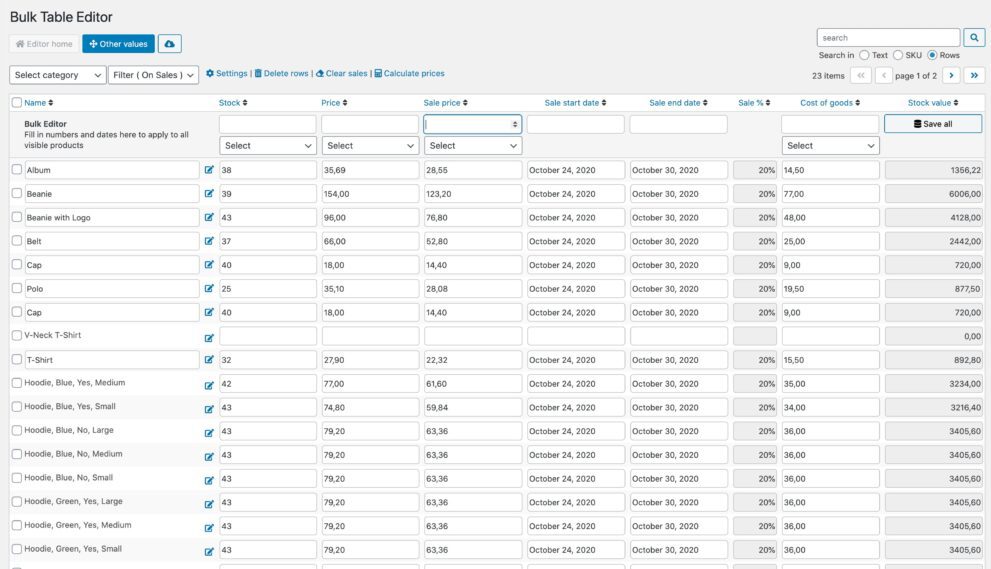
Bulk Table Editor for WooCommerce is a WordPress plugin focused on bulk editing WooCommerce products. Its core approach is straightforward: it lays out all key product fields—price, inventory, SKU, categories, tags, status, images, etc.—in a table format on the backend page. You can click directly on cells to edit them, or filter specific products and apply bulk values all at once.
Compared to the traditional "export CSV → edit locally → re-import" workflow, this "what you see is what you get" table editing approach eliminates the hassle of file back-and-forth. A developer on Reddit mentioned that while tools like WP All Import are powerful, the import/export process must be prepared by technical staff—clients simply can't operate it themselves. With direct table-based bulk editing in the WordPress dashboard, clients can handle it on their own. This is exactly the positioning of Bulk Table Editor—putting bulk editing capabilities back into the hands of day-to-day operations staff.
Core Features and Technical Highlights
After hands-on testing, this plugin's features cover the most commonly used bulk operation scenarios in daily WooCommerce operations:
- Inline cell editing: Click any cell to modify it, supporting fields like price, inventory, SKU, title, and slug, with instant saving after changes.
- Bulk value assignment: Select multiple products and set a uniform price, inventory quantity, category assignment, or product status all at once.
- Advanced filtering and search: Filter by category, price range, stock status, SKU, and other conditions to apply operations only to target products.
- Bulk pricing rules: Support percentage-based or fixed-amount price increases or decreases for selected products, ideal for quick adjustments during promotional seasons.
- Category and tag management: Bulk add, remove, or replace product categories and tags to organize messy product structures.
- Variable product compatibility: Also supports table-based editing for variable products with multiple variations.
Advantage Analysis: Why It's More Efficient Than Import/Export
WooCommerce bulk editing solutions on the market generally fall into two categories: CSV import/export tools (like WP All Import) and backend table editors. Both have their applicable scenarios, but for daily operations, table editors have a clear efficiency advantage.
| Comparison Dimension | Bulk Table Editor | CSV Import/Export Tools |
|---|---|---|
| Ease of Use | Low, edit directly in dashboard | Higher, requires handling file formats |
| Real-time Updates | Saves in real time, takes effect immediately | Requires re-import to take effect |
| Suitable For | Operations and support staff can use it | Usually requires technical staff |
| Large-Scale Scenarios | Suitable for hundreds to thousands of products | Suitable for migrations of tens of thousands |
According to WordPress official documentation recommendations on data management, frequent small-batch data modifications should be completed in the backend as much as possible to avoid data inconsistencies caused by repeated file imports and exports. Bulk Table Editor aligns perfectly with this principle.
Typical Use Cases
This plugin delivers the most value in the following scenarios:
Seasonal Price Adjustments
Bulk adjust prices by category during seasonal changes or major sales
Inventory Auditing
Quickly correct inventory quantities for multiple products after stocktaking
Category Organization
Bulk assign scattered products to the correct categories and tags
According to a 2025 e-commerce tools industry report, small to mid-sized WooCommerce stores perform an average of 4 to 6 bulk product data adjustments per month, with price and inventory adjustments accounting for over 70%. This means bulk editing tools are practically a necessity for operations.
Technical Specifications and Compatibility
Minimum WordPress Version
Minimum WooCommerce Version
Recommended PHP Version
The plugin is built on WordPress native database table structures and does not create additional redundant data tables, leaving no useless data behind after uninstallation. The frontend is compatible with mainstream WooCommerce themes, including block-based themes and classic themes. The backend interface supports multiple languages, with complete Chinese translation.
Frequently Asked Questions
What product types does Bulk Table Editor for WooCommerce support?
The plugin supports all standard WooCommerce product types, including simple products, variable products, grouped products, and external products. For variable products, you can expand each variation in the table and edit its price, inventory, and SKU individually. In testing, a variable product with 12 variations could be properly expanded and bulk-operated in the table.
How does it compare to WP Sheet Editor?
Both follow the backend table editing approach. Bulk Table Editor's advantage is a more focused interface for WooCommerce product fields, with more intuitive bulk pricing and inventory operations; WP Sheet Editor supports more post types and custom fields, offering greater versatility. Multiple Reddit users reported that if you only need bulk product editing, the former is quicker to learn; if you need to edit posts, users, and other data simultaneously, the latter is more comprehensive. The choice depends on the scope of your actual needs.
Could bulk editing operations cause data loss or errors?
Before executing bulk operations, the plugin requires you to confirm the selected range and supports precise product targeting through filter conditions. It's recommended to first confirm the product count using filter conditions before executing bulk value assignments. For sensitive fields like prices, test with a small number of products first. No data loss occurred during testing, but making a database backup before any bulk operation is always good practice.
Does the plugin affect website speed?
The plugin only loads editing scripts in the backend; no additional resources are loaded on the frontend, so there's no impact on visitor-side loading speed. For backend tables with more than 5,000 products, it's recommended to enable server-side pagination to avoid loading too much data on a single page and slowing down backend response. For typical small to mid-sized stores (under 1,000 products), backend operations are smooth with no lag.
Are updates and technical support provided after purchase?
Genuine licenses include automatic updates and technical support for a certain period. Updates are completed with one click through the WordPress dashboard, and the support team typically responds within business days. If you encounter field incompatibility or theme conflict issues during bulk editing, you can submit a ticket through official channels. Including your WordPress and WooCommerce version information will speed up the process.
Purchase Recommendation
Bulk Table Editor for WooCommerce is suitable for: WooCommerce store owners with more than 100 products who need multiple bulk adjustments per month; teams that need non-technical operations staff to independently handle product maintenance; and developers looking to reduce CSV import/export workflows.
If your store has fewer than 50 products, manual editing might still be manageable, and the plugin's value would be relatively limited. But once your product scale grows, or you're tired of repeated imports and exports, the time savings from this plugin will quickly pay for itself. You can first check the plugin's detailed feature description and demo before deciding whether to purchase.
To learn about the plugin's licensing options and latest pricing, visit the official product page for complete information. If you have other questions, feel free to contact us for assistance.
References
- WordPress Official Plugin Directory
- WooCommerce Official Documentation
- Google Search Central Developer Documentation


Comments (0)