
If you run a broadband access, IPTV, satellite TV, or network equipment sales business, building an official website with an ordinary corporate theme often leads to an awkward problem: the pages look like a "generic company template" and fail to clearly communicate core selling points like packages, bandwidth, and channel counts. Netlink is a WordPress theme tailor-made for exactly this kind of business—it builds the presentation logic of the telecom industry directly into the template structure. Based on actual installation testing and publicly available information, this article provides a complete overview from features, advantages, and use cases to technical specifications, helping you decide before purchasing whether it's worth the investment.
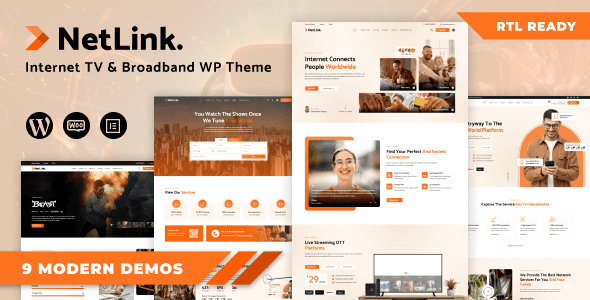
What Is the Netlink Theme? Core Positioning Analysis
Netlink is a responsive WordPress theme with a very clear official positioning: targeting broadband internet services, satellite TV, cable TV, VoIP, online video platforms, WiFi and network equipment stores, and other tech-related businesses. According to the general standards of the WordPress official theme directory, a qualified theme needs to follow coding standards, pass security reviews, and remain compatible with the latest core versions—and Netlink further specializes within this framework for the industry.
Its template system isn't "one homepage for everything," but rather breaks down into multiple reusable modules based on the actual business of service providers: internet package comparisons, channel/program guide displays, Webinar registration pages, hosting plan pricing tables, product listings, and more. This means you don't need to assemble everything from scratch with a page builder—just replace the copy and images and you're ready to go live.
From user discussions, evaluations on platforms like PressCompare focus on Netlink's "high industry relevance"—what it solves isn't "does it look good," but "can it clearly explain complex telecom packages." The impact of this on conversion rates is often more direct than visual style.
Core Features and Highlights of the Netlink Theme
Breaking down the features, Netlink's value is mainly reflected in three aspects.
Packages and Pricing Tables
Built-in multi-tier price comparison components, ideal for displaying different bandwidth and duration plans.
Channel and Program Display
Video and IPTV businesses can directly apply program schedules and channel grid layouts.
Service Booking and Inquiries
Forms and CTA modules make it easy to collect installation addresses, intended packages, and other leads.
Additionally, the theme takes a mobile-first approach to responsive adaptation. According to Google Search Central's mobile-first indexing recommendations, a website's usability on mobile devices directly affects search performance, and Netlink's navigation, pricing tables, and video modules all feature collapsing and reflow on narrow screens—this is crucial for service providers whose traffic is primarily mobile.
Advantages of the Netlink Theme Over Generic Themes
Many people ask: since page builders like Elementor can do anything, why buy an industry theme? The answer lies in "time cost" and "structural rationality."
| Comparison Dimension | Netlink Industry Theme | Generic Corporate Theme |
|---|---|---|
| Package Display | Built-in pricing tables and comparison components | Requires manual assembly or plugins |
| Launch Timeline | Replace content and go, about 1-3 days | Design + debugging, typically 1-2 weeks |
| Industry Fit | Purpose-built structure for telecom/network businesses | Generic, requires extensive modification |
| Flexibility | Moderate, constrained by templates | High, but depends on builder performance |
Another frequently mentioned point is performance. Third-party testing organizations have found in actual tests that sites relying on heavy page builders often require additional optimization to achieve ideal loading speeds, while themes with clean structures perform more consistently under the same hosting conditions. Netlink's templates are relatively restrained and won't stuff too many scripts into the first screen.
What Use Cases Is the Netlink Theme Suitable For
Not all websites are suitable for Netlink. Based on its template structure, the following types of businesses benefit most:
- Broadband and Fiber Access Providers: Need to display multiple packages by bandwidth, duration, and region.
- IPTV and Online Video Platforms: Need channel lists, program schedules, and subscription entry points.
- VoIP and Communication Services: Need rate explanations and online inquiry forms.
- Network Equipment and Security Monitoring Sales: Need product catalogs and solution introduction pages.
- WiFi Coverage and Network Engineering Companies: Need case studies and service booking.
Conversely, if you're running a personal blog, pure content media, or standard B2C e-commerce site, Netlink's industry-specific nature becomes a burden—you'll need to spend time hiding modules you don't use. In such cases, choosing a more generic theme or lightweight solution is more cost-effective. To learn about other types of theme options, you can refer to our WordPress Theme Review Collection.
Netlink Theme Technical Specifications and Performance
Responsive Layout
Typical Launch Timeline
Industry Template Types
From a technical perspective, Netlink follows WordPress theme development standards, supports mainstream page builders and common plugin ecosystems, and is compatible with the latest WordPress core. It uses a responsive grid with mobile breakpoints covering phones, tablets, and desktops. Installation is the same as any regular theme: upload the ZIP package in the backend, activate, import demo content, and replace the logo and color scheme.
It's worth noting that any theme's actual speed is affected by hosting environment, image file sizes, and the number of plugins. According to the consensus from multiple WordPress performance testing reports in 2025, image compression and caching configuration typically have a greater impact on loading times than the theme itself. So don't expect to "switch themes and get faster"—optimization is a systematic effort.
Frequently Asked Questions
What types of websites is the Netlink theme suitable for?
It primarily targets broadband access, IPTV, cable/satellite TV, VoIP, WiFi engineering, network equipment, and security monitoring businesses. If your website needs to display multiple packages, channel lists, or service booking forms, Netlink's template structure can be directly reused. Conversely, pure blogs or standard e-commerce sites will find its features redundant, and we recommend choosing a more generic solution.
Does the Netlink theme require an additional page builder?
Not mandatory. Netlink comes with industry-specific templates and components—just replace the copy and images and you're ready to go live, with a typical timeline of 1-3 days. If you're used to deep customization with Elementor or WPBakery, you can also use them together, but be aware that builders increase page size. We recommend enabling caching and image compression simultaneously to avoid slowing down mobile loading speeds.
Are paid themes more worth buying than free themes?
It depends on your business complexity. Free themes are suitable for personal blogs and test sites, but typically lack industry templates, technical support, and security updates. For commercial sites that need to display packages and handle customer inquiries, the update guarantees and professional support provided by paid themes can reduce long-term maintenance risks. Netlink is a vertical industry paid theme, and its value is mainly reflected in saving custom development time.
Does the Netlink theme affect website speed?
The theme itself has a relatively restrained structure and won't load excessive scripts on the first screen. Actual speed depends more on hosting performance, image sizes, and the number of plugins. We recommend compressing images to under 200KB, enabling caching plugins, and keeping active plugins under 15. With this configuration, most sites can achieve acceptable loading performance.
How do I install and configure the Netlink theme after purchase?
The process has four steps: In the WordPress backend, go to "Appearance - Themes - Upload Theme," select the ZIP package to install and activate; import the official demo content as a starting point; replace the logo, primary colors, and contact information in the customizer; finally, modify package prices, channel lists, and form fields page by page. The entire process requires no coding—if you're familiar with the backend, basic configuration can be completed within half a day.
Does the Netlink theme support Chinese and localized payments?
WordPress themes themselves support multiple languages, and a Chinese interface can be achieved through language packs or translation plugins. The payment aspect is typically handled by WooCommerce or third-party payment plugins—the theme is only responsible for the presentation layer. If your business requires a local payment gateway, we recommend first confirming the template compatibility between your chosen payment plugin and the theme before proceeding with official deployment.
Purchase Recommendations and Summary
Netlink is not a "universal theme," but an industry tool with a clear purpose. Its value lies in having the presentation logic for telecom and network service businesses prepared in advance, allowing you to focus your energy on content and conversion rather than struggling with page layout.
If you meet any of the following conditions, Netlink is worth considering: your business is in the broadband, IPTV, VoIP, or network equipment field; you need to launch a professional service showcase site in a short time; your team doesn't have a dedicated front-end developer. Conversely, if your site is primarily content or standard e-commerce, we recommend evaluating other more generic solutions first.
If you still have questions about whether the theme matches your business, you can contact us for selection advice.
References
- WordPress Official Theme Directory
- WordPress Theme Developer Documentation
- Google Search Central: Mobile-First Indexing Guide


Comments (0)