
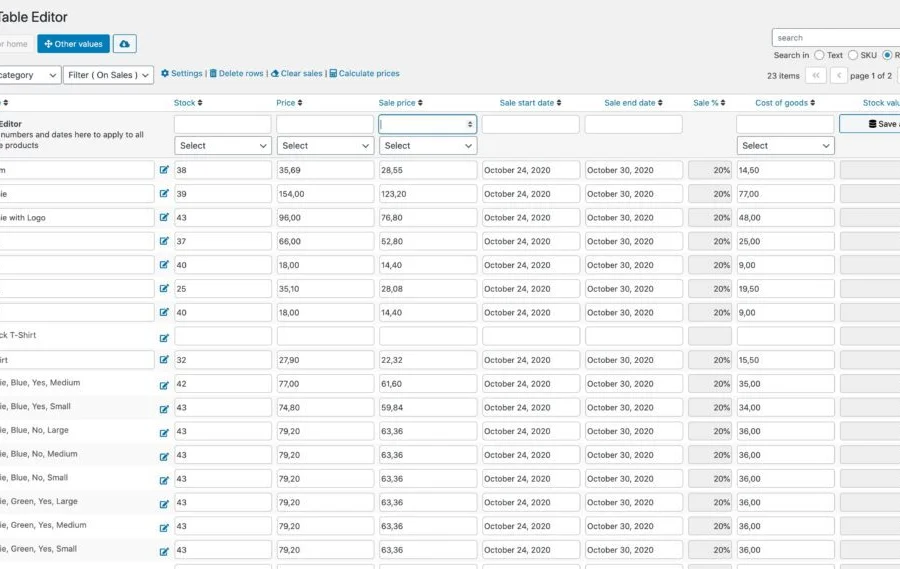
Bulk Table Editor for WooCommerce Batch Editing Plugin Professional Review
Bulk Table Editor for WooCommerce is a powerful WordPress batch editing plugin designed specifically for WooCommerce stores, allowing you to efficiently manage hundreds or thousands of product data in a single table interface. Whether you're adjusting prices, modifying inventory, generating SKUs, or setting up promotional campaigns, this plugin helps you save a significant amount of time. For e-commerce operators who need to frequently update product information, it is undoubtedly an essential tool. For more WordPress resources and tutorials, please visit bobohello.com.
Core Features of Bulk Table Editor for WooCommerce
This plugin provides a complete batch editing solution, with main features including:
- Bulk set sale prices, edit regular prices, modify inventory quantities
- Easily batch update product attributes such as tags, weight, dimensions, etc.
- Automatically generate unique SKUs, supporting both products and variations
- Support for custom fields, such as wholesale prices, cost prices, etc.
- Built-in row filters to quickly screen products that need editing
- One-click clearing of sales, starting or stopping promotions
- Batch delete products without having to do them one by one
- Support for multisite network setup
- User role permission control (shop managers and administrators)
- Product image magnifier feature
- Save progress bar for more intuitive operations
Why Choose Bulk Table Editor for WooCommerce?
Compared to manually editing each product, Bulk Table Editor for WooCommerce transforms tedious tasks into simple table operations. You can view all products, variations, and existing sales data directly in the table, and use columns to display metrics like sales percentages. Batch price adjustments support rounding up, rounding down, and logical decimals (such as 19.70), and can also calculate the total inventory value of each product. Additionally, the plugin is compatible with subscription products and variable products, and supports multisite environments. If you need official documentation or more information, please visit the official page.
Installation and Usage Tutorial
Installing Bulk Table Editor for WooCommerce is very simple:
- In the WordPress admin panel, go to "Plugins" > "Add New", and upload the plugin ZIP file.
- After activating the plugin, it's ready to use without additional activation.
- Find "Bulk Table Editor" under the WooCommerce menu and enter the editing interface.
- Select the products or variations you want to edit, and modify fields like price and inventory directly in the table.
- Click save, and all changes will be applied in bulk.
Note: This plugin has been tested for compatibility with the latest version. For specific operations, please refer to the official documentation.
Frequently Asked Questions
How do I install Bulk Table Editor for WooCommerce?
You can install it by uploading the plugin ZIP file through the WordPress admin panel. Once activated, it's ready to use with no activation code required. For specific steps, please refer to the official documentation.
What product types does Bulk Table Editor for WooCommerce support?
It supports simple products, variable products, and subscription products, and is also compatible with multisite networks.
Does the plugin support batch modification of custom fields?
Yes, this plugin supports custom fields such as wholesale prices, cost prices, etc., which you can edit directly in the table.
How often is it updated?
The plugin is regularly updated to be compatible with the latest version of WooCommerce. For specific update logs, please refer to the official documentation.

