
If you're running a niche media site, independent blog, or digital publishing project, choosing the right theme often affects your long-term experience more than choosing the right host. There are tens of thousands of themes in the WordPress ecosystem, but very few are truly deeply optimized for "content-first" scenarios. Verta is one of those products that gets mentioned repeatedly—it focuses on a modern, clean typographic language, aimed at niche media projects and content-driven websites. This review takes a practical usage perspective, breaking down its functional boundaries, applicable scenarios, and purchasing logic to help you get the numbers straight before placing an order.
What Is the Verta Theme: Positioning and Core Design Philosophy
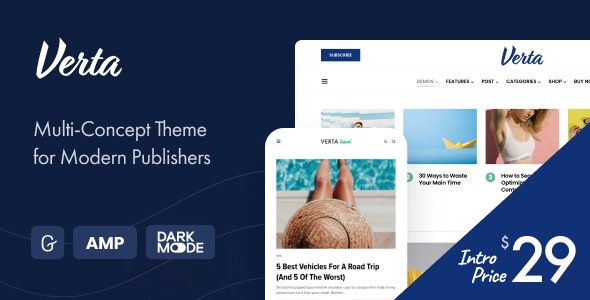
Verta is a modern, clean WordPress theme with a very clear official positioning: serving niche media projects, publishers, and content-centric websites. It doesn't take the "all-purpose" route; instead, it concentrates its resources on the typography system, post list structures, and reading experience.
According to the WordPress official documentation on theme architecture, a theme's core responsibility is to determine how content is presented, not to carry business logic. Verta's design basically follows this principle: it refines the modules frequently used by content-driven sites—post cards, category aggregation, author pages, and topic pages—while keeping admin settings restrained.
Its most discussed feature is the "multi-concept" approach. Simply put, the theme includes 9 importable demo sites that you can switch between at any time without affecting your existing content. This means a site redesign no longer equals "starting from scratch"—posts, categories, and media files all stay in place; only the appearance layer gets a new skin.
Breaking Down Verta's Core Features
Looking at the features laid out, Verta's capabilities roughly fall into four areas.
Typography and Reading Experience
The theme's font hierarchy, line height, and whitespace have all been tuned for long-form reading scenarios. For in-depth reports or review articles that run two or three thousand words, these details directly affect how long readers stay. Google Search Central has repeatedly emphasized in its documentation on page experience that content readability and layout stability are foundational factors affecting user retention.
Demo Sites and Appearance Switching
The 9 demo sites cover different content tones, from magazine-style dense layouts to blog-style spacious layouts. Switching demos won't touch your content—this is the key point that distinguishes it from many "one-time" themes.
Content Aggregation and Category Structure
Category pages, tag pages, and author archive pages all offer multiple list styles. For sites doing niche media, how you organize articles under the same topic into a "special feature feel" often determines whether readers will click on a second article.
Restrained Admin Settings
There aren't that many settings, which is a good thing for beginners. Many themes turn the admin into a "control panel maze," which actually raises maintenance costs. Verta leans toward pragmatism on this point.
Import Demo
Choose the demo site closest to your target tone and import the basic structure with one click
Replace Content
Replace demo posts with your own content and adjust category and tag structures accordingly
Fine-Tune Styles
Adjust according to brand colors and font preferences while maintaining overall typographic consistency
Switch Skins Anytime
If you want to redesign later, just switch to another demo—content remains unaffected
Analysis of Verta's Advantages
Explaining the strengths thoroughly is more useful than piling on specs. Verta's advantages come down to three points.
First, low redesign cost. The biggest fear for content-driven sites is "one redesign, one batch of lost traffic." Verta's demo-switching mechanism turns appearance iteration into a low-risk operation, which is highly valuable for sites that already have some indexed content.
Second, strong content structure expressiveness. It refines modules like post lists, topic aggregation, and author archives, making it suitable for media-type sites that need to "organize content with a sense of hierarchy."
Third, low barrier to entry. Admin settings are restrained, with no overly complex stacking of options. For content teams without dedicated front-end developers, it's more worry-free to maintain.
Importable demo sites
Content loss when switching appearance
Open-source ecosystem compatibility
Scenarios Where Verta Fits and Where It Doesn't
No single theme suits everyone. Being clear about the boundaries is more responsible than just singing praises.
| Scenario Type | Recommended? | Reason |
|---|---|---|
| Niche media / digital publishing | Highly recommended | Strong fit for content aggregation and topic structures |
| In-depth blog / independent review site | Recommended | Long-form typography and reading experience are well optimized |
| Sites with existing content that need a redesign | Recommended | Switching demos doesn't affect existing content |
| Heavy e-commerce sites | Not recommended | Not designed for complex transaction flows |
| Sites requiring extensive custom forms | Depends | Requires form plugins; the theme itself doesn't handle this responsibility |
Technical Specifications and Compatibility Notes
From a technical standpoint, Verta follows the general standards of WordPress theme development, supporting standard widget areas, menu locations, and custom settings. It maintains compatibility with mainstream page builders and commonly used plugins, meaning you don't have to abandon your existing toolchain to use this theme.
According to multiple WordPress ecosystem reports in 2025, theme compatibility with page builders is one of the top three considerations for users when purchasing themes. Verta's performance in this area is on the steady side—not aggressive, but not prone to problems either.
It's worth noting that any theme's performance is strongly correlated with your hosting environment, number of plugins, and degree of image optimization. The theme itself is only one piece of the puzzle. If you'd like to learn more about installation and configuration details, you can check the detailed page for the Verta theme.
Frequently Asked Questions
Will existing posts and images be lost after switching demo sites in the Verta theme?
No. This is a fairly key point in Verta's design: switching demo sites only affects the appearance layer—that is, templates, styles, and layout structures—while content data such as posts, categories, tags, and the media library all remain in the database. In practice, you can first switch demos in a testing environment to confirm the results, then decide whether to apply them to your live site. For sites that have already accumulated hundreds of posts, this mechanism can save a significant amount of rebuilding effort.
Is Verta suitable for beginners with no technical background at all?
Basically yes. Its admin settings are relatively restrained, without piling a large number of toggles into a single panel. The typical path for beginners is: import a demo site close to your target, replace the demo content, then make minor adjustments based on brand colors. If deeper template modifications are involved, some HTML and CSS knowledge is needed. According to Reddit community discussions, WordPress is friendly to non-programmers, but when you really want to change details, knowing a bit of code makes things much smoother.
Does the Verta theme affect website loading speed?
The theme itself is not the sole factor determining speed. Actual speed test results are usually affected by hosting performance, caching plugins, image file sizes, and the number of external scripts. Verta doesn't have obvious redundant stacking at the code level, putting it at a medium-to-light level. It's recommended to use it with caching plugins and image compression solutions; most sites can keep first-screen loading within an acceptable range. Running a speed test before going live is more direct than looking at any spec sheet.
Can Verta be used with common page builders?
Yes. Verta maintains compatibility with mainstream page builders—you can either use the theme's built-in modules to build pages, or call on a builder for pages that require a high degree of customization. Note that over-relying on builders may introduce additional scripts, which in turn affects performance. It's recommended to use them only on pages that truly need complex layouts, while keeping regular post pages with the theme's native structure.
If I want to switch themes later, will migrating from Verta be troublesome?
Not particularly troublesome. Because Verta leaves content storage to WordPress itself rather than locking it into a proprietary theme format, core data like posts, categories, and media remain intact after switching themes. What mainly needs to be rehandled is the appearance layer: menu locations, widget areas, and possibly page layouts. It's recommended to back up your database before switching themes and verify in a testing environment before proceeding.
Does the Verta theme support multilingual sites?
It supports basic multilingual scenarios. You can pair it with mainstream multilingual plugins to achieve language switching at the content level, and the theme itself won't be an obstacle in terms of typography. If your site needs to serve multiple language markets, it's recommended to plan your URL structure and language-switching logic early in the setup to avoid indexing fluctuations caused by large-scale adjustments later.
Purchase Advice: When Is It Worth Buying
The criteria are actually quite simple. If your site is content-centric and meets any of the following, Verta is worth serious consideration:
First, you're building a niche media or in-depth content site and need a typography system that can organize articles with a sense of hierarchy; second, you already have a certain amount of content and want to redesign without taking on the risk of content rebuilding; third, you want admin maintenance to be simple enough and don't want to be dragged down by complex settings.
Conversely, if you're running a heavy e-commerce site, need extensive custom business workflows, or have very specific customization requirements for a theme, then Verta may not be the optimal solution—it's a content-oriented theme, not a universal framework.
Final Thoughts
Verta's value isn't in the number of features, but in how solidly it handles the few things content-driven sites need most: typography, aggregation, and redesign cost. It doesn't try to please everyone, and that's precisely why it suits a specific audience. Choosing a theme is like choosing a tool—fit always matters more than the spec sheet. If you'd like to learn more about installation details or run into configuration issues, you can reach out through Contact Us for support.
References
- WordPress Official Documentation: Theme and Site Management Basics
- Google Search Central: Page Experience and Content Readability Guidelines
- WordPress Official Theme Directory


Comments (0)