
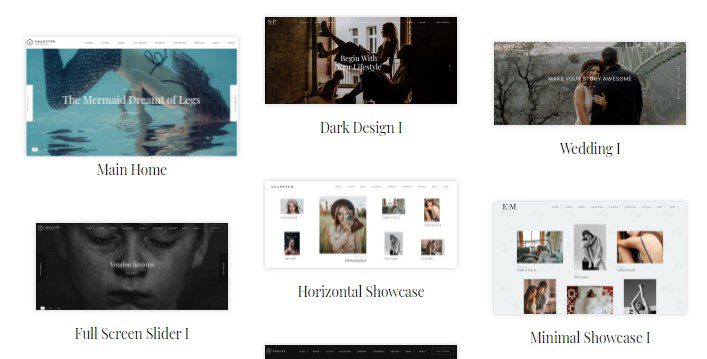
Snapster Photography WordPress Theme: A Creative Showcase Platform Built for Professional Photographers
Snapster is a WordPress theme designed specifically for photography studios and independent photographers, with powerful functionality powered by the Aheto plugin. Whether you shoot weddings, portraits, landscapes, or commercial photography, Snapster helps you create a unique and professional online portfolio website. The theme comes with a rich set of modules and blocks covering albums, galleries, events, full-screen displays, proofing, pricing tables, and blogs, allowing visitors to fully understand your photography services and portfolio style.
If you're looking for a photography theme that combines visual impact with practicality, visit WordPress Resource Site to learn more about comparisons and recommendations of similar themes. Snapster's core advantage lies in its flexible layout system and deep optimization for the photography industry, enabling even users without programming experience to quickly build an impressive photography website.
Core Features and Use Cases of the Snapster Theme
Snapster offers a variety of pre-built page templates, including full-screen galleries, grid albums, event showcase pages, and pricing table pages. Photographers can use these templates to display different categories of work, such as separating wedding photography from commercial shoots, making it easy for potential clients to quickly find content of interest. The proofing feature allows clients to preview and select photos online, greatly simplifying the communication process for post-shoot selections.
Compatibility and Extensibility of the Snapster WordPress Theme
The theme is compatible with mainstream page builders and leverages the Aheto plugin to deliver rich modular content editing. Whether you need to embed video backgrounds, slideshows, or dynamic albums, Snapster runs smoothly. For users looking to further extend functionality, you can integrate WooCommerce for photo sales or use contact form plugins to collect client inquiries. For specific compatibility details, please refer to the official documentation.
Why Choose Snapster as Your Photography Website Theme
Snapster focuses on image presentation quality in its design, supporting fast loading and responsive display of high-resolution images. Its typography style is clean and elegant, highlighting the photography work itself without letting interface elements overshadow it. Additionally, the theme features SEO-friendly code structure and responsive layout, helping to improve your website's performance in search engines. For photography studios that value brand image, Snapster is a professional choice worth considering.
If you'd like to learn more about WordPress theme optimization tips and website-building resources, welcome to visit bobohello.com for more practical tutorials.
Frequently Asked Questions
How do I install the Snapster theme?
Installing the Snapster theme is very simple—just upload the theme zip file on the Appearance-Themes page in your WordPress admin panel and activate it. After activation, follow the prompts to install and activate the Aheto plugin, then import the demo content to quickly set up your website framework. For detailed steps, please refer to the official documentation.
What types of photographers is Snapster suitable for?
Snapster is suitable for wedding photographers, portrait photographers, commercial photographers, landscape photographers, and photography studios. Its diverse templates and modules can meet the display needs of different photography fields.
Does the Snapster theme support online proofing and client photo selection?
Yes, Snapster includes a built-in proofing feature that allows clients to preview photos online and mark or select them, facilitating communication between photographers and clients. For specific feature details, please refer to the official documentation.
How often is the Snapster theme updated?
The Snapster theme is updated regularly to maintain compatibility with the latest version of WordPress and to fix known issues. Users are advised to keep the theme and plugins up to date for optimal performance and security. The changelog can be viewed on the official page.


Comments (0)