
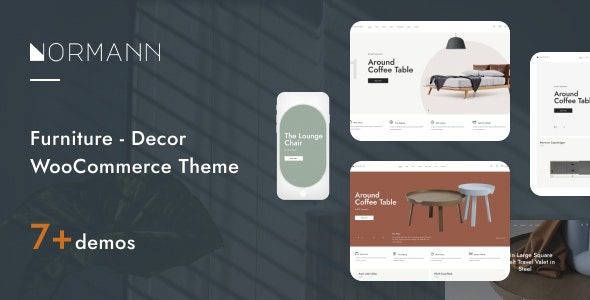
In-Depth Analysis of the Normann Furniture Store WooCommerce Theme
Normann is a WordPress theme built specifically for the furniture and home goods industry, constructed on WooCommerce. It adopts a Nordic minimalist style, offering scene-based product displays, navigation categorized by space, and large-image detail pages, making it ideal for furniture brand independent stores, home lifestyle shops, and soft furnishing stores. This article will detail the functional highlights, applicable scenarios, and usage considerations of the Normann theme to help you determine whether it suits your online store.
I. Applicable Scenarios for the Normann Theme
The Normann theme is particularly suitable for the following types of e-commerce websites:
- Furniture brand independent stores: Display large items such as sofas, tables and chairs, and beds, using scene-based images to boost purchase desire.
- Home lifestyle shops and soft furnishing stores: Sell lighting, home textiles, decorations, etc., using inspiration content sections to attract traffic.
- Home goods category stores: Collections of multi-brand or multi-category home products, with space-based category navigation making it easy for customers to find items.
If you are looking for more store themes, you can refer to the WordPress e-commerce theme recommendations feature, which has summaries organized by category.
II. Core Functional Highlights of the Normann Theme
The Normann theme fully considers the unique needs of furniture e-commerce in its design. Below are its main features:
- Scene-based display: Products are categorized by spaces such as living room, bedroom, and study, allowing customers to quickly find the products they need according to actual usage scenarios, in line with the decision-making flow of furniture purchases.
- Product detail pages: Support multi-image displays and dimension specification tables, providing ample purchase decision information to reduce customer concerns.
- Matching recommendations: Related product modules can recommend complementary furniture or decorations, effectively increasing average order value.
- Promotion sections: Built-in positions for discounts, spend-and-save offers, and seasonal activities, making it convenient to run various promotional campaigns.
- Inspiration content: A home decor inspiration blog section that attracts organic traffic through quality content and enhances user stickiness.
Design Style and User Experience of the Normann Theme
Normann adopts a Nordic minimalist style with calm tones and clear layouts, suitable for displaying high-quality furniture images. The mobile layout is optimized to ensure smooth browsing on phones and tablets. However, due to the extensive use of large images, it is recommended to pair with caching and image optimization plugins to improve loading speed.
III. Advantages and Disadvantages of the Normann Theme
Advantages:
- The space categorization logic aligns with furniture purchasing habits, enhancing user experience.
- The minimalist style is timeless and works with various product images, suitable for multiple home categories.
- The mobile layout is solid, with good responsive design.
Disadvantages and considerations:
- With many large images, speed optimization is essential; otherwise, it may affect SEO and conversion rates.
- The style leans cool; if selling warm-toned categories such as children's furniture, you need to assess the fit.
If you need more e-commerce theme options, you can check the WordPress e-commerce themes and plugin recommendations feature for summary information organized by category.
IV. Installation and Usage Tips for the Normann Theme
Before installing the Normann theme, please ensure that the WooCommerce plugin is installed in your WordPress environment. After installing the theme, it is recommended to import demo content to quickly set up the page structure. During configuration, focus on setting up product categories (divided by space) and promotion modules. To maintain website speed, it is recommended to use image compression and caching plugins. The update frequency of the Normann theme depends on the developer; please refer to the official documentation for details.
Frequently Asked Questions
How to install the Normann theme?
In the WordPress admin panel, go to "Appearance" -> "Themes" -> "Add New Theme," upload the theme ZIP package, and activate it. Before installation, please ensure the WooCommerce plugin is installed. For detailed steps, please refer to the official documentation.
What types of websites is the Normann theme suitable for?
It is suitable for furniture brand independent stores, home lifestyle shops, soft furnishing stores, and home category stores for lighting, home textiles, etc. Its scene-based display and space-based category navigation are particularly suited for furniture e-commerce.
Is the Normann theme compatible with the latest version of WordPress?
Normann v1.7.3 is generally compatible with newer WordPress versions, but please refer to the official documentation for specific compatibility. It is recommended to back up your website before updating.
How often is the Normann theme updated?
The theme update frequency is determined by the developer; please refer to the official documentation or theme page for details. Regular updates help with security and feature improvements.


Comments (0)