
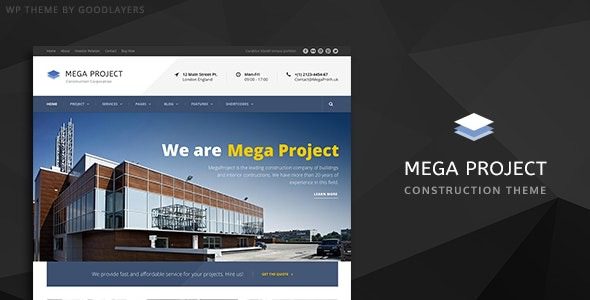
Mega Project WordPress Theme In-Depth Review: A Complete Solution for Construction Company Projects and Engineering Structures
The Mega Project WordPress theme is a solution built specifically for the construction industry by GoodLayers. The official description clearly states its applicable scope includes construction companies, construction websites, architectural design, engineering firms, construction portals, and building materials stores. This theme is not a generic corporate theme with simply swapped images; rather, it treats "projects" as an independent content type, with the page skeleton built around three major modules—company, projects, and news—providing a professional structure for construction-related sites.
How the Mega Project Theme Builds Pages
The theme comes with GoodLayers' own drag-and-drop page builder, which the official description claims has been used by over a thousand sites. The builder includes shortcut setting buttons that let you apply page configurations for home, about, services, contact, and more with a single click, then adjust the section order according to project needs. The slider functionality is handled by Master Slider, supporting fullscreen, full-width, and boxed presentations, with a timeline controlling the transition rhythm. Parallax sections can individually set background images, scroll speed, or remain fixed, and each parallax section can also have custom skins attached to independently modify font and link colors. Layouts offer boxed and full-width formats, with container width adjustable in pixels, and sidebar width available in five options (16%, 25%, 33%, 41%, 50%), plus two additional options for two-column layouts (25% and 33%). Navigation supports a built-in Mega Menu and can also enable floating navigation.
Professional Design for Projects and Content Types
Projects are the core content type of the Mega Project theme, with five official project list styles: Classic, Classic No Spacing, Modern, Modern No Spacing, and Medium. Project detail pages are used to display project overviews, construction scope, and image galleries. Company news follows the blog system, offering four blog styles: Column, Medium, Full Width, and Masonry. Testimonial and personnel modules can also be placed on pages, and the team page is organized by personnel entries. Landing page templates can disable the header, footer, or both, making them suitable for single-page campaign pages or landing pages. The delivered files include layered PSD, PHP, CSS, and JS, support Retina and Font Awesome, and include a built-in shortcode generator and theme customizer; fonts can be uploaded, Google Fonts are selectable, and the official description mentions the code has been SEO-optimized. For more WordPress theme resources, you can refer to related sites.
Construction-Related Sites Suited for the Mega Project Theme
Construction companies, engineering contractors, architectural design firms, construction portals, and building materials and equipment stores can all use it directly. With WooCommerce enabled, product elements are restyled in a more restrained manner; the official wording is "WooCommerce friendly," meaning it works alongside a store rather than deeply rewriting shop pages. Multilingual support relies on WPML, social links can be placed in the header, and the official description notes compatibility with mainstream browsers including Firefox, Safari, Chrome, and Edge. When multilingual or distribution sites are needed, pairing with WPML is more reliable. For more construction industry themes, refer to the official page.
Key Points for Installing and Using the Mega Project Theme
Demo images are not included in the theme package. The official description clearly states that the photos used on the preview site come from third-party stock libraries and require separate licensing, so this cost should be factored in when replacing assets. The theme does not use Elementor; page building relies on its own builder. If your team is already accustomed to the Elementor workflow, you should first evaluate the switching cost; conversely, if you simply want to install one less plugin, the built-in builder is convenient. The demo site is restored through the built-in importer, and the official team also provides step-by-step videos. After importing according to the steps, you'll get a structure close to the preview, and then you just need to replace the project and news content.
| Item | Description |
|---|---|
| Page Building | Built-in drag-and-drop builder, with Master Slider |
| Project Display | Project post type, five list styles |
| Store & Multilingual | WooCommerce compatible, WPML supported |
| Demo Import | Built-in importer, restore structure step by step |
Frequently Asked Questions
How do I install the Mega Project theme?
You can install it by uploading the theme zip package in the WordPress admin under Appearance > Themes, or via FTP. After installation, you need to import the demo content; the theme includes a built-in importer, and following the official video steps will restore the preview structure.
Which page builders does the Mega Project theme support?
The theme uses GoodLayers' built-in drag-and-drop page builder and does not depend on Elementor or other third-party builders. The builder provides one-click preset page configurations, making it suitable for users who want to reduce plugin dependencies.
Is the Mega Project theme compatible with WooCommerce?
The official description labels it as WooCommerce friendly, meaning it is compatible with WooCommerce, and the product element styles have been adjusted to suit construction-related sites, though it does not deeply rewrite shop pages. For specific compatibility details, please refer to the official documentation.
How often is the Mega Project theme updated?
The update frequency depends on the release schedule of the developer GoodLayers. For specific changelogs and frequency, please refer to the official documentation or the ThemeForest page.
Does the Mega Project theme support multilingual sites?
The theme supports the WPML multilingual plugin, allowing you to build multilingual sites. Social links can be placed in the header, and it is compatible with mainstream browsers.


Comments (0)