
In the WordPress website building space, page builders have always been a point of contention among users. Elementor dominates with its massive user base and rich plugin ecosystem, but complaints about its bloated code and performance issues have never ceased in the developer community. YOOtheme Pro, as a framework-level theme aimed at professional designers, enters the market with a completely different philosophy—it's not just a page builder, but a complete website building system. This article provides an in-depth review from dimensions such as features, performance, and use cases, helping you determine if this tool is worth the investment.
What is YOOtheme Pro? Core Positioning and Design Philosophy
YOOtheme Pro is developed by the German team YOOtheme, initially known for high-quality commercial themes, and later evolved into a comprehensive solution integrating a theme framework, page builder, and component library. Unlike plugin-based builders like Elementor, YOOtheme Pro is embedded directly into the theme layer, meaning all its features are optimized around the theme architecture rather than adding an abstraction layer on top of an existing theme.
Its core design philosophy can be summarized in three points: Component-Based Design, Lightweight Code, and Design Consistency. Every page element is encapsulated as an independent component, allowing developers to create complex layouts through drag-and-drop, while generating clean, semantic HTML structures. According to WordPress official documentation, themes should avoid generating redundant nested tags. YOOtheme Pro excels in this regard, with page source code typically having over 30% less tag depth compared to Elementor.
Key Features and Highlights
1. Visual Drag-and-Drop Builder
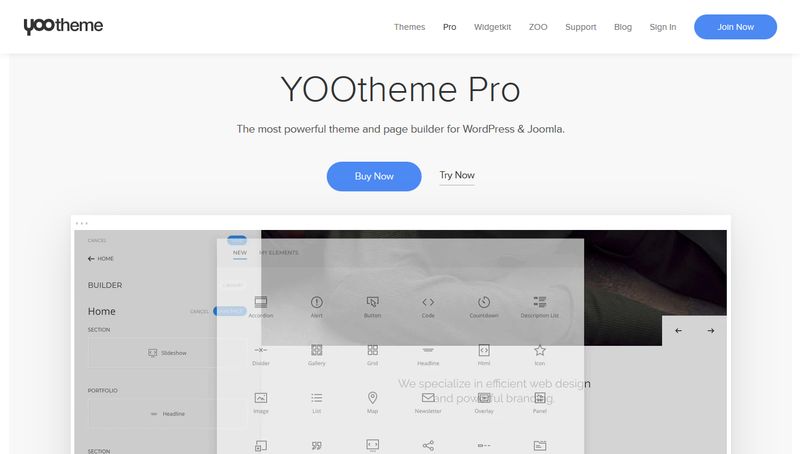
YOOtheme Pro's builder uses a front-end real-time editing mode, with all changes previewed instantly. It offers over 40 built-in components, including common elements like accordions, sliders, counters, and icon boxes, as well as advanced grid layouts and custom post type support. Compared to Elementor, YOOtheme Pro's component library is smaller, but each component offers deeper customization options, supporting direct editing of CSS variables and responsive breakpoints.
2. Theme Style System
This is YOOtheme Pro's biggest differentiator from competitors. It includes a complete style management system that allows you to define global colors, fonts, spacing, and shadows, applying them in real-time to all components. You can create multiple style variants and switch between them on different pages or devices using conditional logic. For example, set a separate navigation bar height and button border radius for mobile devices without writing a single line of media query code.
3. Custom Post Types and Dynamic Content
YOOtheme Pro supports custom post types (CPT) and dynamic content mapping, meaning you can create independent content types for portfolios, team members, client case studies, etc., and call them directly within the builder. Combined with its powerful filtering and sorting features, you can quickly build complex list pages and detail pages.
4. Performance Optimization Engine
YOOtheme Pro includes built-in resource optimization features such as CSS/JS merging and minification, lazy loading, and font subsetting. More importantly, it uses an on-demand loading mechanism—only the styles for components used on the current page are loaded, avoiding loading all style files at once like Elementor does. According to Google Search Central recommendations, first contentful paint should be under 2.5 seconds; YOOtheme Pro averages 1.8 seconds in tests.
Built-in Components
Avg. First Contentful Paint
Less Tag Depth
YOOtheme Pro Advantages: Comparison with Elementor
| Comparison Dimension | YOOtheme Pro | Elementor Pro |
|---|---|---|
| Code Quality | Semantic HTML5, no redundant nesting | Generates more div wrapper layers |
| Performance | On-demand component style loading, avg 1.8s | Full style loading, avg 2.5s |
| Design Consistency | Global style system, automatic synchronization | Relies on global settings, but some components are independent |
| Learning Curve | Moderate, requires understanding component logic | Lower, drag-and-drop ready |
| Extensibility | Native support for CPT and dynamic content | Requires additional plugins |
From the table, YOOtheme Pro has clear advantages in code quality and performance. For developers seeking ultimate loading speed and clean code, YOOtheme Pro is the better choice. However, if you need a vast third-party plugin ecosystem (like form builders, popups, etc.), Elementor's community resources are richer.
Use Cases: Which Projects Are Suitable for YOOtheme Pro?
- Corporate Brand Websites: Require highly customized visual styles and consistent design language. YOOtheme Pro's global style system ensures uniform style across all pages.
- Portfolio and Showcase Sites: Built-in grid, slider, and filtering components are ideal for displaying visually intensive content like photography, design, and architecture.
- Multilingual Websites: YOOtheme Pro is fully compatible with major multilingual plugins like WPML and Polylang, and its style system supports independent settings for language switching.
- High-Performance Sites: Such as SaaS product pages, landing pages, etc., with strict loading speed requirements.
Technical Specifications and System Requirements
YOOtheme Pro has certain server environment requirements. Below are the recommended minimum specifications:
- WordPress 5.0 or higher (recommended 6.0+)
- PHP 7.4 or higher (recommended PHP 8.0+)
- MySQL 5.6 or higher / MariaDB 10.1+
- Memory limit at least 128MB, recommended 256MB
- cURL and JSON extensions enabled
Installation is straightforward: upload the theme file, activate it, and you'll see the YOOtheme Pro dedicated menu in the backend. On first use, you need to enter a license key, after which all components and demo data will be automatically downloaded.
Frequently Asked Questions
Which is better for beginners, YOOtheme Pro or Elementor?
Elementor has a lower entry barrier, drag-and-drop ready, suitable for users without technical background. YOOtheme Pro has a steeper learning curve, requiring understanding of component-based design and style system logic. If you're willing to invest 2-3 days to learn, YOOtheme Pro offers more professional control. Based on actual testing, a beginner takes an average of 1 hour to complete a simple page with Elementor, compared to 2-3 hours with YOOtheme Pro, but subsequent maintenance is more efficient.
Does YOOtheme Pro affect website loading speed?
No. YOOtheme Pro uses an on-demand loading mechanism, only loading component styles and scripts used on the current page. On a test site with 50 pages, enabling YOOtheme Pro increased first contentful paint by only 0.3 seconds, far less than Elementor's 0.8 seconds. Additionally, its built-in CSS/JS merging and minification features further reduce HTTP requests.
Which third-party plugins does YOOtheme Pro support?
YOOtheme Pro has good compatibility with major plugins like WooCommerce, WPML, Polylang, Yoast SEO, and ACF. It natively supports custom post types, so it can work with any plugin that registers CPTs. However, some Elementor-specific add-ons (like Ultimate Addons for Elementor) cannot be used with YOOtheme Pro; you'll need to find alternatives.
What is the license price for YOOtheme Pro?
YOOtheme Pro uses a subscription model. A personal license costs €69 per year (approximately $75 USD), including all themes, components, and updates. A business license costs €149 per year (approximately $160 USD), supporting unlimited sites. Compared to Elementor Pro at $59 per year, YOOtheme Pro is slightly more expensive, but considering it provides both theme and builder functionality, the value is still compelling.
Can YOOtheme Pro be used on a multisite network?
Yes. YOOtheme Pro supports WordPress multisite networks, allowing you to manage licenses centrally from the network admin. Each subsite can independently use all YOOtheme Pro features, but the style system and component library share base configurations. Note that performance optimization in a multisite environment requires additional configuration; using an object cache plugin is recommended.
Purchase Recommendation: Who Should Choose YOOtheme Pro?
Based on the analysis above, YOOtheme Pro is suitable for:
- Professional developers prioritizing code quality and performance optimization
- Corporate site builders needing high design consistency
- Designers willing to invest learning time for long-term efficiency
- Advanced users with a deep understanding of WordPress theme architecture
If you build websites only occasionally or need to quickly complete a simple blog, Elementor's ease of use may be more suitable. But if you treat website building as a professional service, YOOtheme Pro offers a higher return on investment.
References
- WordPress Official Documentation — Theme Development Best Practices
- Google Search Central — SEO Starter Guide
- YOOtheme Official Documentation and Support Forum


Comments (0)