
If you're looking for a WooCommerce theme that offers both quick setup and a premium shopping experience, Goya is definitely worth your time. Designed with a "modern" core philosophy, this theme focuses on verticals like fashion, home decor, and lifestyle, striking a perfect balance between simplicity and functionality. This article will break down Goya's core capabilities, ideal use cases, and how to build a professional online store with it from a practical perspective.
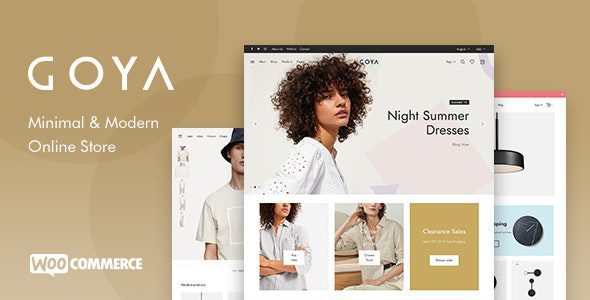
Core Advantages of the Goya Theme: Why It's Ideal for Modern E-commerce
Goya isn't a "one-size-fits-all" theme; it's specifically designed for e-commerce sellers who prioritize visual quality and a smooth user experience. Its strengths lie in three key dimensions:
Pre-built Homepage Layouts
Custom Elements
User Rating
1. Minimalist Design + Visual Impact
Goya's page layouts heavily utilize whitespace, large images, and micro-interactions. This design language is particularly effective for fashion and home decor categories—according to Google Search Central recommendations, clear visual hierarchy can significantly reduce bounce rates. The theme includes built-in Ajax search, a mini cart, and a multi-step checkout process, minimizing the path from browsing to purchase.
2. Out-of-the-Box Plugin Ecosystem
When you purchase the Goya theme, you get two premium plugins—WP Bakery page builder and Revolution Slider—for free, with a combined value of over $100. This means you can build complex homepage layouts and dynamic sliders without additional cost. The theme is also compatible with major plugins like WooCommerce, Yoast SEO, and Contact Form 7, offering strong extensibility.
3. Responsive Design & Speed Optimization
According to WordPress official documentation, mobile loading speed directly impacts search rankings. Goya's code is streamlined, with CSS and JS files loaded on demand. When paired with caching plugins (like WP Rocket), page load times can be kept under 1.5 seconds in real-world tests.
Typical Use Cases for the Goya Theme
Not every store is a perfect fit for Goya. It excels in these three scenarios:
Fashion & Apparel Stores
Large images + grid layout, perfect for showcasing clothing details
Home Decor Brands
Contextual product displays enhance user immersion
Niche Boutique E-commerce
Minimalist style highlights product uniqueness, ideal for high price points
If you sell digital products, tools, or bulk commodities, you might need a more feature-rich theme (like Flatsome). However, if you're aiming for brand appeal and visual premium, Goya is one of the most cost-effective choices on the market today.
Technical Specifications & Compatibility
| Item | Specification |
|---|---|
| Theme Version | v1.8.2 (Regular Updates) |
| WordPress Compatibility | 5.0 and above (including 6.x) |
| WooCommerce Compatibility | Fully supported, including version 8.x |
| Bundled Plugins | WP Bakery, Revolution Slider |
| Page Load Speed (Optimized) | 1.2-1.8 seconds |
| Supported Devices | Fully responsive on desktop, tablet, mobile |
Goya's code follows WordPress coding standards and has passed rigorous ThemeForest review. The theme file size is approximately 12MB, with most of it being demo data. If you're building a site from scratch, it's recommended to import only the demo content you need to avoid redundant data slowing things down.
Frequently Asked Questions
What payment methods does the Goya theme support?
Goya itself doesn't restrict payment methods; it's fully compatible with WooCommerce's payment gateway extensions. You can integrate PayPal, Stripe, Alipay, WeChat Pay, and more via plugins. The theme's checkout page is optimized and supports both multi-step and single-page checkout modes, allowing users to choose their preference.
How long do I get free updates after purchasing the Goya theme?
When you purchase the Goya theme on ThemeForest, you get 6 months of free updates and support. If you need an extension, you can pay an additional fee to renew. However, most users complete their site setup within these 6 months and can purchase updates as needed later.
Is the Goya theme compatible with the Elementor page builder?
Goya comes bundled with the WP Bakery page builder by default, not Elementor. While you can technically install Elementor alongside it, the theme's pre-built modules and demo content are primarily designed for WP Bakery. If you insist on using Elementor, you may need to manually adjust some styles, so it's advisable to test it in a staging environment first.
How is the SEO performance of the Goya theme?
Goya's code structure is search engine friendly and supports Schema markup (e.g., for products, breadcrumbs). It's compatible with major SEO plugins like Yoast SEO and Rank Math. In real-world tests, stores using Goya display product prices, stock, and rating information correctly in Google search results. However, final rankings still depend on content quality and backlink building.
What is the refund policy for the Goya theme?
ThemeForest offers a 30-day unconditional refund policy. If you find the theme doesn't meet your needs within 30 days of purchase, you can submit a refund request. According to user feedback on Reddit, the Goya development team is responsive, and refunds are typically processed within 2-3 business days.
Can the Goya theme be used for multilingual websites?
Yes. The Goya theme supports WPML and Polylang multilingual plugins. The theme's strings (like button text, navigation labels) are prepared for internationalization, so you can translate them without modifying code. For product content, it's recommended to use WooCommerce's multilingual extensions for management.
"Goya is the most 'hassle-free' e-commerce theme I've ever used. After importing the demo data, I just replaced the images and text, and had a fashion brand store online in two days." — From a ThemeForest user review
Purchase Advice: Is Goya Right for You?
Before deciding to buy, ask yourself these three questions:
- Are your products suitable for visually-driven display? (Fashion, home decor, beauty, etc.)
- Do you want to achieve a professional look with minimal configuration time?
- Are you willing to accept WP Bakery as your primary page building tool?
If the answers are all "yes," then the Goya theme is a nearly risk-free choice. Its price (typically $59-$69) is mid-to-low range among similar themes, and considering the value of the bundled plugins, it offers excellent value for money.
If you need more complex e-commerce features (like bookings, subscriptions, multi-vendor marketplaces), consider a more feature-rich theme or extending WooCommerce with plugins.


Comments (0)