
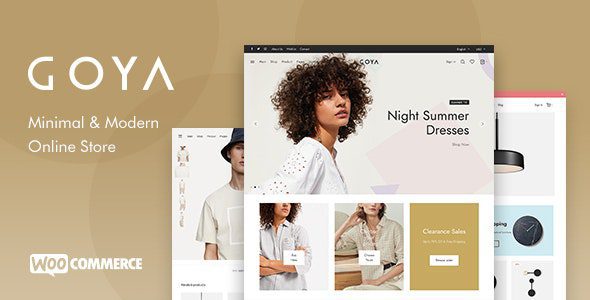
Goya WordPress Theme: A Modern Minimalist WooCommerce Shop Theme Overview
The Goya WordPress theme is a modern, minimalist shop theme designed specifically for WooCommerce, aiming to provide all the essential features for your online store. Its clean and elegant style effectively showcases products and boosts sales. Whether you're a startup or an established brand, the Goya theme helps you build a professional and efficient e-commerce website through flexible layouts and powerful features.
Powered by WooCommerce and the WP Bakery page builder, this theme ensures you have maximum flexibility when creating and managing your store. The Goya theme not only stands out visually but also excels in performance and user experience, making it an ideal choice for building an online store.
Key Features and Highlights of the Goya Theme
The Goya theme integrates numerous advanced features, allowing you to effortlessly create a fully functional online store. Here are some core features worth noting:
Modern Minimalist Design for Enhanced User Experience
The Goya theme adopts a modern, minimalist design style, focusing on content presentation and visual hierarchy. Its responsive layout ensures your website provides a smooth browsing experience on all devices. The adaptive mobile design, clear typography, and refined details collectively deliver a delightful shopping journey for users.
Powerful WooCommerce Integration
As a professional WooCommerce theme, Goya offers a rich set of e-commerce features: AJAX cart, product quick view, multiple product layouts, product swatches, catalog mode, and more. These features are designed to streamline the shopping process and increase conversion rates.
Flexible Customization Options
The Goya theme is deeply integrated with the WordPress Customizer, allowing you to adjust your website's appearance without writing code. From header layouts to color schemes, from font choices to page elements, all settings are intuitive and easy to use. Additionally, over 30 built-in page builder elements let you freely combine page content.
Multiple Header and Footer Layouts
The theme offers various preset header and navigation styles, including sticky headers, transparent headers, full-screen menus, and more. You can also create your own footer layouts using the drag-and-drop builder to meet different brand identity needs.
Installing the Goya Theme and Importing Demos
The installation process for the Goya theme is simple and intuitive, supporting one-click demo content import. Simply follow the installation wizard to complete the setup quickly. The theme also supports importing over 30 builder sections individually, allowing for flexible combinations.
After installing the Goya theme, it's recommended to first install the necessary plugins (such as WooCommerce, WP Bakery, etc.), then import the demo data. The demo data will help you understand the theme's layout and functionality, providing a starting point for your content creation. Detailed documentation and user guides are available during the installation process.
SEO Optimization and Performance of the Goya Theme
The Goya theme was developed with SEO best practices in mind, adhering to coding standards to ensure search engines can easily crawl and index your website content. Additionally, the theme is optimized for performance, including features like image lazy loading and infinite scroll, to improve page load speeds and enhance user experience. For more WordPress optimization tips, you can refer to related resources.
Use Cases for the Goya Theme
The Goya theme is suitable for all types of online stores, whether it's fashion apparel, electronics, home goods, or digital products. Its flexible layouts and rich features allow you to customize a unique storefront based on your product characteristics. Additionally, the theme is also suitable for creative professionals looking to showcase portfolios or blog content.
Frequently Asked Questions
How do I install the Goya theme?
Installing the Goya theme is very simple: In your WordPress admin panel, go to "Appearance" -> "Themes," click "Add New," upload the theme's ZIP file, and activate it. After activation, follow the installation wizard's prompts to install the required plugins and import the demo data.
Which browsers and devices does the Goya theme support?
The Goya theme is responsive and compatible with all modern browsers (Chrome, Firefox, Safari, Edge, etc.), and displays perfectly on mobile phones, tablets, and desktop devices.
Is the Goya theme compatible with the latest versions of WordPress and WooCommerce?
The Goya theme is regularly updated to maintain compatibility with the latest versions of WordPress and WooCommerce. We recommend always using the latest versions of the theme and core software for the best experience.
How often is the Goya theme updated?
The update frequency of the Goya theme is not fixed, but developers regularly release new versions to fix bugs, add features, or optimize performance. You can receive update notifications through the WordPress admin panel and update with one click.

