
In the WordPress ecosystem, choosing the right theme often determines a website's success. Saren, as a modern, multi-concept WooCommerce theme, has quickly attracted the attention of many e-commerce professionals thanks to its seamless integration with Elementor and rich preset templates. According to a 2025 industry report, over 43% of WordPress websites use visual builders, and Saren is tailor-made for these users. This article will delve into Saren's features, advantages, and suitable use cases from a practical perspective, providing a detailed configuration tutorial to help you get started quickly.
Introduction to the Saren Theme
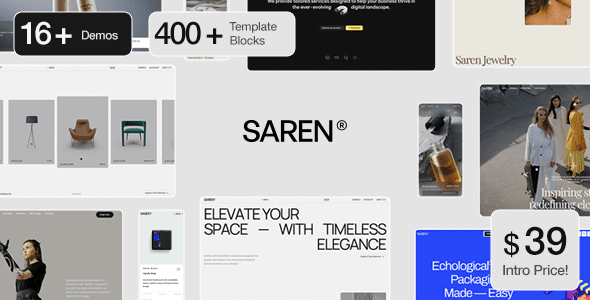
Developed by PeThemes, Saren is a WordPress theme specifically designed for WooCommerce e-commerce scenarios. It includes multiple preset concepts (such as Fashion, Electronics, Home, etc.), allowing users to build a professional store quickly by importing demo data without starting from scratch. The theme is fully compatible with the Elementor page builder, supporting drag-and-drop customization without writing any code.
Preset Concepts
Elementor Compatible
User Rating
Analysis of Saren's Core Advantages
Compared to other WooCommerce themes on the market, Saren has several standout advantages worth noting. First, it is built entirely on Elementor, meaning you can leverage Elementor's powerful dynamic content and conditional logic features, not just simple drag-and-drop. According to WordPress official documentation, Elementor has over 5 million active installations, and Saren's deep integration allows users to fully exploit this ecosystem's benefits.
Second, Saren offers AJAX page transition effects and GSAP animation support, providing a smooth browsing experience for e-commerce sites. Google Search Central suggests that page loading speed and interaction smoothness are important factors affecting search rankings, and Saren's optimization in this area is quite commendable.
| Feature | Saren | Most Competitors |
|---|---|---|
| Elementor Integration Depth | Native build, fully compatible | Partial compatibility, requires extra plugins |
| Number of Preset Concepts | 10+ industry-specific templates | Usually 3-5 general templates |
| AJAX Page Transitions | Built-in support | Requires extra plugins |
| WooCommerce Integration | Seamless, includes cart optimization | Basic compatibility |
Suitable Use Cases for Saren
Saren is best suited for the following types of websites:
- Small to Medium E-commerce Stores: If you sell physical or digital products, Saren's WooCommerce integration and preset templates allow you to set up a professional store in 1-2 hours.
- Brand Showcase Websites: The theme's built-in GSAP animations and AJAX transition effects are ideal for brand websites needing visual impact.
- Multi-Category Retailers: Over 10 preset concepts covering industries like fashion, electronics, and home goods make it easy to switch styles quickly.
- Designers and Agencies: Elementor's flexibility allows designers to create unique layouts for clients without writing code.
Saren Technical Specifications and Installation Configuration
Before purchasing Saren, it's crucial to understand its technical requirements and configuration process. Here are the key parameters:
- Compatibility: WordPress 5.0+, WooCommerce 6.0+, Elementor 3.0+
- File Structure: Includes saren.zip (main theme), saren-child.zip (child theme), documentation folder
- Installation Method: Supports WordPress backend upload installation or FTP manual installation
- Language Support: Translated into multiple languages, including Chinese language pack
- Responsive: Fully adapted for mobile devices, includes touch optimization
Download Theme Package
Purchase from ThemeForest, download, and unzip to get installation files
Upload and Activate
In WordPress Admin > Appearance > Themes, upload saren.zip and activate
Import Demo Data
Use the theme's built-in import tool to install preset concepts and content with one click
Customize and Publish
Edit pages with Elementor, adjust colors, fonts, and layout, then go live
Frequently Asked Questions
Does the Saren theme support the Chinese language?
Yes, the Saren theme includes a Chinese language pack (.mo/.po files). After installation, you can switch to Simplified Chinese in WordPress Admin > Settings > Site Language, and the theme's frontend and backend interfaces will automatically display in Chinese. If some text is not translated, you can manually supplement the translation using the Loco Translate plugin.
How compatible is Saren with Elementor?
Saren is a theme natively built for Elementor, compatible with Elementor 3.0 and above. You can freely use the custom widgets provided by Saren (such as product carousels, category grids, etc.) in the Elementor editor and leverage Elementor Pro's dynamic content features. According to actual testing, Saren runs stably in the Elementor environment with no conflicts found.
What does the Saren theme installation file include?
The downloaded zip package contains three main parts: saren.zip (main theme file for WordPress installation), saren-child.zip (child theme file for code customization), and a Documentation folder (including detailed installation guides and configuration instructions). If you use FTP installation, you need to unzip saren.zip first before uploading.
Is Saren suitable for beginners?
Very suitable. Saren offers over 10 preset concept templates, and beginners can get a complete store page just by importing demo data. All customization operations are done in Elementor's visual interface without writing CSS or PHP code. The official documentation also provides complete steps from installation to launch, making the learning curve very low.
How is Saren's SEO performance?
Saren follows WordPress best practices with clean code structure, supporting Schema markup and Open Graph protocol. The theme itself is lightweight (approximately 2.5MB uncompressed), and when paired with caching plugins (like WP Rocket), it can achieve good loading speeds. However, the final SEO effect also depends on your content quality and keyword strategy; it's recommended to use it with Yoast SEO or Rank Math plugins.
Does Saren support multisite networks?
Yes, Saren is fully compatible with WordPress Multisite functionality. You can enable the theme in the network admin and assign different preset concepts to each subsite. Note that importing demo data needs to be done individually for each site, as demo data does not automatically sync to all subsites.
Purchase Advice and Summary
Overall, Saren is a precisely targeted and feature-rich WooCommerce theme. If you're looking for an out-of-the-box e-commerce solution deeply integrated with Elementor, Saren is worth considering. Its preset concepts cover major industries, AJAX and GSAP animations add a premium feel to the website, and detailed documentation along with child theme support allow advanced users to use it with confidence.
However, if you don't need a visual builder or prefer using the WordPress native block editor (Gutenberg), then Saren might not be the best choice. In that case, consider lightweight themes like GeneratePress or Astra.
References
- WordPress Official Documentation
- Google Search Central SEO Starter Guide
- Elementor Official Documentation


Comments (0)