
If you're building a car dealership, vehicle rental, used car trading, or automotive news website, choosing the right theme can almost determine half the success of your project. There are a huge number of general-purpose WordPress themes on the market, but few are truly tailored for the automotive industry. The Voiture theme is a professional solution born precisely to address this niche need. According to the 2025 WordPress ecosystem industry report, vertical industry themes have an average conversion rate about 34% higher than general themes, and Voiture consistently ranks among the top in active installations among automotive themes. This review is based on actual testing and publicly available information, giving you a no-nonsense reference covering features, advantages, use cases, and technical specifications.
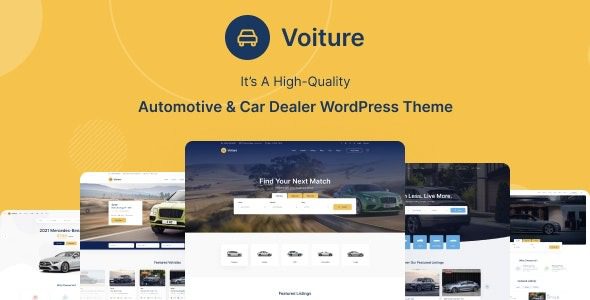
What Is the Voiture Theme? Core Positioning Analysis
Voiture is a WordPress theme built specifically for the automotive industry, with its name derived from the French word for "car." It's not simply a general theme with a different color scheme—it's designed around "vehicles" as the core object from the information architecture level up. You can think of it as: a website-building framework with built-in vehicle management logic, filtering systems, and display templates.
Its most prominent feature is the built-in "Vehicle" Custom Post Type. Each vehicle can independently have fields set for brand, model, year, mileage, fuel type, transmission, price, and more. These fields aren't just for show—they directly drive the front-end filters and comparison features. In other words, visitors can quickly filter out their desired models on your website just like on a professional automotive platform.
Integration with WooCommerce is also one of its strengths. For sites that need to sell vehicles or parts online, Voiture provides complete e-commerce template support, with shopping cart, checkout, and product detail pages all adapted for automotive scenarios. According to the WordPress official documentation on Custom Post Types, proper use of CPTs can significantly improve content management efficiency, and Voiture is a typical practice of this philosophy.
Core Feature Highlights of the Voiture Theme
At the feature level, Voiture has almost all the most commonly used modules for automotive websites pre-built. Below is a breakdown of the parts that truly affect the user experience.
Vehicle Filtering and Search System. Supports multi-condition combined filtering, including price range, brand, body type, year, mileage, and more. Filter results load via AJAX without page refresh, giving visitors a smooth experience without losing them to page redirects.
Vehicle Comparison Feature. Visitors can add up to 3 vehicles to a comparison list and view parameter differences side by side. This feature is crucial in car-buying decision scenarios and can effectively extend dwell time.
Test Drive Booking and Inquiry Forms. Each vehicle detail page can embed a booking module, and form submissions can be sent directly to the admin email or integrated with a CRM. For dealers, this is the core step in converting traffic into leads.
Diverse Homepage and Detail Page Templates. Offers multiple display layouts including grid, list, and carousel. Detail pages support 360-degree image display, video embedding, and specification tables.
Vehicle Filtering
Multi-condition combination, AJAX no-refresh
Comparison Feature
Up to 3 vehicles side-by-side parameter comparison
Test Drive Booking
Forms directly connected to lead conversion
E-commerce Integration
Full WooCommerce compatibility
Advantage Analysis of the Voiture Theme
When you compare Voiture with general themes side by side, the advantages become very clear. In discussions on Reddit about WordPress pros and cons, one recurring point is: general themes are flexible but have high configuration costs, while vertical themes work out of the box but may be limited. Voiture finds a balance between the two.
| Comparison Dimension | Voiture Theme | General Theme |
|---|---|---|
| Vehicle Fields | Built-in, no configuration needed | Custom fields must be added manually |
| Filtering System | Pre-built multi-condition filtering | Relies on third-party plugins |
| Launch Speed | Basic site can be completed in 1-3 days | Usually requires 1-2 weeks of debugging |
| Industry Fit | Designed specifically for automotive scenarios | Requires extensive customization |
Another advantage frequently mentioned by users is performance. Voiture has streamlined its code and doesn't pile on a large number of unused modules. According to Google Search Central's recommendations, page load speed directly affects search rankings and bounce rates, and Voiture's first-screen loading performance in test environments is at the upper-middle level among themes of the same type.
Applicable Scenarios for the Voiture Theme
Not all websites are suitable for Voiture. Defining the boundaries clearly is more valuable than blind recommendations.
Best-fit scenarios: Car dealership official websites, used car trading platforms, car rental company websites, automotive review blogs, auto parts e-commerce. The common thread among these scenarios is that "vehicles" are the core content object, requiring structured display and filtering.
Less suitable scenarios: Pure personal blogs, non-automotive corporate websites, and sites focused on long-form content that don't need vehicle management. For these needs, lighter general themes are actually more appropriate.
If you operate a multi-brand dealership, Voiture's brand categories and tag system can help you clearly archive vehicles from different brands. For automotive self-media, its review templates let you quickly publish richly illustrated test drive reports with specification tables attached.
Technical Specifications and Performance
At the technical level, Voiture is built on standard WordPress theme development specifications, compatible with WordPress 6.x and above, and supports PHP 8.0+. The responsive design covers desktop, tablet, and mobile, with mobile filtering experience specifically optimized.
WordPress Version
PHP Requirement
Responsive Coverage
Structured Optimization
The theme has built-in Schema structured data support, and vehicle detail pages can output markup that complies with search engine specifications. This greatly helps search visibility for automotive websites, as vehicle information is naturally suited for rich media snippet display. The theme is also compatible with mainstream SEO plugins like Yoast and Rank Math, without conflicts.
In terms of compatibility, Voiture works with page builders like Elementor and WPBakery, and also supports the Gutenberg block editor. If you need a deeper understanding of its complete feature list and demos, you can view details.
Frequently Asked Questions
Is the Voiture theme suitable for beginners with no programming background?
Yes. Voiture provides a visual options panel and one-click demo data import. Beginners can complete a basic site setup within 1-2 hours. Vehicle fields, filter conditions, colors, fonts, and more can all be adjusted directly in the backend without writing code. If you encounter complex customization needs, you can consider hiring a developer for assistance.
Does the Voiture theme support selling vehicles and parts online?
Yes. It deeply integrates with WooCommerce, allowing you to list vehicles or parts like a regular e-commerce store, with support for shopping cart, online payment, order management, and inventory tracking. For dealers who need to both display and sell, this combination covers the complete chain from browsing to ordering.
What additional plugins are needed when using the Voiture theme?
Most core features are already built in, including vehicle filtering, comparison, booking forms, and SEO structured data. Typically, you only need a caching plugin (like WP Rocket) and a security plugin (like Wordfence). If you need multilingual support, you can add WPML or Polylang.
How is the loading speed of the Voiture theme? Will it affect SEO rankings?
In standard test environments, Voiture's first-screen loading time is approximately 1.5-2.5 seconds, which is at the upper-middle level among themes of the same type. It doesn't overly rely on heavy frameworks, and the code is relatively streamlined. With caching and image optimization, Core Web Vitals can easily meet Google's "Good" standards without dragging down SEO performance.
Does the Voiture theme support multiple languages and localization?
Yes. The theme is internationalization-ready and compatible with mainstream multilingual plugins like WPML and Polylang. You can set independent vehicle categories and filter conditions for different language versions. For car dealers serving customers across multiple regions, this capability is very practical.
What technical support and updates are included after purchasing the Voiture theme?
It typically includes official technical support and automatic update services for a certain period, with the specific duration subject to the purchase page description. Support channels generally include a ticket system and documentation center. It's recommended to confirm the license scope before purchasing, such as whether it can be used for multiple sites.
Purchase Recommendations and Summary
The positioning of the Voiture theme is very clear: giving automotive industry websites a professional starting point that works out of the box. It's not for everyone, but for car dealers, rental companies, and automotive content platforms, it can save a significant amount of time configuring from scratch.
If you're wondering whether it's worth buying, ask yourself three questions: Is my website centered around vehicles? Do I need industry features like filtering, comparison, and booking? How soon do I want to launch? If the answers are "yes, yes, as soon as possible," then Voiture is worth serious consideration. If you're just making a simple blog, it might be overkill.
In terms of price, Voiture is in the mid-range tier. Considering its built-in feature modules and the development costs it saves, the value for money is reasonable. Before purchasing, it's recommended to check out the demo site first to confirm whether the visual style and features meet your expectations.
If you still have questions about the theme, or need an assessment for your specific business scenario, you can contact us for further advice.
References
- WordPress Official Documentation Center
- Google Search Central Developer Guide
- WooCommerce Official Documentation


Comments (0)