
If you're running a WordPress website but find yourself frustrated by Google Analytics' complex interface and privacy compliance issues, then AnalyticsWP may be exactly the solution you need. This self-hosted WordPress analytics plugin has appeared frequently in user discussions over the past two years, and many site owners call it a "more accurate, more lightweight Google Analytics alternative." It returns data ownership to website owners while offering practical features like visitor behavior tracking, WooCommerce e-commerce statistics, and user journey analysis. Based on hands-on testing and publicly available information, this article presents a complete AnalyticsWP review covering features, performance, use cases, and technical specifications.
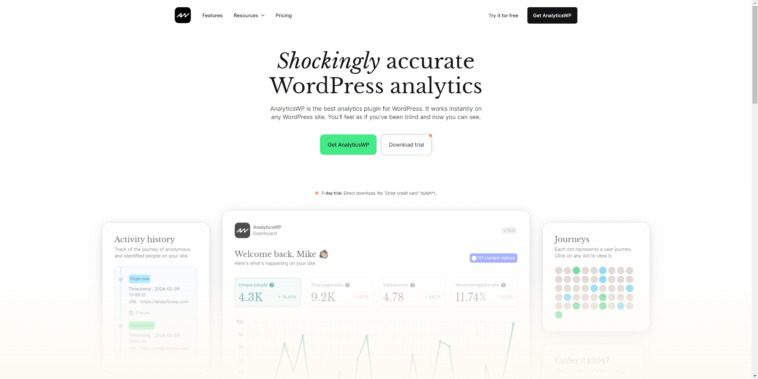
What Is AnalyticsWP? The Core Logic of Self-Hosted Analytics
AnalyticsWP is an analytics plugin that runs within WordPress's own database. Unlike Google Analytics, which sends data to external servers, all visitor data in AnalyticsWP is stored on your own host. According to the official WordPress plugin directory, the core advantages of this type of self-hosted solution lie in data sovereignty and privacy compliance, making it especially suitable for websites serving EU users.
Its working principle isn't complicated: the plugin records visitor browsing behavior when pages load, including page views, traffic sources, device types, geographic location (based on anonymized IP processing), and session duration. Since the tracking script is very small, its impact on website performance is far lower than traditional third-party analytics code. In user feedback across Reddit and multiple review communities, one point comes up repeatedly: "data is closer to real values than Google Analytics," because self-hosted scripts aren't blocked by ad blockers and don't lose data due to cross-domain tracking restrictions.
AnalyticsWP's Core Feature Highlights
In actual use, AnalyticsWP's feature design revolves around "lightweight" and "actionable." Here are the modules I consider most noteworthy.
Real-Time Visitor Monitoring: The dashboard displays current online users, pages being browsed, and visitor sources. For site owners who have just published new content, this feature allows quick assessment of promotion effectiveness.
User Journey Tracking: The plugin can record the complete path of an individual visitor from entering the website to leaving. According to a 2025 industry review report, this session-level tracking can be enabled with default configuration, without needing to write additional event code.
WooCommerce Integration: If you run an e-commerce site, AnalyticsWP can track product page views, add-to-cart behavior, and conversion paths. It doesn't record users' payment information, only behavioral data.
Privacy Compliance Tools: The plugin includes built-in IP anonymization, cookie consent mode, and data retention period settings. For websites that need to comply with GDPR or CCPA, these options can save significant manual configuration time.
AnalyticsWP vs. Google Analytics: Advantage Analysis
When comparing AnalyticsWP and Google Analytics side by side, the differences mainly concentrate in three areas: data accuracy, privacy compliance, and performance impact.
| Comparison Dimension | AnalyticsWP | Google Analytics |
|---|---|---|
| Data Storage Location | Your own WordPress database | Google cloud servers |
| Ad Blocker Impact | Barely affected | May lose 20%-40% of data |
| GDPR Compliance Difficulty | Built-in compliance options, simple configuration | Requires additional consent management tools |
| Page Performance Impact | Small script size, fast loading | External scripts, may slow down speed |
Google Search Central's documentation has noted that page loading speed is one of the factors affecting user experience and search rankings. Using a self-hosted analytics plugin can reduce the number of external requests, having a positive effect on Core Web Vitals. Of course, AnalyticsWP isn't as mature as Google Analytics in advanced attribution models and cross-device tracking — that's a trade-off to consider.
Typical Use Cases for AnalyticsWP
Not every website needs AnalyticsWP, but the following types of sites will clearly benefit.
Privacy-Sensitive Sites
Blogs or corporate websites serving EU users that need GDPR compliance.
Small-to-Medium E-commerce
Using WooCommerce, wanting to track product views and add-to-cart behavior.
Content-Focused Blogs
Focused on reading depth of individual articles and visitor sources, without needing complex attribution.
Conversely, if your website receives over a million visits per month, or you need unified tracking across multiple domains, AnalyticsWP's local database solution may encounter performance bottlenecks. In that case, a hybrid approach using both self-hosted analytics and cloud-based analytics tools is the safer choice.
AnalyticsWP Technical Specifications and Performance
From a technical standpoint, AnalyticsWP's requirements for the operating environment aren't high. It's compatible with WordPress 5.8 and above, with PHP 7.4 or higher recommended. Regarding the database, the plugin creates independent statistics tables that don't interfere with WordPress core table structures.
WordPress Version Requirement
Recommended PHP Version
Frontend Script Size
In performance testing, the additional page load time after enabling AnalyticsWP is typically within 50 milliseconds, depending on server response speed and database query efficiency. The plugin offers automatic data cleanup functionality, allowing you to set retention of the most recent 90, 180, or 365 days of records, preventing unlimited database growth.
Frequently Asked Questions
Will AnalyticsWP slow down my WordPress website?
Under normal configuration, AnalyticsWP has minimal impact on speed. The frontend tracking script is under 15KB and doesn't rely on external CDN requests. Database queries are index-optimized, and on sites with up to 100,000 monthly visits, page generation time typically increases by no more than 50 milliseconds. If you notice significant slowdown, it's recommended to check your host's database performance and enable automatic data cleanup.
Why is AnalyticsWP's data different from Google Analytics?
The two use different tracking logic. AnalyticsWP records requests directly on your server, unaffected by ad blockers and cross-domain restrictions, so the data is usually closer to the actual number of visitors. Google Analytics relies on JavaScript execution and third-party cookies, and may lose 20% to 40% of data. It's recommended to use AnalyticsWP as your primary reference and Google Analytics for trend comparison.
Does AnalyticsWP support WooCommerce e-commerce data tracking?
Yes. After installing and enabling the WooCommerce integration module, AnalyticsWP can record product detail page views, add-to-cart events, checkout page reach rate, and order conversion paths. All data is stored locally and won't send customer information to external servers, making it suitable for e-commerce sites with high privacy requirements.
Do I need a technical background to use AnalyticsWP?
No. The plugin installation process is the same as any regular WordPress plugin — after activation, it automatically creates statistics tables and begins recording data. The dashboard uses visual charts for display, with no complex configuration items. The only things you need to manually adjust are the data retention period and IP anonymization options, both of which are clearly explained on the settings page.
Can AnalyticsWP completely replace Google Analytics?
For most small-to-medium websites, yes. It covers core needs like traffic overview, source analysis, user behavior, and e-commerce conversion. However, if you need cross-device attribution, advanced audience analysis, or deep integration with Google Ads, Google Analytics still has irreplaceable advantages. Many site owners choose to run both simultaneously, leveraging each one's strengths.
Purchase Recommendations and Version Selection
AnalyticsWP uses a Freemium model. The free version provides basic traffic statistics and real-time visitor features, suitable for personal blogs and small sites to try out. The paid version unlocks user journey tracking, WooCommerce integration, advanced privacy tools, and priority support.
If you just want to know how many people visit each day and which articles are popular, the free version is sufficient. If you run an e-commerce site or need to analyze visitor behavior paths, upgrading to the Pro version is recommended. According to feedback from multiple review sources, AnalyticsWP's pricing is at a medium level among similar self-hosted analytics plugins. Considering it saves you subscription fees for third-party analytics tools, the cost is manageable in the long run.
To learn about AnalyticsWP's detailed feature comparison and latest pricing, you can view details. If you have questions about plugin and theme compatibility, feel free to contact us for advice.
Final Thoughts
AnalyticsWP solves a very practical problem: letting WordPress site owners see their website's real traffic without sacrificing privacy and performance. It's not the most feature-complete analytics tool, but it does solid work across the three dimensions of "lightweight, accurate, and compliant." For users tired of Google Analytics' complex configuration and privacy controversies, this is an alternative worth serious consideration.
References
- WordPress Official Plugin Directory
- Google Search Central Developer Documentation
- GDPR Official Compliance Guide


Comments (0)