
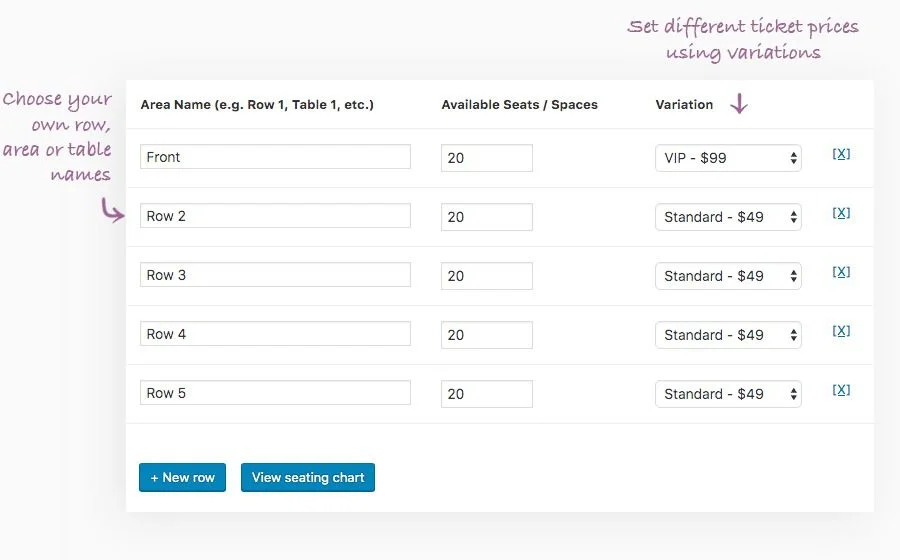
The FooEvents Seating plugin is a powerful WordPress seat selection plugin designed for event organizers, allowing guests to visually select seats based on the venue layout during checkout. Whether it's a conference room, theater, or banquet hall, it easily manages rows, seats, tables, and chair quantities, and supports creating VIP areas or restricting seats by price. This article will detail the features, installation methods, and common issues of FooEvents Seating.
Core Features of the FooEvents Seating Plugin
The FooEvents Seating plugin is an extension of the FooEvents event management system, perfectly integrated into the WooCommerce ecosystem. With it, you can customize seat maps, set different price zones, and display selected seats in real-time. This plugin is especially suitable for large events, concerts, or weddings that require precise seating arrangements.
Flexible Seat Layout Management
You can create any number of rows and seats, or specify table and chair quantities using FooEvents Seating. It supports drag-and-drop editing for easy layout adjustments. Additionally, you can set prices for different areas, such as VIP zones or general zones, to enhance ticket sales strategies.
Improving User Ticket Purchase Experience
During checkout, customers can directly select seats on an interactive seat map, reducing communication costs. Seat status is updated in real-time to avoid duplicate bookings. This intuitive experience can significantly boost conversion rates, especially for events requiring fixed seating. For more on WordPress event management methods, refer to related resources.
The official demo page provides a detailed feature showcase, click here for a live preview.
Installation and Localization Instructions
Installing the FooEvents Seating plugin is very simple: download the plugin package, then upload and activate it via the WordPress admin panel under "Plugins" -> "Add New Plugin". This version is v2.0.1 localized, already including the Chinese language pack, requiring no additional configuration. Ensure the FooEvents core plugin is installed, as Seating relies on it as an extension to function.
Compatibility and Updates
FooEvents Seating is compatible with the latest WordPress and WooCommerce versions and is regularly updated to fix vulnerabilities and add new features. It is recommended to keep the plugin updated for optimal performance and security.
Frequently Asked Questions
How to install FooEvents Seating?
After downloading the plugin ZIP file, go to the WordPress admin panel under "Plugins" -> "Add New Plugin", click "Upload Plugin", select the file, and then activate it. Ensure the FooEvents core plugin is installed.
What types of events does FooEvents Seating support?
It is suitable for any event requiring assigned seating, such as concerts, plays, sports events, conferences, weddings, etc. You can customize the layout based on the venue.
Does it support localization?
Yes, this version is localized and includes Chinese language files, automatically displaying the Chinese interface after installation.
How to update the plugin?
You can download the latest version from the official channel, manually upload and update it via the WordPress admin panel, or enable automatic updates.
Which plugins is FooEvents Seating compatible with?
It is designed for the FooEvents event management system and is compatible with WooCommerce. For a specific compatibility list, please refer to the official documentation.


Comments (1)