
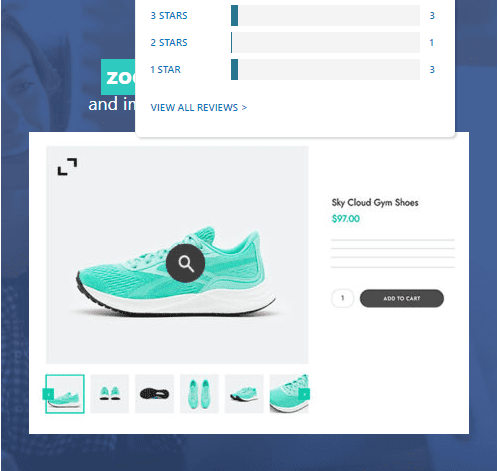
YITH WooCommerce Zoom Magnifier Plugin: An Essential Tool for Enhancing Product Detail Display
In e-commerce, the details of product images directly influence users' purchasing decisions. YITH WooCommerce Product Gallery & Image Zoom Premium (Zoom Magnifier) is a powerful WordPress plugin that provides high-precision image zoom functionality for your online store, allowing customers to easily view product details and thereby boost conversion rates. This article will detail the features, installation methods, and usage tips of this YITH WooCommerce Zoom Magnifier plugin.
When customers cannot physically touch products, high-quality images and zoom functionality become key to building trust. The YITH WooCommerce Zoom Magnifier plugin allows users to hover over product images to see clear, magnified details of specific areas. Additionally, it supports multi-angle image display through a thumbnail carousel below the main image, enabling customers to switch perspectives and fully understand the product. Research shows that this interactive approach can increase conversion rates by 27%.
If you are looking for ways to enhance product display, consider trying this plugin. Meanwhile, you can visit our WordPress resource site for more practical tools and tutorials.
Core Features and Advantages
Intuitive Zoom Effects
The plugin offers multiple zoom modes, including hover zoom, click zoom, and inner zoom, catering to different scenarios. The zoom window can be customized in size and position to ensure it does not interfere with users browsing other page elements.
Mobile Adaptation
For mobile devices, the plugin supports touch gesture zoom and automatically adjusts the zoom window based on screen size, optimizing the mobile user experience.
Deep Integration with YITH Themes
As part of the YITH plugin series, Zoom Magnifier works seamlessly with YITH themes and other YITH plugins, providing a consistent management interface and settings options.
Installation and Configuration Guide
System Requirements
YITH WooCommerce Zoom Magnifier requires WordPress 5.0 or higher, WooCommerce 4.0 or higher, and a PHP 7.2 or higher environment.
Installation Steps
1. Search for "YITH WooCommerce Zoom Magnifier" in the WordPress admin plugin installation page, or upload the downloaded plugin zip file.
2. After activating the plugin, go to the YITH settings page for configuration.
3. In the WooCommerce product editing page, you can set zoom options individually for each product.
For more detailed configuration methods, please refer to the official documentation.
Frequently Asked Questions
How to Enable Product Image Zoom?
After activating the plugin, find the "Product Image" settings area on the WooCommerce product editing page and check the "Enable Zoom" option. You can also globally enable or disable this feature in the YITH settings.
What Image Formats Does the Plugin Support?
The plugin supports common image formats such as JPG, PNG, GIF, and WebP. It is recommended to use high-resolution images for the best zoom effect.
Will the Zoom Effect Affect Page Loading Speed?
The plugin is performance-optimized, loading only necessary scripts and styles on the front end. The size of the images themselves can affect loading speed, so it is advisable to use image compression tools to optimize images.
Is It Compatible with Other Page Builders?
YITH WooCommerce Zoom Magnifier is compatible with major page builders such as Elementor and WPBakery. If compatibility issues arise, check if the plugin version is up to date or contact official support.
How Often Is the Plugin Updated?
The YITH team regularly updates the plugin to ensure compatibility with the latest WordPress and WooCommerce versions. You can view the update log on the YITH official website.

