
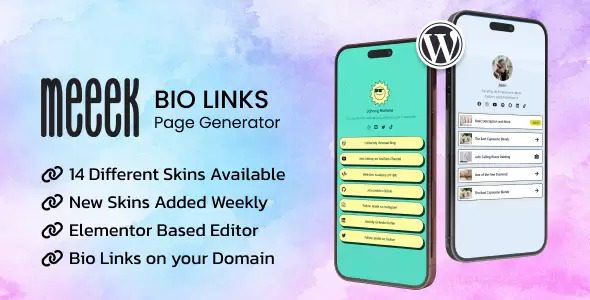
Meeek is a Bio link generator plugin for WordPress designed specifically for Elementor, helping individuals, brands, and businesses create stunning profile link pages that centralize social media, contact information, and other online profiles. With the Meeek plugin, you can easily boost your online presence, enhance user engagement, and improve social media accessibility. This article provides a complete guide to using the Meeek plugin, including installation methods, core features, and frequently asked questions.
Meeek Plugin Core Features Explained
As a professional Bio link generator, the Meeek plugin offers a rich set of feature modules that allow you to build highly customized link pages without writing a single line of code. Its intuitive drag-and-drop interface integrates seamlessly with Elementor, enabling you to quickly add, sort, and beautify multiple social links, with support for custom styles, themes, and layouts. Whether you're a personal blogger, influencer, or corporate brand, Meeek meets your needs for centralized link management and improved conversion rates.
Meeek Plugin Installation and Configuration Steps
Installing the Meeek plugin is very simple — you can install it directly through the plugin upload feature in the WordPress admin panel. After uploading the plugin zip file, activate the plugin and you're ready to go. Meeek v3.8.1 has been tested and verified, requiring no additional configuration to get started quickly. Once activated, you'll see the Meeek widget in the Elementor editor — simply drag it onto your page to start creating your Bio link page.
Tips for Integrating Meeek Plugin with Elementor
To make the most of the Meeek plugin's features, we recommend familiarizing yourself with Elementor's basic operations first. In the Elementor editor, search for the "Meeek" widget, drag it to your desired location, then use the left panel to configure link lists, appearance styles, animation effects, and more. You can also add icons, descriptions, and custom colors to each link to make your page more visually appealing. Additionally, Meeek supports responsive design, ensuring excellent display on mobile phones, tablets, and desktops.
Meeek Plugin Use Cases and Advantages
The Meeek plugin is suitable for a variety of scenarios, such as personal resume pages, social media aggregation pages, brand promotion pages, event marketing pages, and more. It helps you consolidate social accounts scattered across different platforms in one place, making it easy for followers to follow you with a single click. For businesses, Meeek can also be used for product promotions and campaign marketing, providing clear multi-link navigation to boost user engagement. Compared to similar plugins, Meeek's advantages lie in its deep integration with Elementor, extensive customization options, and lightweight performance.
If you're looking for more WordPress resources, feel free to visit related resource sites for more quality plugin and theme recommendations.
Frequently Asked Questions
How do I install the Meeek plugin?
Installing the Meeek plugin is similar to installing other WordPress plugins. In the WordPress admin panel, go to "Plugins" > "Add New," click the "Upload Plugin" button, select the Meeek plugin zip file and upload it, then click "Install Now" and activate it. Once activated, you can find the Meeek widget in the Elementor editor.
Is the Meeek plugin compatible with all WordPress themes?
The Meeek plugin is built on Elementor, so as long as your WordPress theme is compatible with Elementor, the Meeek plugin will work properly. The vast majority of modern themes support Elementor, but to ensure optimal compatibility, we recommend using officially recommended WordPress themes and checking the theme documentation before installation.
What types of links does the Meeek plugin support?
The Meeek plugin supports adding any type of link, including social media links (such as Facebook, Twitter, Instagram), email links, phone numbers, custom URLs, and more. You can also set icons and descriptions for each link to meet different needs.
How often is the Meeek plugin updated?
The update frequency of the Meeek plugin depends on the developer's release schedule. Typically, developers release regular updates to fix bugs, add new features, and ensure compatibility with the latest versions of WordPress and Elementor. We recommend regularly checking update notifications in the WordPress admin panel and updating the plugin promptly for the best experience.


Comments (0)