
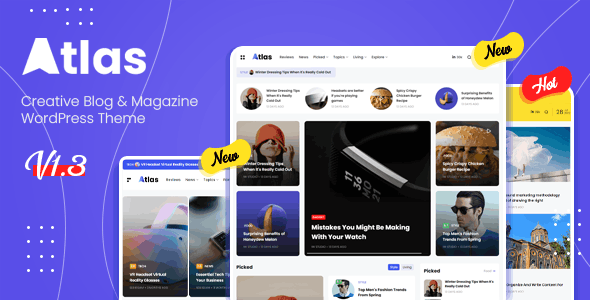
Atlas Creative Blog & News WordPress Theme Overview
Atlas is a WordPress theme specifically designed for blogs and news websites, standing out with its compact yet modern design. Whether for a personal blog or a news portal, Atlas allows visitors to easily browse content through its carefully arranged layout elements. The theme is built on the popular Elementor page builder, giving users the freedom to customize headers, footers, and page layouts to meet individual needs. Additionally, Atlas offers multiple pre-built demos that can be imported with a single click for quick launch, significantly reducing website setup time. Despite its rich feature set, Atlas maintains a strong focus on performance optimization, ensuring fast loading speeds through streamlined code without sacrificing any existing functionality.
Atlas is a popular choice among creative blog and news WordPress themes, combining aesthetics with practicality for all types of content creators. The official version is continuously updated to ensure compatibility with the latest WordPress releases, providing users with a stable experience.
Core Features and Advantages of the Atlas Theme
Elementor Integration and Flexible Layouts
Atlas features deep integration with Elementor, meaning you can leverage its drag-and-drop editor to freely build pages. Whether creating a unique homepage, article layouts, or landing pages, Atlas offers a high degree of flexibility. The pre-built demo templates cover a variety of styles, and you can import them with just one click to quickly launch your website.
Performance Optimization and Acceleration Options
Despite being based on Elementor, Atlas ensures smooth website performance through code minification and acceleration options. It eliminates redundant code while retaining core functionality, thereby improving page load speeds, enhancing user experience, and boosting SEO performance.
Modern Design Style
Atlas adopts a compact and modern design with neatly arranged elements and a clean, clear visual appearance. This design is not only aesthetically pleasing but also guides visitors' attention to the content, improving the reading experience. It is suitable for news, magazines, personal blogs, and various other use cases.
Atlas Theme Installation and Configuration Guide
Installing the Atlas theme is very simple. First, in the WordPress admin panel, use the theme upload feature to select the Atlas ZIP file for installation. After activation, the system will prompt you to install necessary plugins (such as Elementor) — follow the prompts to complete the installation. Then, you can import demo content in the theme settings to generate a complete website framework with one click. The entire process requires no programming knowledge, making it ideal for beginners and quick website setup needs.
If you need more detailed information about Atlas, you can visit the official product page for the latest documentation and support. Additionally, for WordPress theme selection and optimization advice, you can refer to related resources for more recommendations.
Frequently Asked Questions
How do I install the Atlas theme?
Installing the Atlas theme is similar to installing any regular WordPress theme: in the admin panel, go to "Appearance" > "Themes," click "Add New Theme," upload the Atlas ZIP file, then install and activate it. After activation, follow the prompts to install required plugins and import demo data.
What scenarios is the Atlas theme suitable for?
Atlas is specifically designed for blog and news websites, making it suitable for personal blogs, news portals, magazine sites, and more. Its modern design and flexible layouts also make it ideal for showcasing creative work.
How compatible is the Atlas theme with WordPress?
The official version of Atlas is continuously updated to ensure compatibility with the latest WordPress versions. For specific compatibility details, please refer to the official documentation or check the theme's changelog.
How often is the Atlas theme updated?
Atlas releases regular updates to fix issues, add features, and maintain compatibility. Please regularly check for update notifications in your admin panel, or follow the official page for the latest version information.

