
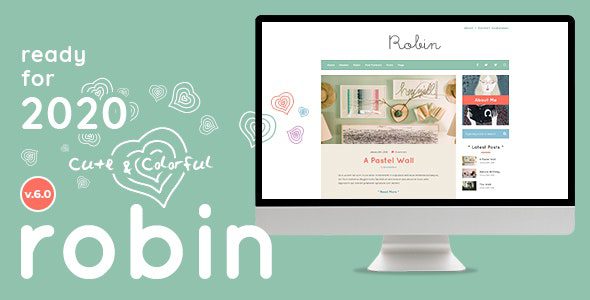
Robin WordPress Theme: A Colorful Design for Creative Blogs
The Robin WordPress theme is a highly regarded personal blog theme, designed specifically for bloggers passionate about crafts, cooking, illustration, or any creative hobby. Its fairytale-like, colorful style and practical features make it an ideal choice for craft blogs and DIY content creators. Whether you are a beginner or a seasoned blogger, Robin can add unique visual appeal to your website. This article provides a detailed introduction to the features, installation methods, and common issues of the Robin v7.0.12 Chinese version, helping you get started quickly.
The Robin WordPress theme features bold yet harmonious color schemes, refined typography, and an overall vibrant design. It is not only a visual delight but also deeply optimized for user experience, ensuring visitors can easily browse your content. The theme includes a variety of customization options, allowing you to adjust layouts, colors, and fonts without any coding knowledge, creating a truly personalized blog.
As a professional blog theme, the Robin WordPress theme also offers rich demo import functionality. You can import preset demo data with one click to quickly build a website similar to the demo site. This greatly saves time and effort in building a site from scratch. Additionally, the Robin theme is fully compatible with mainstream WordPress plugins, including page builders, SEO plugins, and caching plugins, ensuring your website runs stably and efficiently.
If you are looking for a blog theme that is both adorable and powerful, the Robin WordPress theme is undoubtedly an excellent choice. Its colorful design can attract more visitors, while its robust features make content management more effortless. For more related resources, you can visit our blog resource site for the latest WordPress theme and plugin recommendations.
Core Features and Highlights of the Robin Theme
The Robin WordPress theme offers a wealth of features to meet the various needs of creative blogs. Its highlights include:
- Multiple Homepage Layouts: Supports various homepage styles, allowing you to choose the most suitable display method based on your content type.
- Custom Widgets: Built-in multiple customized widgets, such as latest posts, social sharing, author introduction, etc., enhancing the practicality of the sidebar.
- Responsive Design: Perfectly adapts to mobile phones, tablets, and desktop devices, ensuring an excellent browsing experience on any screen size.
- SEO Optimization: The theme code follows best SEO practices, helping with search engine crawling and ranking.
- Translation Ready: Supports multiple languages, making it easy to build a multilingual blog.
Steps to Install and Configure the Robin Theme
Installing the Robin WordPress theme is very simple and can be completed in just a few steps. First, in the WordPress admin panel, go to "Appearance" -> "Themes" and click "Add New Theme," upload the Robin theme zip file, and activate it. After activation, you need to install and activate the necessary plugins that come with the theme; these are usually prompted in the admin panel. Then, you can use the "Tools" -> "Import" function to import demo data and quickly obtain a layout similar to the demo site. After importing, please manually set up menus and slideshows, as the imported data does not automatically configure these elements. If you encounter any issues during installation, you can refer to the official documentation or contact us for support.
Suitable Use Cases for the Robin Theme
The Robin WordPress theme is particularly suitable for the following types of websites:
- Personal blogs: Share life, interests, and professional knowledge.
- Craft/DIY websites: Showcase works and tutorials.
- Food blogs: Publish recipes and cooking tips.
- Illustration/design portfolios: Display visual works.
Updates and Compatibility of the Robin Theme
The developers of the Robin theme regularly release updates to fix bugs and add new features. The theme remains compatible with the latest versions of WordPress and supports major browsers. It is recommended that you regularly check for updates to ensure the security and stability of your website. If you are using an older version, please back up your website data before upgrading.
Frequently Asked Questions
How do I install the Robin theme?
In the WordPress admin panel, go to "Appearance" -> "Themes" -> "Add New Theme," upload the Robin theme zip file, and activate it. Then follow the prompts to install the necessary plugins.
What types of websites can use the Robin theme?
The Robin theme is very suitable for personal blogs, craft DIY, food, illustration, and other creative websites. Its colorful design can enhance the attractiveness of your site.
Which plugins are compatible with the Robin theme?
The Robin theme is compatible with most mainstream WordPress plugins, such as Elementor, Yoast SEO, WooCommerce, and more. For specific compatibility, please refer to the official documentation.
How often is the Robin theme updated?
The update frequency is not fixed, but developers release updates regularly. It is recommended to follow official announcements and regularly check for updates in the admin panel.
Is there a free version of the Robin theme?
Robin is a premium theme, but you can preview its effects on the official demo site. The Chinese version introduced in this article is a localized version; please refer to the official documentation for details.


Comments (0)