
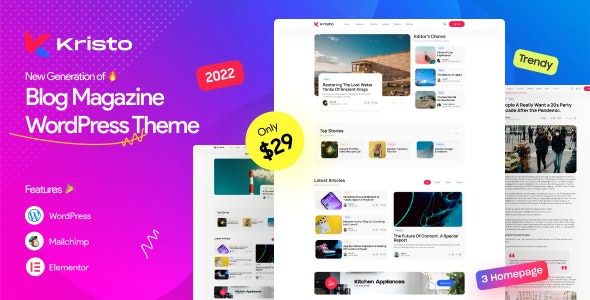
Introduction to Kristo Modern Magazine WordPress Theme
Kristo is a stylish and engaging modern magazine WordPress theme designed specifically for news and magazine websites. Whether you run a blog, sports, fashion, technology, football, politics, video, travel, beauty, health, or yoga website, Kristo provides the ideal solution. This theme integrates all the features needed for a news/magazine website, with a clean, modern, user-friendly interface, fast loading times, high customizability, and flexible functionality that helps you quickly launch your online news magazine business.
Core Features and Benefits of the Kristo Theme
The Kristo theme offers a rich set of features that meet all the needs of a modern magazine website. Its responsive design ensures perfect display on mobile, tablet, and desktop devices. The theme includes multiple homepage layouts, article styles, and custom widgets, making it easy to create a unique website appearance. Additionally, Kristo is compatible with major page builders, supports drag-and-drop editing, and allows you to easily create complex pages without writing code. Furthermore, the theme emphasizes SEO optimization, helping to improve search engine rankings and attract more traffic.
Use Cases and Flexibility of the Kristo Theme
Kristo's flexibility makes it suitable for various content types. For example, sports news websites can utilize its eye-catching article lists and score sections; fashion blogs can benefit from its elegant typography and image display features; technology news sites can enhance user experience through its fast loading and clean layout. Regardless of your content direction, Kristo delivers professional visual presentation and a smooth browsing experience.
Why Choose Kristo as Your Magazine Website Theme
Among the many magazine WordPress themes, Kristo stands out for its practicality and aesthetic appeal. It comes with built-in ad space management, email subscription forms, social sharing buttons, and other practical features to help you expand your website's reach and monetize it. The theme also supports one-click demo content import, allowing you to quickly set up your website's foundation. If you need more assistance, you can refer to related theme resources for more inspiration. Additionally, you can visit the official product page to view detailed demos and documentation.
Installing and Configuring the Kristo Theme
Installing the Kristo theme is very simple: log in to your WordPress admin panel, go to "Appearance" -> "Themes," click "Add New Theme," upload the theme zip file, and activate it. Then, you can configure your website's logo, colors, fonts, and other parameters through the theme options panel, and import demo data to quickly establish your website structure. The entire process requires no programming knowledge and is perfect for beginners.
Frequently Asked Questions
How do I install the Kristo theme?
Installation steps: Download the theme zip file, upload and activate it in WordPress admin under "Appearance" -> "Themes" -> "Add New Theme." After activation, it's recommended to import demo data to quickly configure your website.
What content types does the Kristo theme support?
Kristo is suitable for news, blogs, sports, fashion, technology, travel, food, and various other magazine-style websites. Its flexible layouts and modules can accommodate different content display needs.
Is the Kristo theme compatible with popular plugins?
Yes, Kristo is compatible with major page builders (such as Elementor), SEO plugins (such as Yoast), and caching plugins, ensuring website extensibility and performance.
How often is the Kristo theme updated?
The update frequency depends on the developer, with new versions typically released after WordPress core updates or feature improvements. We recommend checking the official page for the latest updates, and please refer to the official documentation for specific details.


Comments (0)