
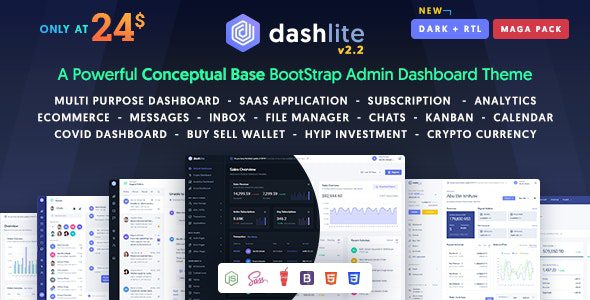
What Is the DashLite WordPress Theme? An In-Depth Analysis of an Enterprise-Grade Admin Dashboard Template
DashLite is an enterprise-grade Bootstrap 5 responsive admin dashboard template created by Softnio, a world-leading interaction design studio for admin panels and dashboards. As an industrial-grade front-end UI solution for SaaS cloud service platforms, cryptocurrency trading consoles, e-commerce order fulfillment ERPs, and internal enterprise digital middle platforms, the DashLite WordPress theme provides developers with a minimalist, luxurious, and buttery-smooth admin interface construction system. Built on pure modern HTML5, CSS3, the Bootstrap 5 framework, and native JavaScript, it is compatible with all kinds of back-end frameworks, completely breaking through the outdated bottlenecks of ordinary admin templates—fragmented, dated interfaces that lack deep support for vertical business scenarios.
DashLite Core Features Breakdown: Why It's the Top Choice for Enterprise Middle Platforms
1. Industrial-Grade Code Standards Built on the Native Bootstrap 5 Architecture
The DashLite WordPress theme is deeply crafted on a pure native Bootstrap 5 architecture, with clean and streamlined code, so front-end engineers can freely extend it at will without learning obscure frameworks. Out of the box, it integrates as many as 90+ high-quality core pages covering mainstream business scenarios, including cryptocurrency trading dashboards, SaaS subscription billing consoles, bulk e-commerce order fulfillment, ticket support workflows, and instant chat messaging. These engineering standards and out-of-the-box readiness directly determine a development team's iteration and delivery efficiency as well as the commercial premium of the software.
2. Fully Automatic Native Dark Mode and Multi-Form Responsive Navigation
DashLite natively supports seamless, smooth switching between a minimalist pure-white light mode and a deep dark geek mode. With a single click, it instantly switches to an elegant, eye-friendly dark theme, greatly reducing the visual fatigue of operations staff who stare at screens for long periods. It features publication-grade multi-form responsive side drawers and top floating navigation layouts, supporting a classic vertical sidebar, a compact icon bar, and a horizontal top menu, adapting to any device viewport. Whether on a desktop with an ultra-wide 4K monitor, an iPad tablet, or a smartphone in portrait view, dashboard cards automatically scale to fit, completely eliminating horizontal overflow.
3. Comprehensive Industrial-Grade Business BI Data Charts and Visualization Dashboards
It fully integrates enterprise-grade Chart.js and the NioIcon high-fidelity vector icon library, supporting real-time line trend charts, revenue donut share charts, bar comparison charts, and global visitor heat maps. Charts use modern browser hardware-accelerated rendering; hovering over a data node instantly and smoothly reveals a skeuomorphic bubble card with precise values, delivering a strong sense of modern tech sophistication. It supports dynamic time filter controls, letting you freely select Today, Last 7 Days, or Last 30 Days to view metric trend curves, with data interactions flowing effortlessly.
DashLite WordPress Theme Download and In-Depth Operational Comparison
When conducting technical selection demonstrations for a brand-new enterprise-grade SaaS admin UI architecture, testing the code reuse rate and delivery speed of Bootstrap 5 components in large projects, or building an internal management sandbox, many senior full-stack system architects and front-end technical directors search for DashLite template downloads to quickly run layout feasibility tests. Under the protection of the open-source GPL license, technical staff can fully dive into its underlying HTML/JS/CSS source code and freely integrate it into various back-end business frameworks such as Laravel, Vue.js, React, and Node.js, freely customizing proprietary component libraries and data interface protocols. For more high-quality WordPress resources, visit the WordPress resource site.
| Admin Development Dimension | Traditional Outdated Patchwork Templates | DashLite Modern Bootstrap System |
|---|---|---|
| Business Scenario Coverage | Only three to five simple pages; most business logic must be written from scratch | 90+ complete out-of-the-box business pages, boosting development speed 5x |
| Vertical Scenario Presets | Only generic tables, lacking business forms such as cryptocurrency | Built-in cryptocurrency trading, SaaS billing, and other vertical business dashboards |
| Dark Mode Support | No dark design; manual recoloring takes weeks of work | Native deep support for one-click, seamless light/dark mode switching |
| Mobile Responsiveness | Mobile sidebar misaligned and overlapping, terrible experience | Responsive touch across all devices, smooth one-handed drawer swipe switching |
DashLite Clean, Lightweight Execution and Zero Front-End Performance Loss
The underlying template code has been optimized through extreme engineering builds, completely eliminating heavy, useless redundant libraries. The compiled size is compact and nimble, with first-screen rendering taking only microseconds. It fully leverages modern browser hardware acceleration, maintaining full-frame performance whether handling no-refresh sorting of thousands of table data rows or complex modal interactions. Before officially pushing the admin system to a live production environment for daily business use by all staff, be sure to rehearse the entire flow in a test environment—from user login and permission authentication to data report integration—and ensure that input validation for all form components is compliant. Relying on a modern, pure native lightweight front-end architecture, the system remains rock-solid even under massive concurrent business scenarios, bringing unparalleled professional engineering prestige to your enterprise digital middle platform.
Frequently Asked Questions
How do I install the DashLite template on a WordPress site?
DashLite is essentially an admin UI template based on HTML5/Bootstrap 5, not a traditional WordPress theme package. To use it in WordPress, you typically need to integrate its front-end assets into a custom theme or plugin. Please refer to the official documentation for specific integration methods.
What use cases does DashLite support?
DashLite is suitable for a wide range of enterprise-grade admin scenarios, including SaaS cloud service platforms, cryptocurrency trading consoles, e-commerce order fulfillment ERPs, internal enterprise digital middle platforms, and collaborative OA systems. It includes 90+ preset pages covering mainstream business forms.
Is DashLite compatible with mobile devices?
Yes. DashLite uses a fully responsive design across all devices, automatically adapting to desktops, tablets, and smartphones. On mobile, the sidebar automatically collapses into a slide-out drawer, supporting one-handed touch operation.
How often is the DashLite template updated?
DashLite is continuously maintained and updated by the Softnio team. Please refer to the official documentation or product page for specific release frequency and changelogs.

