
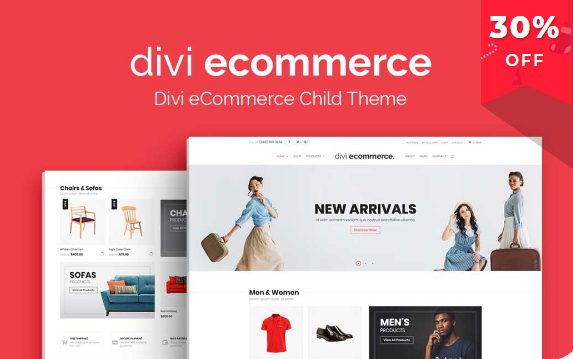
Divi Ecommerce: A Professional Divi Child Theme Solution Built for WooCommerce
Divi Ecommerce is a WooCommerce child theme designed specifically for Divi theme users. It comes with a large collection of sales-driven elements, making it ideal for brands that want to sell products online and boost profits. The child theme integrates deeply with WooCommerce, covering every step of the customer purchase journey. Brands only need to import their own content and product images to quickly build an online store. If you're looking for a solution that seamlessly connects Divi and WooCommerce, Divi Ecommerce is worth checking out.
Unlike generic Divi child themes, Divi Ecommerce is heavily optimized for ecommerce scenarios, including product display modules, shopping cart interactions, and checkout flows. It's not just a simple style override — it redesigns key ecommerce pages from a user experience perspective. For users who have already built their website with Divi, this is a low-cost ecommerce functionality upgrade.
Core Features and Advantages of Divi Ecommerce
Divi Ecommerce offers a rich set of pre-built templates and modules to help you quickly create a professional online store. Its main features include:
- Deep WooCommerce Integration: Product pages, category pages, shopping cart, and checkout pages are all carefully designed to ensure visual consistency with Divi.
- Sales-Driven Elements: Built-in promotional banners, countdown timers, cross-selling modules, and more to help boost conversion rates.
- One-Click Demo Content Import: Through Divi's demo import feature, you can quickly replicate the official demo site, saving setup time.
- Responsive Design: Delivers a smooth shopping experience on all devices.
If you're interested in other resources in the Divi ecosystem, you can visit BobohHello Resource Site for more WordPress themes and plugins.
Divi Ecommerce Installation and Configuration Steps
Before installing Divi Ecommerce, please make sure the Divi theme is already installed and activated. The specific steps are as follows:
- In the WordPress admin panel, go to "Appearance" > "Themes" > "Add New Theme," upload the Divi Ecommerce child theme zip file, and activate it.
- Install and activate the required plugins (such as WooCommerce) as prompted.
- Import demo templates: In the Divi theme options, use the demo import feature to select the Divi Ecommerce demo content.
- Enter any activation license (if required), then start customizing your store.
Note: Installing a child theme will not affect the functionality of the parent Divi theme. It's recommended to make all custom modifications in the child theme so that changes are not lost during future updates.
Use Cases and Compatibility of Divi Ecommerce
Divi Ecommerce is suitable for ecommerce websites of all sizes. Whether you're a startup brand or an established enterprise, you can quickly build a professional online store with it. It's compatible with the latest versions of WordPress, WooCommerce, and the Divi theme. As a child theme, it inherits all of Divi's features while adding ecommerce-specific styles and modules.
In terms of performance, Divi Ecommerce follows Divi's coding standards and won't significantly increase page load times. However, it's recommended to use it alongside caching plugins and image optimization tools for the best performance. The official team regularly updates the child theme, fixing bugs and adding new features to ensure compatibility with WooCommerce.
If you need more detailed changelogs or technical support, please refer to the Divi Ecommerce official page.
Frequently Asked Questions
Does Divi Ecommerce need to be purchased separately?
Divi Ecommerce is a third-party child theme and needs to be obtained separately. It is not an official Elegant Themes product, but it is designed specifically for Divi. For specific licensing and pricing, please refer to the official documentation.
What plugins need to be installed before installing Divi Ecommerce?
You need to install the Divi theme and WooCommerce plugin first. The child theme itself may depend on certain Divi modules or plugins, and you'll be prompted during installation. For details, please refer to the official documentation.
Does Divi Ecommerce support the latest WordPress version?
The child theme is regularly updated to be compatible with the latest WordPress and WooCommerce versions. It's recommended to back up your website before updating and check the changelog. For specific compatibility information, please refer to the official documentation.
How do I import Divi Ecommerce demo content?
In the Divi theme options, use the demo import feature and select the Divi Ecommerce demo. Before importing, make sure your server meets the memory and execution time requirements.
How often is Divi Ecommerce updated?
The update frequency depends on the developer, and updates typically follow major WooCommerce version releases. You can get update notifications through official channels. For details, please refer to the official documentation.


Comments (0)