
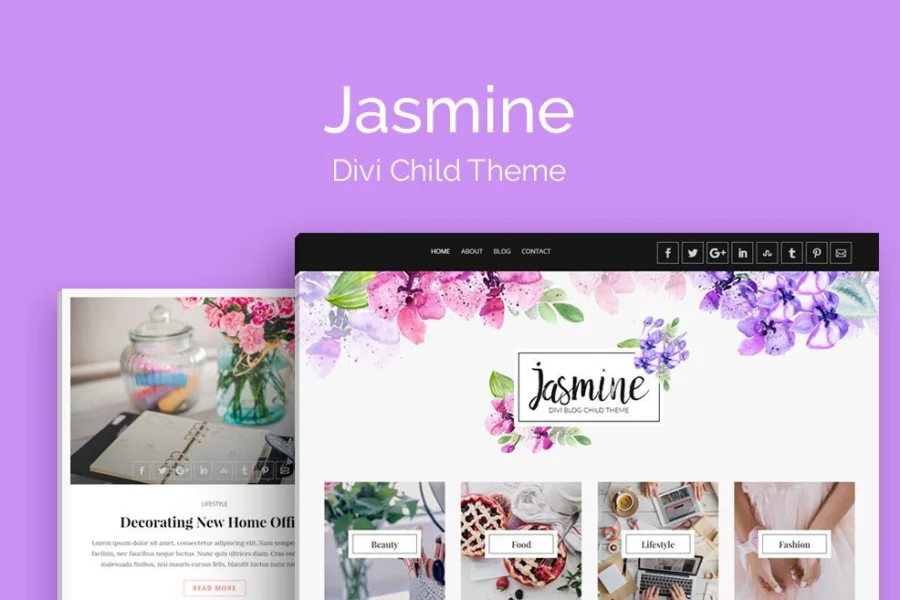
Jasmine Blog Divi Child Theme: An Elegant Blogging Solution for Content Creators
Jasmine Blog is a beautifully crafted Divi child theme designed specifically for bloggers, content creators, and lifestyle writers. It helps you easily build a clean and elegant online presence without the time and effort of starting from scratch. The theme is fully compatible with Divi Builder and WooCommerce, ready to use out of the box, and presents a refined, feminine visual style. With built-in custom typography settings and ready-made page layouts, creating a beautiful blog has never been faster or easier.
If you're looking for a blog theme that can go live quickly while combining aesthetics and functionality, Jasmine Blog is worth a closer look. It is built on the powerful Divi framework, inheriting Divi's flexibility and extensibility while offering a more focused blog design language through its child theme format. For users building personal blogs or lifestyle sites with WordPress, this theme can significantly lower the barrier to entry. For more WordPress resources and tutorials, feel free to visit BobHello Resource Site.
Core Features and Design Highlights of Jasmine Blog
Jasmine Blog was designed with the goal of letting bloggers focus on content creation rather than being bogged down by technical details. It offers the following key features:
Deep Integration with Divi Builder
As a Divi child theme, Jasmine Blog is fully compatible with Divi Builder's visual editing capabilities. You can use drag-and-drop modules to quickly build page layouts and preview results in real time without writing code. Whether it's the homepage, post pages, or archive pages, everything can be customized through Divi Builder.
WooCommerce Compatibility
Although positioned as a blog theme, Jasmine Blog is also compatible with WooCommerce, meaning you can easily add an online store on top of your blog to sell digital or physical products. For lifestyle bloggers, this extensibility is very practical.
Custom Typography and Ready-Made Layouts
The theme includes built-in custom typography settings that allow you to adjust details such as fonts, font sizes, line heights, and colors to match your brand style. It also provides multiple ready-made page layouts that can be used with minor modifications after import, greatly saving design time.
Who Is Jasmine Blog Suitable For?
Jasmine Blog is particularly suitable for the following groups:
- Personal bloggers: Those who want to showcase content with an elegant, feminine visual style.
- Lifestyle writers: Creators covering areas such as fashion, beauty, travel, and food.
- Content entrepreneurs: Those who need to quickly establish a professional blog presence and may want to expand with e-commerce features.
- Divi users: Those already familiar with the Divi ecosystem who want a ready-made blog child theme.
If you fall into any of the above categories, Jasmine Blog can help you reduce upfront design investment and focus more energy on content production.
How to Install and Configure the Jasmine Blog Child Theme
The steps to install the Jasmine Blog child theme are relatively simple, but you need to ensure that you have already installed and activated the Divi theme (parent theme). The specific process is as follows:
- In the WordPress admin panel, go to "Appearance" -> "Themes" -> "Add New Theme" -> "Upload Theme."
- Upload the Jasmine Blog child theme ZIP package and install it.
- After installation is complete, click "Activate" to activate the child theme.
- Install any necessary plugins as prompted (e.g., Divi Builder is already installed with the Divi theme).
- Import demo content or manually configure page layouts.
Note: The child theme must rely on the parent Divi theme to work properly. If you haven't installed Divi yet, please purchase and install the Divi theme first. For specific steps, please refer to the official documentation.
Performance and Compatibility Considerations
As a Divi child theme, Jasmine Blog's performance is closely tied to the Divi framework. Divi itself offers rich performance optimization options, such as enabling dynamic CSS and lazy loading images. It is recommended to configure caching and optimize images before going live to ensure page loading speed. In terms of compatibility, the theme has been tested for compatibility with the latest versions of WordPress and WooCommerce, but please check the official changelog for specific version support.
Frequently Asked Questions
Does Jasmine Blog require the Divi theme to be installed first?
Yes, Jasmine Blog is a Divi child theme and must be used after the Divi parent theme is installed and activated. The child theme itself does not include Divi's core functionality.
Does this theme support Chinese?
The Jasmine Blog theme itself supports multiple languages and can be localized through translation files. For whether a Chinese language pack is provided, please refer to the official documentation or contact the developer.
Can Jasmine Blog be used with WooCommerce?
Yes, the theme has declared compatibility with WooCommerce, and you can add online store functionality on top of your blog. It is recommended to verify the specific integration results in a testing environment.
How often is the theme updated?
The update frequency depends on the developer; please refer to the official documentation or changelog for details. It is recommended to check for updates regularly to ensure security and compatibility.

