
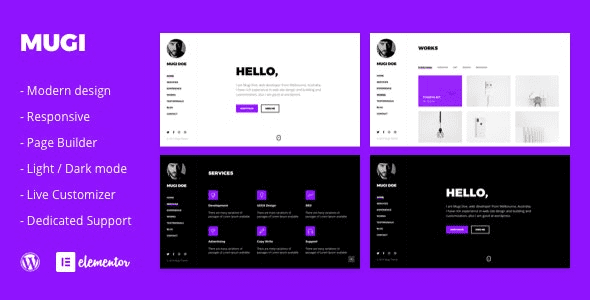
Mugi WordPress Theme: A Complete Solution for Building a Professional Personal Portfolio and Resume
Mugi WordPress Theme is a theme designed specifically for personal portfolios, resumes, and freelancers, developed by PxlSolutions. It is best suited for users who need a shareable digital resume combined with a portfolio showcase. Whether you are a job seeker, recent graduate, designer, or developer, Mugi helps you quickly build a professional personal website.
Core Features and Page Structure of the Mugi Theme
The Mugi theme provides a complete page structure to help you showcase your personal information efficiently:
- Hero Section: Name, job title, a one-line self-introduction, and social links, so visitors can learn about you at first glance;
- Portfolio: Supports infinite scroll display of works, accompanied by brief project descriptions, making it easy to showcase your project experience;
- Work Experience: Clearly lists companies, positions, dates, and your responsibilities and achievements;
- Skills & Tools: Displayed in tiers by proficiency level, avoiding labeling everything as "expert";
- Contact Information: Includes email, contact form, and a downloadable resume PDF, making it easy for HR to reach you.
Technical Composition and Compatibility
The Mugi theme is built on the Elementor page builder and live customizer, supports one-click demo import for quick onboarding. It uses the Bootstrap 4 framework, features infinite scroll, includes a built-in library of over 2,000 icons, supports Google Fonts, is coded with HTML5/CSS3 and SCSS, passes W3C validation, and is cross-browser compatible. The theme comes with detailed documentation to help you resolve issues during use. Historical updates go up to 2022, with previous fixes for conflicts with Elementor Pro and demo import issues.
Practical Tips and Considerations for Using the Mugi Theme
Although the Mugi theme is powerful, the following points should be noted in actual use:
- Relatively outdated updates: There have been no major version updates in recent years. Before using it with the latest versions of Elementor and WordPress, it is recommended to verify on a staging site first before deploying to your live site.
- Resume PDF consistency: Page content and the PDF resume should stay consistent. HR often only looks at the attachment, so ensure the information is in sync.
- Privacy protection: Sensitive information such as phone numbers, home addresses, and dates of birth need not be made public. Email and a contact form are sufficient for contact.
- Portfolio-job matching: For job-seeking portfolios, only include projects relevant to the target position. Miscellaneous items can be displayed on a separate page.
- Loading performance: Infinite scroll continuously loads images, so pay attention to image file sizes on mobile and optimize loading speed.
For a personal site used for job applications, the hero section should directly state the target role and city—don't make HR guess. Write portfolio entries in three lines following "problem—approach—result," which is more effective than piling up screenshots; place the resume PDF in a prominent location and keep it updated in sync with the page, so the link and attachment match when you apply. For more WordPress themes and plugin resources, you can refer to the bobohello resource site.
A few easily overlooked details: portfolio links should open directly rather than only showing thumbnails; name the PDF resume file clearly with your name and target role; leave a copyable email at the bottom of the page. These small things determine whether your application goes smoothly. Update cadence matters more than content volume—even adding just one work per quarter shows you are still active in the field better than not updating for two years. For application links, use a short domain or a dedicated domain—don't send out a temporary staging site address. Also verify the social accounts on your page; a dead link is worse than no link at all.
Frequently Asked Questions
How do I install the Mugi theme?
Installing the Mugi theme is very simple: In the WordPress admin, go to "Appearance" -> "Themes" -> "Add New Theme," upload the theme zip file, and activate it. For details, please refer to the official documentation.
What use cases is the Mugi theme suitable for?
The Mugi theme is suitable for personal portfolios, online resumes, freelancer showcases, digital agencies, and more. It is especially suited for job seekers, designers, and developers who need to showcase their work and experience.
Is the Mugi theme compatible with the latest versions of WordPress and Elementor?
Historical updates for the Mugi theme go up to 2022. It is recommended to verify compatibility with the latest versions of WordPress and Elementor in a staging environment before use to ensure stable operation.
How often is the Mugi theme updated?
The Mugi theme has not had major version updates in recent years. For specific update plans, please follow the official channels. It is recommended to check compatibility regularly.


Comments (0)