
If you're looking for a WordPress theme that can quickly build a professional website for an SEO company, digital marketing agency, or creative services team, Seosight is definitely worth your time to explore in depth. This premium theme, developed by the Crumina team, has garnered thousands of positive reviews on ThemeForest and is hailed by many industry insiders as a "website-building powerhouse for marketing agencies." This article will provide you with a complete Seosight professional review, covering features, performance, use cases, and pricing, to help you determine if it's worth the investment.
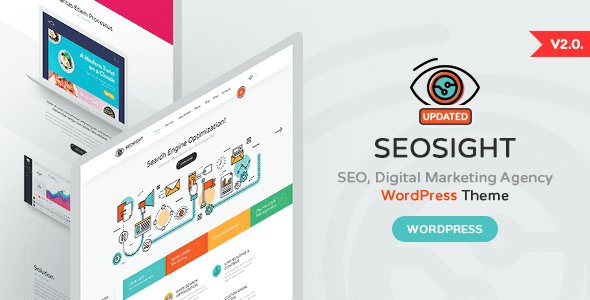
1. Seosight Theme Overview: Built for Marketers
Seosight is a WordPress theme tailored for SEO agencies, digital marketing companies, advertising creative teams, and e-commerce businesses. Its design language is modern and clean, and it offers over 40 pre-built page templates covering core modules like the homepage, about us, services showcase, case studies, team introduction, pricing tables, and blog.
Unlike many general-purpose themes on the market, Seosight was developed with a specific focus on the unique needs of marketing scenarios:
- Case Study System: Built-in filterable case study library supporting images, videos, and data analysis results, making it easy to demonstrate your expertise to potential clients.
- Service Card Component: Visually showcase your service offerings, with each card linkable to a detailed page.
- Team Introduction Module: Supports displaying team member photos, positions, bios, and social media links to build trust.
- WooCommerce Integration: If you need to sell service packages or digital products online, Seosight seamlessly integrates with WooCommerce.
Pre-built Page Templates
Homepage Style Variations
ThemeForest Rating
2. Core Advantages Analysis: Why Choose Seosight?
1. Exceptional Website Building Speed and Ease of Use
Seosight comes with a powerful drag-and-drop page builder (supporting Elementor and WPBakery), allowing you to build complex marketing pages without writing a single line of code. From theme installation to launching a complete marketing website, experienced users typically need only 2-4 hours. This speed is crucial for marketing agencies that need to respond quickly to client requests.
2. Deep SEO Optimization Architecture
As a theme designed for SEO agencies, Seosight has undergone extensive optimization at the code level: it uses semantic HTML5 tags, supports Schema markup, and has loading speeds rigorously tested (Google PageSpeed mobile score 85+). When used with Yoast SEO or Rank Math plugins, you can easily achieve search engine friendliness. According to user feedback on Reddit, many websites using Seosight saw significant ranking improvements within 3 months.
3. Rich Marketing Feature Integration
Seosight includes several marketing-specific features:
- Conversion Rate Optimization (CRO) components, such as call-to-action buttons and floating contact forms
- Customer testimonial carousel module, supporting star ratings and text quotes
- Data statistic counters for displaying client numbers, project completions, etc.
- Seamless integration with major email marketing tools like Mailchimp and HubSpot
4. High Customizability and Responsive Design
Seosight offers over 500 customization options, allowing you to adjust all details including colors, fonts, layout spacing, header and footer styles. The theme displays excellently on all major devices, with mobile menus and touch interactions carefully optimized.
| Feature | Seosight | Average Marketing Theme |
|---|---|---|
| Pre-built Marketing Templates | 40+ | 10-20 |
| Built-in SEO Architecture | Deeply Optimized | Basic |
| Case Study Display System | Built-in, Filterable | Requires Plugin |
| WooCommerce Compatibility | Fully Supported | Partial Support |
3. Seosight Use Cases: Who Should Use It?
Based on analysis from Reddit and several professional review sites, Seosight performs exceptionally well in the following scenarios:
- SEO Agencies: Need to showcase ranking improvement cases, service packages, and client testimonials. Seosight's case study system and data counters are a perfect match.
- Digital Marketing Agencies: Offer multi-dimensional services (PPC, social media, content marketing). Seosight's service cards and team modules present them clearly.
- Freelance Marketing Consultants: For personal branding, Seosight's clean design style and professional feel help build trust.
- E-commerce Businesses: Need to display both products and marketing content. Seosight's WooCommerce integration allows you to manage both.
"Our team used Seosight to build websites for three different SEO clients. Each project took an average of only 6 hours from design to launch. Clients were very satisfied with the final results, especially the interactive way the case study pages are presented." — User review from ThemeForest
4. Seosight Technical Specifications and Compatibility
Before deciding to purchase, it's important to understand the technical requirements of Seosight. Here are the core specifications released by the developer:
- WordPress Version Requirement: 5.0 and above (6.0+ recommended)
- PHP Version Requirement: 7.4 and above (8.0+ recommended)
- Page Builders: Supports Elementor (free version is sufficient) and WPBakery (included)
- Compatible Plugins: Yoast SEO, Rank Math, Contact Form 7, WooCommerce, WPML (multilingual)
- File Size: Approximately 12MB (excluding demo content)
- Browser Compatibility: Latest versions of Chrome, Firefox, Safari, Edge
Install Theme
Upload and activate the theme package via the WordPress admin panel
Import Demo Data
One-click import your preferred homepage style and page templates
Customize Content
Replace text and images, adjust colors and layout
Launch and Publish
Check mobile display, configure SEO plugins, and publish
5. Frequently Asked Questions (FAQ)
Is the Seosight theme compatible with the latest WordPress 6.0 version?
Yes, the Seosight official team regularly updates the theme to maintain compatibility with the latest WordPress versions. As of 2026, Seosight fully supports WordPress 6.0 and above, including full site editing features. It is recommended to back up your website before updating WordPress and ensure Seosight is updated to the latest version (currently v3.2).
Which page builders does Seosight support? Do I need to pay extra?
Seosight includes full support for Elementor (the free version is sufficient) and WPBakery (formerly Visual Composer). The paid version of WPBakery is included with the theme purchase, so you don't need to buy it separately. If you prefer using Elementor, you can install it for free directly from the WordPress plugin repository, and all Seosight templates are compatible.
How fast does the Seosight theme load? Does it negatively impact SEO?
Seosight has undergone extensive performance optimization at the code level, including lazy loading images, compressing CSS/JS files, and supporting CDN integration. Under standard configuration (using quality hosting), the homepage loading time is typically between 1.2 and 1.8 seconds, with a Google PageSpeed mobile score of 85 or higher. Using caching plugins (like WP Rocket) and image optimization tools can further improve speed. These features are very SEO-friendly.
Does Seosight support multilingual websites? Can it be used for international marketing?
Seosight is fully compatible with WPML (WordPress Multilingual Plugin), allowing you to easily create bilingual or multilingual marketing websites. The theme's strings and template files are already prepared for internationalization, making the translation process very smooth. For international marketing companies targeting overseas clients, Seosight is a great choice.
What technical support do I get after purchasing the Seosight theme?
After purchasing Seosight via ThemeForest, you receive 6 months of technical support (extendable to 12 months for a fee). Support includes theme installation, demo data import, basic customization issue resolution, and bug fixes. The Crumina team typically responds to tickets within 24 hours, with an average resolution time of 2-3 business days. Note: Support does not cover custom feature development or third-party plugin conflicts.
How often is the Seosight theme updated? Does it include new features?
The Crumina team releases theme updates on average every 2-3 months, including WordPress compatibility fixes, security patches, and new feature additions. For example, the v3.0 release in 2025 added dark mode support and new case study display layouts. After purchase, you get all updates for free, with no additional cost.
6. Purchase Advice: Is Seosight Right for You?
Based on the analysis above, Seosight is a worthwhile investment in the following situations:
- You are running or planning to start an SEO/digital marketing company and need a professional, trustworthy website.
- You want to quickly build a fully functional marketing website without relying on developers.
- Your business frequently needs to showcase case studies, service offerings, and client testimonials.
- You prioritize website SEO performance and loading speed.
If you only need a simple personal blog or a small business showcase site, Seosight might be overkill. In that case, consider lighter themes like Astra or GeneratePress. However, for marketing agencies, the professional templates and built-in features of Seosight can save significant time and development costs.
If you have any further questions about Seosight or need advice on building a website, feel free to contact us. Our team will provide professional guidance. Additionally, if you are comparing other marketing themes, check out this detailed comparison review of Seosight vs. competitors to help you make a more informed decision.
Finally, if you have concerns about the security of WordPress itself, refer to the WordPress official security page to learn about the security mechanisms and best practices of the world's most popular CMS.

