
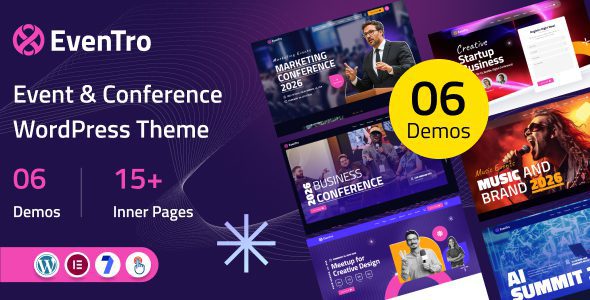
EvenTro is a modern, powerful, and highly flexible WordPress theme, specifically designed for various events, conferences, meetings, seminars, summits, gatherings, workshops, and exhibitions. With its clean design and user-friendly layout, EvenTro helps event organizers create professional websites to attract attendees, showcase speakers, and efficiently manage event information.
Core Features of the EvenTro Theme
The EvenTro theme offers a rich set of features to meet all event management needs. It includes built-in event schedule management, speaker showcase, ticketing system integration, and responsive design, ensuring the website looks perfect on any device. Additionally, the theme supports multiple page layouts and color schemes, allowing you to easily customize your brand image.
Why Choose EvenTro for Your Event Website Theme
Among many WordPress themes, EvenTro stands out because it is optimized specifically for event organizers. It includes pre-built demo data that can be imported with one click for quick website setup. Furthermore, the theme is fully compatible with popular plugins like WooCommerce, Elementor, and The Events Calendar, offering strong extensibility.
Installing and Localizing EvenTro
Installing the EvenTro theme is very simple: upload the theme file in the WordPress backend, activate it, and then import the demo content. For Chinese users, we provide a localization package to ensure both the backend interface and frontend text display in Chinese, enhancing the user experience. For specific localization methods, please refer to the related tutorial.
Use Cases for the EvenTro Theme
Whether it's a small workshop or a large international conference, EvenTro is up to the task. It is suitable for corporate events, music festivals, sports events, educational seminars, and many other occasions. The theme's schedule management feature supports multi-day conferences, and the speaker list can be customized for sorting, making it easy for attendees to get an overview.
If you are looking for a professional and easy-to-use event theme, EvenTro is an excellent choice. Visit the official page for more details.
Frequently Asked Questions
How to Install the EvenTro Theme?
In the WordPress backend, go to "Appearance" -> "Themes", click "Add", upload the EvenTro ZIP file, and activate it. Then import the demo data.
Which Plugins Are Compatible with EvenTro?
EvenTro is fully compatible with popular plugins such as Elementor, WooCommerce, and The Events Calendar. Please refer to the official documentation for specifics.
Is There a Chinese Localized Version of EvenTro?
Yes, we provide a localization package to ensure both the backend and frontend display in Chinese. After installing the localization package, check that the language files are loaded correctly.
Does EvenTro Support Multiple Languages?
EvenTro is compatible with WPML and Polylang plugins, allowing you to easily create multilingual event websites.
How Often Is EvenTro Updated?
The theme is regularly updated to ensure compatibility with the latest WordPress version and to fix bugs. Please follow the official page for specific update logs.


Comments (0)