
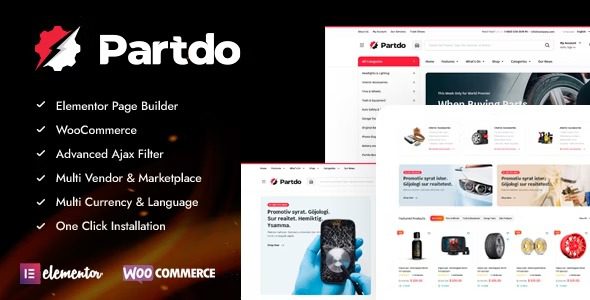
Partdo v1.5.0 is a WooCommerce theme designed specifically for auto parts and tool shops, featuring integrated Elementor page builder, multi-vendor support, and rich marketplace functionality. Whether you're planning to create an auto accessories store, tool shop, or electronics store, Partdo allows you to build a professional and fully functional online store within hours. This guide will provide an in-depth analysis of Partdo theme's core features, installation steps, and frequently asked questions to help you get started quickly.
Partdo Theme Core Features Overview
The Partdo auto parts and tools shop WooCommerce theme comes with over 50 e-commerce-optimized features built in, from product display to shopping experience, with every detail carefully designed. Here are some core highlights worth noting:
- Elementor Page Builder: Drag-and-drop editing to create beautiful pages without any code.
- Full WooCommerce Compatibility: Supports all standard WooCommerce features, including variable products, grouped products, and more.
- Multi-Vendor Marketplace Support: Built-in Dokan and WC Marketplace integration to easily transform into a multi-seller platform.
- Advanced Search & Filtering: AJAX-driven attribute search, brand filtering, and color filtering to enhance user search efficiency.
- Mobile Optimization: Sticky add-to-cart, bottom menu, and mobile filters ensure a smooth mobile shopping experience.
- Marketing Tools: Countdown timers, stock progress bars, buy-now buttons, catalog mode, and more to boost promotional campaigns.
- Multilingual & RTL Support: Compatible with WPML and Polylang, with support for RTL languages such as Arabic.
Partdo Theme Use Cases
The Partdo auto parts and tools shop WooCommerce theme is particularly suitable for the following types of online stores: auto accessories retail stores, tire and wheel specialty shops, motorcycle parts stores, tool equipment online marketplaces, electronics accessory stores, and multi-vendor marketplace platforms. Its flexible layout and powerful customization options ensure that e-commerce needs in any vertical niche can be met.
Partdo Theme Installation and Quick Start
Installing the Partdo theme is very simple, and you can complete it easily even without a technical background. Here is the standard installation process:
- In the WordPress admin panel, go to "Appearance" → "Themes," click "Add New" and upload the Partdo theme zip file.
- After activating the theme, you'll be prompted to install required plugins (such as Elementor, WooCommerce, etc.). Follow the prompts to install and activate them.
- Go to "Appearance" → "Import Demo Data," select your preferred demo template, and import it with one click. Note: The free version or certain versions may not include all demos; please refer to the official documentation for details.
- After the import is complete, use Elementor to edit pages and replace them with your product images and content.
If you need more detailed steps, you can visit related resource sites for additional tutorials. If you encounter demo import issues, please ensure your server configuration meets the requirements, or contact the theme support team.
Partdo Theme Performance and Compatibility
The Partdo theme performs exceptionally well, with clean code structure and fast loading speeds. It is compatible with major browsers and supports responsive design. Additionally, the theme offers a wide range of customization options, including colors, fonts, and layouts, which you can preview and adjust in real-time through the customizer. For optimal compatibility, it's recommended to use the latest versions of WordPress and WooCommerce and to update the theme regularly.
Frequently Asked Questions
How do I install demo data for the Partdo theme?
In the WordPress admin panel, go to "Appearance" → "Import Demo Data," select the demo template you need, and click import. If the import fails, please check your server memory limits or contact official support.
Does the Partdo theme support multi-vendor functionality?
Yes, the Partdo theme includes built-in compatibility with Dokan and WC Marketplace. Simply install the corresponding multi-vendor plugin to transform your store into a multi-seller marketplace.
Is the Partdo theme compatible with RTL languages?
Yes, the Partdo theme is fully compatible with RTL (right-to-left) languages such as Arabic, allowing you to easily create a multilingual store.
How often is the Partdo theme updated?
The update frequency depends on the developer, but updates are typically released quarterly or semi-annually to fix bugs and add new features. It's recommended to enable automatic updates to stay current.
Does the Partdo theme have online documentation or video tutorials?
The theme provides detailed documentation and video tutorials, which you can find on the official page (official product page).


Comments (0)