
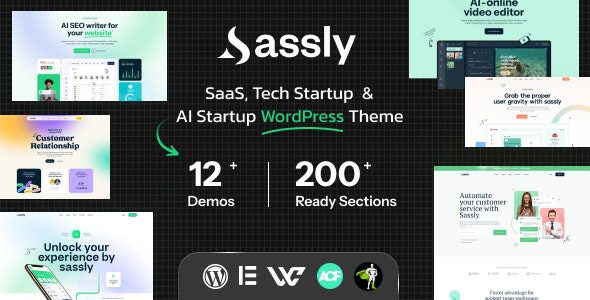
Sassly WordPress Theme: A Professional Showcase Solution for SaaS and AI Startups
Sassly is a WordPress theme designed specifically for SaaS, artificial intelligence, and tech startup companies. It officially provides multiple homepage and inner page layouts to help teams clearly present software features, use cases, and pricing plans. It is suitable for teams that already have a clear product or service scope, integrating feature descriptions, use cases, and content resources into a branded website. Note that the Sassly theme itself is a presentation-layer tool and does not replace the actual SaaS application or AI service backend.
Building Product Narratives from User Tasks
An excellent software website should first explain who it serves and its core purpose, then use real interface screenshots to show how users complete tasks. Avoid piling up vague terms like "intelligent" and "efficient," and instead focus on specific workflow changes. For example, collaboration tools can show task assignment and follow-up interfaces, content platforms can present input and output results, and data analytics services can explain the key metrics that can be viewed. Each introductory point should correspond one-to-one with the product's actual features.
Sassly officially provides diverse homepage and inner page layouts that can be combined as needed, without retaining all demo content. The homepage establishes overall understanding, feature pages explain details in depth, and scenario pages help different roles find suitable solutions. With clear navigation between pages, users won't need to search through a lengthy homepage for all the answers.
Best Practices for Page Structure in the Sassly Theme
The features section can use brief summaries with screenshots, then link to detailed explanations; the plans section clarifies different usage scopes; case studies or customer testimonials provide real context. The official theme emphasizes flexible layout, typography, and navigation options, making it suitable for organizing this content within a unified design. The order of visual blocks should follow user questions rather than being dominated by the most eye-catching animations on the demo site.
Product screenshots can highlight key areas, but sensitive information or irrelevant demo accounts should be avoided. Example results should explain the usage context and should not describe a specific sample as a fixed outcome that all users can achieve. Features in planning should be explained separately from launched features to reduce expectation gaps after users sign up.
- Homepage: Use specific tasks to explain the product and target users.
- Features page: Explain inputs, operations, and achievable results.
- Scenario pages: Explain how different roles use the product.
- Plans and help: Answer questions about scope, cost, and ongoing support.
Coordinated Use of Animations and Navigation
Sassly offers presentation capabilities such as scroll effects, parallax, animation building, and mobile menus. These animations are suitable for highlighting key points when explaining processes, but users should be able to read at their own pace. Key text should not be delayed in appearing, and not every feature image needs continuous motion. Sticky navigation helps with position switching on long pages, but it should not take up too much space on mobile to avoid obscuring content users are comparing.
The theme's visual page environment can help teams adjust introductions and layouts. For extended editing methods, refer to Elementor page design resources. It is recommended to first establish commonly used feature sections and content templates, then let marketing staff replace materials according to guidelines. Component reuse maintains brand consistency, but different features still need independent explanations—you cannot simply copy a block of text and change the name.
Connecting the SaaS Showcase Website with the Real Application
When users click to try, sign up, or view plans on the official website, they should arrive at the corresponding location in the actual product. The theme's login or registration display does not mean that business accounts, model services, and billing backends have been established. WordPress handles introductions and content, the SaaS application handles specific tasks, and the two collaborate through clear entry points. If there are e-commerce features, it is also necessary to separately confirm whether they suit the product's actual billing process.
To build an independent AI content platform, refer to MagicAI content platform source code as a direction for the business system. It and the Sassly theme serve different roles—software features should not be directly regarded as built-in capabilities of the website template. Only by first deciding whether to create a product website or develop an application that users can run tasks on can resources and deployment be reasonably planned.
Blogs Supplement Product Introductions with Usage Context
The official theme provides blog pages suitable for publishing usage tutorials, product updates, and FAQs. Articles can explain a real scenario so readers understand when a certain feature is needed, then link to the corresponding page. Update notes should clearly state the scope of changes to help content stay in sync with the application. Content tasks should be reviewed by personnel familiar with the product to avoid marketing pages continuing to retain outdated operation methods.
Plan information should also revolve around the actual service scope, explaining target users, main capabilities, and support conditions. Do not pile up multiple indistinguishable packages with similar names, and do not use unverified efficiency numbers to prove product value. Sassly's pages and animations are suitable for creating a modern tech brand image, but real features, understandable use cases, and accurate entry points are what turn that image into an effective product experience.
Frequently Asked Questions
How do I install the Sassly theme?
In the WordPress admin, go to "Appearance" -> "Themes" -> "Add New Theme," upload the Sassly theme ZIP file, and activate it. After installation, you can import demo content according to the official documentation and configure options such as menus, fonts, and colors. Please refer to the official documentation for specific steps.
What use cases is the Sassly theme suitable for?
Sassly is designed for SaaS, artificial intelligence, and tech startup companies, suitable for showcasing software products, AI services, digital tools, and tech startup projects. It provides multiple homepage and inner page layouts that can be used to build product websites, feature introduction pages, pricing plan pages, and blog content.
Is the Sassly theme compatible with Elementor?
Yes, the Sassly theme supports visual page editing and can be used with page builders such as Elementor, making it convenient for teams to adjust layouts and content. Please refer to the official documentation for specific compatible versions and extended features.
How often is the Sassly theme updated?
The theme update frequency is determined by the official developer and typically includes feature improvements, compatibility fixes, and security patches. It is recommended to check for updates regularly and back up your website. Please refer to the official documentation for specific changelogs and frequency.

