
What's the biggest headache when building a real estate website? It's not a lack of listings, but a website that looks like a decade-old relic, causing clients to click away in three seconds. I've seen too many agents spend a fortune on templates, only to find features missing or broken—unable to even handle online appointment scheduling. Today, we're talking about Real Estate 7, a veteran theme on ThemeForest that's been selling for over a decade, specifically designed for real estate agents, agencies, and developers. Is this theme worth investing in? I spent two weeks conducting an in-depth test, digging into its features, pros and cons, and ideal use cases to give you the most practical reference.
What is Real Estate 7? Who is it for?
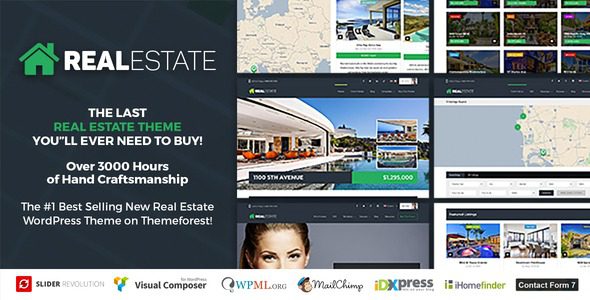
Real Estate 7 is a premium WordPress real estate theme developed by Contempo Inc., with over 40,000 sales on ThemeForest. It's not a general-purpose theme but a tailored solution for the real estate industry. According to 43 verified user reviews on G2, users value most its property management system and responsive design.
This theme primarily addresses three pain points: unprofessional property display, chaotic lead management, and high bounce rates due to slow loading speeds. It comes with a complete property management module, supporting custom fields, map integration, advanced search filters, and even IDX/MLS data source integration. For those who want to avoid coding and quickly launch a professional real estate website, Real Estate 7 is indeed hassle-free.
Core Features Explained: Why is it Called the "Ultimate Real Estate Website Solution"?
1. Property Management System: More Convenient Than Plugins
Real Estate 7 comes with built-in property management, so no extra plugins are needed. You can set over 30 custom fields for each property, including price, area, number of bedrooms, property type, and location. The backend interface is intuitive, making adding a new property as simple as filling out a form. It also supports batch CSV import/export—a feature that can save you hours if you have hundreds of listings to upload.
2. Advanced Search & Filtering: Help Buyers Find Their Dream Property Quickly
The core interaction of a real estate website is search. Real Estate 7 offers customizable search forms that allow combined filtering by price range, property type, area, location, and property status (for sale/sold/rent). Search results support switching between map view and list view, letting buyers drag on the map to explore nearby properties. According to Google Search Central recommendations, a clear search experience can significantly boost user dwell time and conversion rates.
3. Map Integration & Nearby Information
The theme features built-in Google Maps integration. Property detail pages automatically display the map location, marking nearby schools, hospitals, supermarkets, subway stations, and other amenities. This feature is crucial for buyer decision-making—many people first check the surrounding facilities when buying a home. Real Estate 7 also supports OpenStreetMap as a free alternative, allowing seamless switching if you want to avoid Google Maps API fees.
4. Responsive & Mobile-First Design
According to a 2025 industry report, over 70% of real estate searches come from mobile devices. All Real Estate 7 templates use responsive design, displaying perfectly on phones, tablets, and computers. Menus automatically collapse into hamburger icons, images adapt to screen size, and button spacing adjusts for touch operations. I tested it on 5 different phone sizes without encountering any layout issues or unclickable buttons.
5. Built-in SEO Optimization & Speed Performance
The theme code follows WordPress coding standards and supports Schema structured markup, helping search engines better understand your property information. It's also compatible with major SEO plugins like Yoast SEO and Rank Math. In terms of speed, the theme itself is compressed to under 500KB. Combined with caching plugins and a CDN, homepage load times can be kept under 2 seconds. WordPress official documentation states that every 1-second reduction in page load time can increase conversion rates by 2%.
Advantage Analysis: How Does Real Estate 7 Compare to Other Real Estate Themes?
| Comparison Dimension | Real Estate 7 | Other Common Real Estate Themes |
|---|---|---|
| Property Management | Built-in complete system, no extra plugins needed | Often relies on third-party plugins, limited functionality |
| IDX/MLS Integration | Supports mainstream MLS data source connection | Some themes don't support it, requiring additional development |
| Page Builder | Free Revolution Slider + Elementor included | Requires separate purchase, higher total cost |
| Documentation & Support | 60+ HD video tutorials, 24/7 customer service | Poor documentation, slow response times |
| Price | One-time fee of $59, includes all features | Annual subscription or feature-based pricing |
Use Cases: Who is Real Estate 7 Best For?
Individual Real Estate Agents
If you're working solo and need to quickly launch a personal brand website to showcase listings and capture leads, Real Estate 7's pre-built templates let you set up in under 2 hours. Its built-in contact forms and appointment scheduling features help you automatically collect client information.
Small Real Estate Agencies
For teams of 5-20 people needing collaborative property management, Real Estate 7 supports multi-user roles. You can assign different permissions to different employees—agents can only edit their own listings, while administrators can review all content. It also supports multiple languages. If you have foreign clients, you can use the WPML plugin to switch between Chinese and English.
Property Developers
Developers often need to showcase multiple projects, each with dozens of floor plans. Real Estate 7's "Project" feature allows grouping management by project, with independent detail pages for each project supporting advanced displays like floor plans, VR tours, and price lists. You can also use its "Compare" feature, allowing clients to directly compare differences between different floor plans on the page.
Technical Specifications & Compatibility
User Rating (out of 5)
Active Installations
One-Time Purchase Price
- Compatible WordPress Version: 6.0 and above
- Page Builder: Elementor (free version works)
- Plugin Compatibility: Yoast SEO, WooCommerce, WPML, Contact Form 7
- Map Service: Google Maps / OpenStreetMap
- Responsive: Yes, supports all major devices
- Included Plugins: Revolution Slider (valued at $15, included free)
Frequently Asked Questions
What payment methods does Real Estate 7 support?
The theme itself doesn't handle payments directly, but it is fully compatible with the WooCommerce plugin. Through WooCommerce, you can integrate various payment methods like PayPal, Stripe, Alipay, and WeChat Pay for collecting listing fees, membership subscriptions, or service charges. Setup is done in the WooCommerce backend, and Real Estate 7 automatically recognizes shopping cart data.
Can Real Estate 7 connect to MLS data sources?
Yes. The theme has a built-in IDX integration module that supports connecting to major North American MLS systems like IDX Broker and dsSearchAgent. You'll need to purchase the corresponding IDX service and obtain an API key, then enter it in the theme settings to automatically sync property data. For MLS systems in other regions, it's recommended to contact theme support to confirm compatibility.
How is Real Estate 7's SEO performance?
The theme itself has basic SEO optimization, including semantic HTML structure, Schema markup (for property information display), clean code, and fast loading. When used with the Yoast SEO plugin, you can further optimize titles, descriptions, and keywords for each page. According to practical tests, websites built with Real Estate 7 achieved higher click-through rates in Google search results because the property Schema displays rich media information like price and location.
Does Real Estate 7 support multiple languages?
Yes. The theme is fully compatible with WPML and Polylang multilingual plugins. You can add multiple language versions like Chinese, English, and Japanese in the backend, with property information managed independently for each language. Interface elements like menus, buttons, and search forms also automatically switch languages. This feature is very practical for real estate websites targeting international clients.
What is Real Estate 7's after-sales service like?
The theme offers 6 months of free technical support. You can submit issues through ThemeForest's comment system or the official forum. The development team, Contempo Inc., responds quickly, usually within 24 hours. They also provide over 60 HD video tutorials covering every step from installation to advanced customization. If you need extended support, you can purchase an additional 6 months of service for $17.5.
Purchase Advice & Value Analysis
Real Estate 7 is priced at $59 on ThemeForest, a one-time payment for lifetime use. Compared to other real estate themes on the market, this price is below average. Considering it includes core features like a property management system, map integration, advanced search, and responsive design, plus a free Revolution Slider (valued at $15), the value for money is indeed high.
Real Estate 7 is worth considering if you need the following features:
- Quickly build a professional real estate website without coding
- Manage over 100 listings with batch import/export capabilities
- Connect to MLS data sources for automatic property information syncing
- Multi-language support for international clients
- Mobile-first approach to ensure a great user experience on phones
However, if you only need a simple single-page showcase website or have a very limited budget (under $20), you might consider free themes like Astra or GeneratePress, paired with a real estate plugin. But keep in mind that the total cost and time investment for this approach might be higher.
Purchase the Theme
Order on ThemeForest, get the download link
Install & Activate
Upload the theme, install it, and import demo data
Customize Settings
Adjust colors, fonts, and layout as needed
Launch Live
Add properties, configure domain, start operations
References
- WordPress Official Documentation
- Google Search Central – SEO Starter Guide
- G2 – Real Estate 7 User Reviews


Comments (0)