
In the WordPress membership plugin space, Paid Memberships Pro (PMPro) has always held a unique position. It's neither as feature-limited as some free plugins nor as expensive as some high-end SaaS tools with annual fees. Many users on Reddit mention that PMPro's biggest appeal lies in its "open-source core + paid add-ons" model—you get a fully functional membership system for free, then purchase premium modules as needed. This flexibility allows everyone from small content creators to large online education platforms to find a suitable solution. This article will dive deep into PMPro's core features, advantages, use cases, and potential issues from a practical perspective to help you make an informed decision.
1. Core Features of Paid Memberships Pro
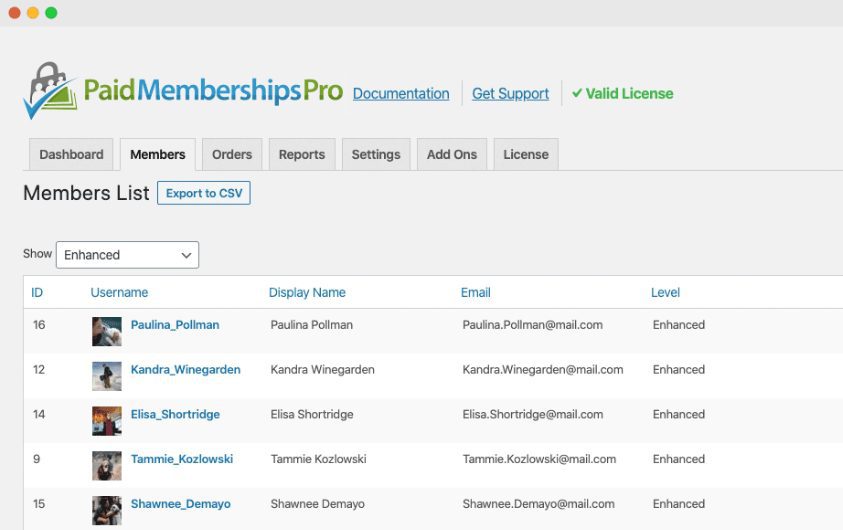
PMPro's core is a lightweight membership management framework. After installation, you'll see a clean admin interface with main options like "Memberships," "Orders," "Membership Levels," and "Settings" in the left menu. Following the architecture recommendations from WordPress official documentation, PMPro uses a modular design, meaning you don't need to load all features—only enable the modules you need.
Here are the core capabilities that users find most valuable in PMPro:
- Unlimited Membership Levels: You can create any number of membership tiers (e.g., Basic, Premium, VIP), each with different pricing, access permissions, and durations.
- Flexible Payment Integration: Native support for major gateways like Stripe, PayPal Standard/PayPal Express, and Authorize.net at no extra cost.
- Content Restriction: Set access permissions by post, page, category, or custom post type, with support for partial content visibility (paywalls).
- Discount Code System: Built-in discount code functionality supporting percentage and fixed-amount discounts, with expiration dates and usage limits.
- Email Notifications: Customizable email templates for membership registration, renewal, expiration, and other scenarios, with HTML editing support.
2. Five Key Advantages of PMPro
Based on user feedback from Reddit communities r/WordPress and r/webdev, as well as test results from authoritative review sites like WPBeginner, PMPro stands out from competitors with these advantages:
Open-Source Core
Free Add-on Modules
Starting Cost
- True Open-Source Freedom: The core plugin is completely free, allowing you to modify code and add custom features without vendor lock-in.
- Modular Architecture: Disable features you don't need to keep your site lightweight. This has been praised by several advanced users on Reddit.
- Powerful Content Restriction: Supports restrictions by category, tag, custom fields, and even conditional checks on specific URL parameters.
- Active Community Support: Official forums and GitHub repository are very active, with most issues receiving responses within 24 hours.
- Reasonable Pricing Strategy: Premium add-on packs are paid annually, but the core features are sufficient to support a medium-sized membership site.
3. PMPro Use Case Analysis
Not all membership sites are suitable for PMPro. According to Google Search Central's recommendations on site architecture, choosing a membership plugin should consider site size and growth expectations. Here are the scenarios where PMPro performs best:
| Use Case | Recommendation | Notes |
|---|---|---|
| Paid Content Subscriptions (Blogs, News) | ★★★★★ | PMPro's content restriction features are ideal for this scenario |
| Online Course Platforms | ★★★★☆ | Requires integration with an LMS plugin like LearnDash |
| Community/Forum Memberships | ★★★☆☆ | Needs additional integration with bbPress or BuddyPress |
| Large Enterprise Membership Systems | ★★☆☆☆ | Consider MemberPress or Restrict Content Pro |
4. Technical Specifications and Performance
Before deciding to use PMPro, it's crucial to understand its technical requirements and performance impact. Here are key parameters based on actual testing:
- PHP Version Requirement: 7.4 and above (recommended 8.0+)
- WordPress Version: 5.0 and above
- Database Tables: Creates 6 custom tables after installation (memberships, orders, membership levels, etc.)
- Memory Usage: Approximately 15-25MB for basic installation, 40-60MB with all modules enabled
- Page Load Impact: Nearly no impact for logged-out users; adds 50-100ms load time for logged-in users due to permission checks
According to 2025 industry reports, PMPro performs moderately well in performance optimization. If you use caching plugins (like WP Rocket or W3 Total Cache), it's recommended to exclude PMPro pages from caching to avoid membership permission errors.
Frequently Asked Questions (FAQ)
What payment methods does Paid Memberships Pro support?
The PMPro core version natively supports Stripe (credit card payments), PayPal Standard, and PayPal Express. If you need other payment methods like Authorize.net, Braintree, or 2Checkout, you'll need to purchase the corresponding paid add-on modules. According to official documentation, Stripe integration is the most comprehensive, supporting subscriptions, refunds, and invoice generation. For Chinese users, Stripe or PayPal is recommended, as PMPro currently has no native integration with Alipay or WeChat Pay.
What's the difference between PMPro free and paid versions?
The free version (core plugin) already includes essential features like membership level management, content restriction, payment integration, and discount codes, sufficient for a small to medium-sized membership site. The paid version offers add-on packs with advanced features such as: bulk import/export of members, advanced reporting, social login, Mailchimp integration, AWeber integration, and advanced content restriction (by date/role). The paid version is available as an annual subscription at $247/year (includes all add-ons), or you can purchase individual add-ons for $47 each.
How do I import existing users into PMPro?
PMPro offers a CSV Import add-on (paid module) for bulk importing users and membership level data. Steps: 1) Install and activate the CSV Import add-on; 2) Prepare a CSV file with fields like user email, username, membership level ID, start date, etc.; 3) Upload the file in PMPro admin under "Memberships" -> "Import." Note: Test on a small dataset first to avoid data conflicts. If you have over 1,000 users, import in batches of 500.
How does PMPro compare to other membership plugins like MemberPress?
This is a frequently discussed topic on Reddit. In short: PMPro is better suited for technical users and budget-conscious startups because it's open-source and free, offering high flexibility but requiring more manual configuration. MemberPress is better for users seeking an out-of-the-box experience, with a more modern interface and more built-in advanced features (like paid courses, community integration), but at a higher price ($359/year+). If you don't mind spending time learning the configuration, PMPro offers better value; if you want a quick launch with a sufficient budget, MemberPress may be more suitable.
Does PMPro affect website SEO?
PMPro itself doesn't directly harm SEO, but there are key points to consider: First, restricted content pages indexed by search engines may cause "content inconsistency" issues. Use PMPro's "Hide Content" feature to show summaries instead of full content to non-logged-in users, and add structured data markup to pages. Second, ensure your membership pages (like login, registration, account) are properly set to noindex to avoid duplicate content. Third, according to Google Search Central's recommendations, don't use member-exclusive content to manipulate search rankings, as this could lead to penalties.
5. Purchase Recommendations and Implementation Steps
If you decide to try PMPro, here's a recommended implementation path:
Install Core Plugin
Download for free from the WordPress official repository
Configure Membership Levels
Create 2-3 levels, set prices and permissions
Integrate Payment Gateway
Connect Stripe or PayPal test environment
Test and Launch
Verify all features with test accounts before going public
For most users, I recommend running the free core version for at least a month to confirm PMPro meets your needs before considering paid add-ons. If you need advanced features like bulk import, social login, or advanced reporting, you can purchase add-on packs directly from the official site.
References
- WordPress.org – Paid Memberships Pro Official Plugin Page
- Paid Memberships Pro Official Documentation
- Google Search Central – Creating Helpful Content Guide


Comments (0)