
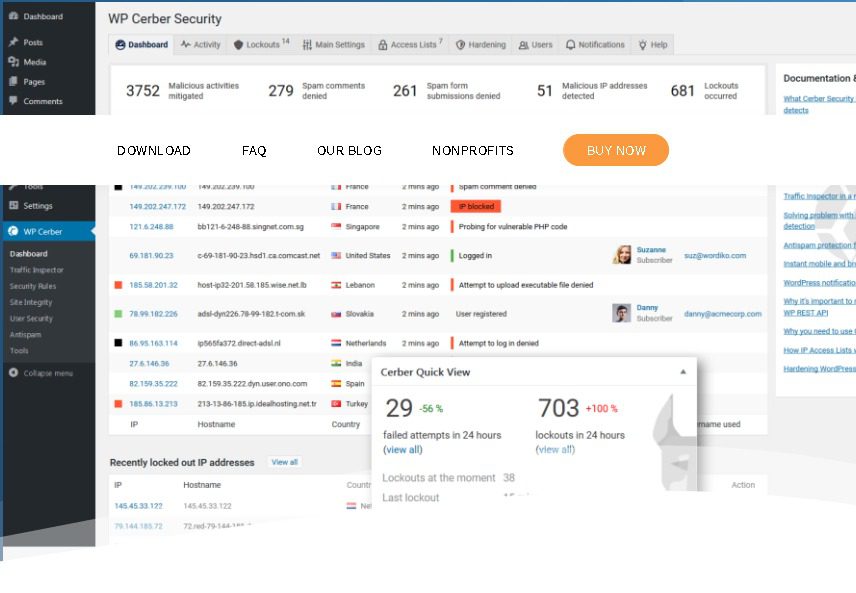
WP Cerber Security Pro is a powerful security plugin designed specifically for WordPress, effectively protecting websites from hacker attacks, spam, and malware. As an ultra-fast and reliable WP Cerber Security Pro WordPress plugin, it uses a unique request inspection algorithm to filter incoming requests for malicious code patterns and traffic anomalies in real time, blocking malicious activity before it can harm your data. Whether for a personal blog or a corporate site, this plugin is an essential tool for ensuring website security.
Core Features of WP Cerber Security Pro
WP Cerber Security Pro offers comprehensive security protection, with the following key features:
- Mitigates brute-force and code injection attacks
- Restricts access based on GEO country/region rules
- Prevents REST API and regular user enumeration
- Limits access to REST API and XML-RPC
- Blocks using a global list of known malicious IP addresses
Why Choose WP Cerber Security Pro?
Among numerous WordPress security plugins, WP Cerber Security Pro stands out with its exceptional performance and rich features. It not only monitors and blocks malicious traffic in real time but also provides detailed logs and reports to help you understand your website's security status. Additionally, the plugin supports custom rules, allowing you to adjust security policies based on specific needs. If you're looking for an efficient security solution, learn more about WordPress security optimization tips, WP Cerber Security Pro is definitely worth considering.
Installation and Usage of WP Cerber Security Pro
Installing WP Cerber Security Pro is very simple—you can upload and activate it directly via the WordPress admin plugin management page. After activation, the plugin automatically enables basic protection, and you can configure advanced settings based on your site's needs. Official documentation is provided to help you get started quickly. For details, please refer to the official documentation.
Frequently Asked Questions
How to install WP Cerber Security Pro?
You can upload the plugin ZIP file via the "Plugins" -> "Add New" feature in the WordPress admin and activate it. After activation, follow the wizard for basic configuration.
Is WP Cerber Security Pro compatible with other security plugins?
Generally, WP Cerber Security Pro is compatible with most WordPress plugins. However, it is recommended to avoid using multiple security plugins simultaneously to prevent conflicts. For specific compatibility, please refer to the official documentation.
Does WP Cerber Security Pro have a Chinese version?
Currently, WP Cerber Security Pro is primarily available in English, but you can translate it yourself using plugins like Loco Translate. The official version does not include a Chinese translation.
How often is WP Cerber Security Pro updated?
The development team releases regular updates to fix vulnerabilities and add new features. It is recommended to keep the plugin up to date to ensure optimal security.
Can WP Cerber Security Pro prevent all types of attacks?
While WP Cerber Security Pro provides robust protection, no plugin can guarantee 100% security. It is advisable to combine it with other security measures, such as using strong passwords and regular backups. For details, please refer to the official documentation.


Comments (1)